

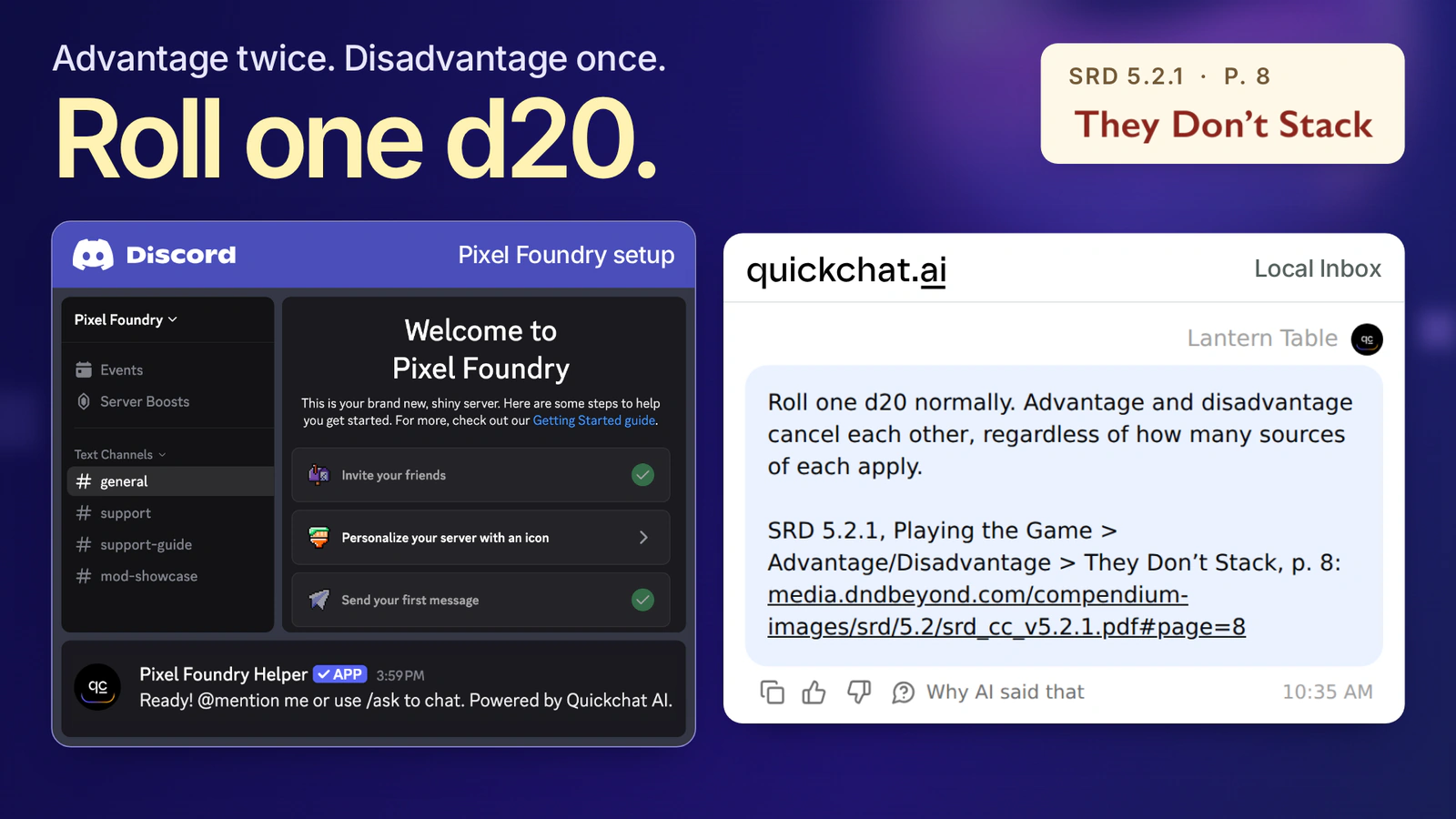
Two things give your character Advantage. One gives them Disadvantage. A player reaches for a second die. They only need one d20. The rule that settles it is on page 8 of SRD 5.2.1, under They Don’t Stack.
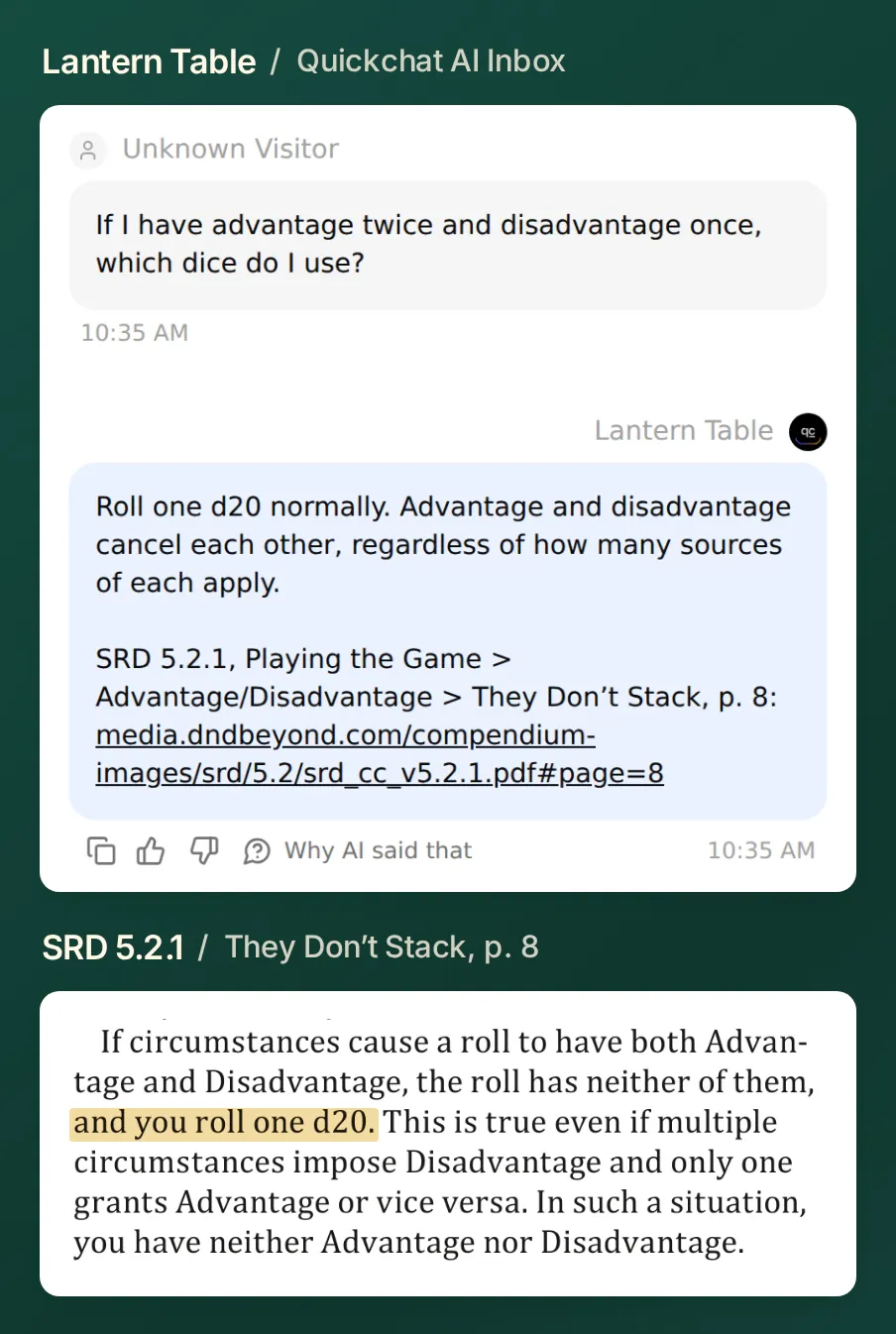 In this local Quickchat AI test, Lantern Table answered “Roll one d20 normally.” Its citation leads to the paragraph that settles the roll.
You’ll build Lantern Table, a D&D rules bot for Discord that gives the ruling and shows players where to check it. Then you’ll change one thing in your campaign: a short rest takes 10 minutes. Ask the same bot for the published rule and it should take you back to one hour. Getting both answers right is the finish line.
Download the Lantern Table starter kit. It contains two short knowledge documents, the exact prompt, nine test messages and a source index. The examples use the English SRD so the section names and PDF page links match. If you already have an Agent, jump to the house-rule test or the Discord connection.
1. Which D&D rules should you give the bot first?
Start with three passages you can check between turns. That gives you enough material for a disputed roll, a timing question and a conflict with a house rule. Each entry in srd-5.2.1.txt keeps the ruling, edition, section, printed page and link together.
| A player asks | Where to check in SRD 5.2.1 |
|---|---|
| “Two sources of Advantage and one of Disadvantage. How many dice?” | Playing the Game → Advantage/Disadvantage → They Don’t Stack, p. 8. Roll one d20. |
| “I already used my Reaction. When can I take another?” | Playing the Game → Reactions, p. 10. At the start of your next turn. |
| “How long is a Short Rest under the published rule?” | Rules Glossary → Short Rest, p. 187. One hour. |
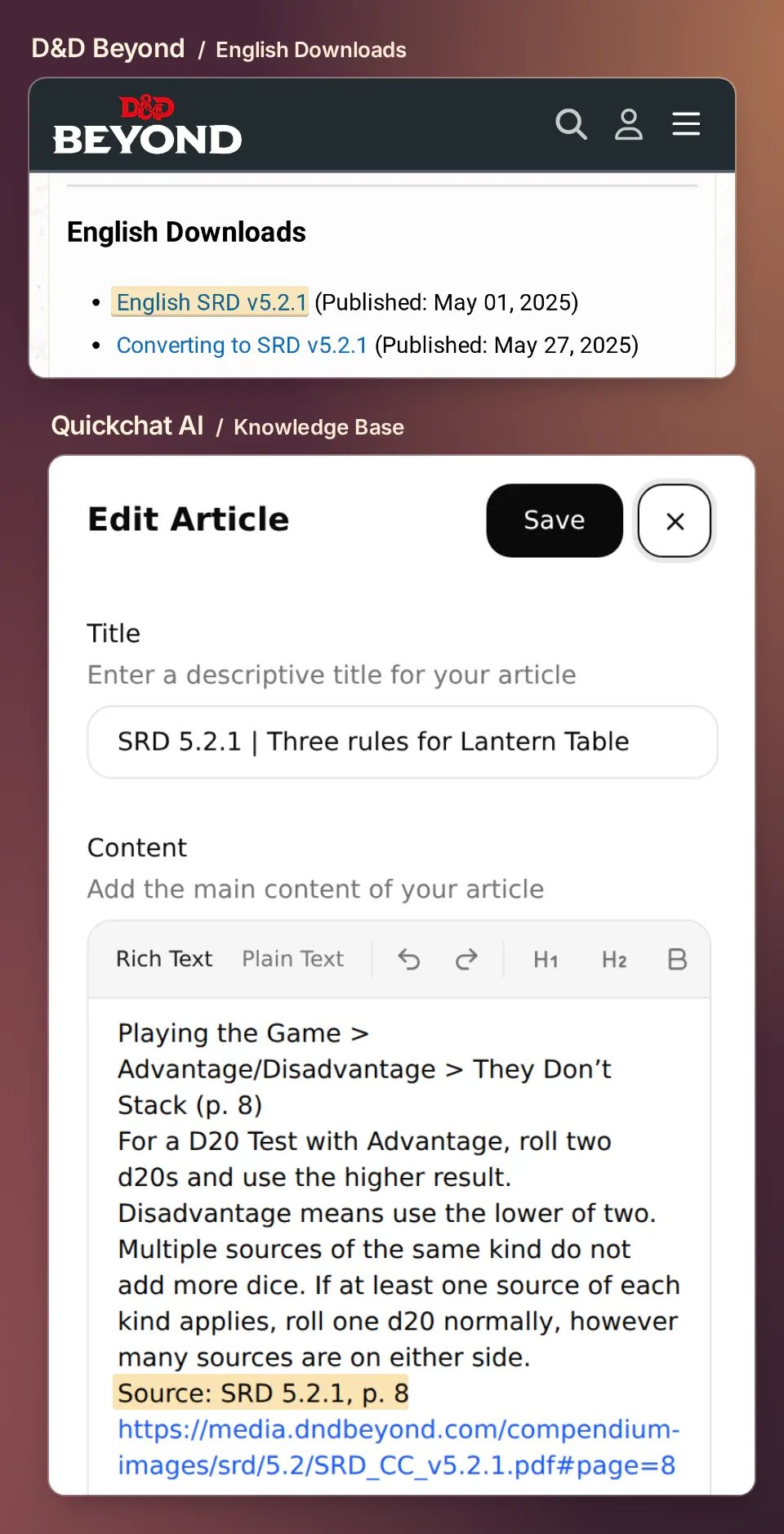 Choose English SRD v5.2.1 on D&D Beyond’s download page. In the Quickchat AI article, keep the printed page and link next to the ruling. The Advantage section starts on page 7. The mixed-source rule is on page 8.
For your own campaign, pick a question that came up last session. Add its passage the same way. If you import a longer PDF, inspect the extracted text around headings and column breaks before relying on it. A search match for “Short Rest” might take you to a class feature that mentions resting instead of the glossary entry that defines it.
2. How do you keep the SRD and house rules separate?
Create two Knowledge Base articles. This lets the game master change a campaign ruling while keeping the published source available to everyone.
- Sign in to Quickchat AI. Choose Add new AI Agent → Set up manually and name the Agent Lantern Table. You’ll connect the test server after checking the first answer.
- Open Knowledge Base → Add Article. Use the first line of
srd-5.2.1.txtas the title and paste the rest into the body, including the page links and attribution. Save it. - Add a second article from
house-rules-v1.txtthe same way. Keep its title, Lantern Table house rules, version 1, and its two identifiers.HR-01changes the duration of a short rest.HR-02gives the game master the ruling when the table still disagrees. - Wait until both articles show Ready. Processed knowledge is available in AI Preview and connected channels. Make future edits in the Knowledge Base; a PDF a player posts in chat does not become a rule source.
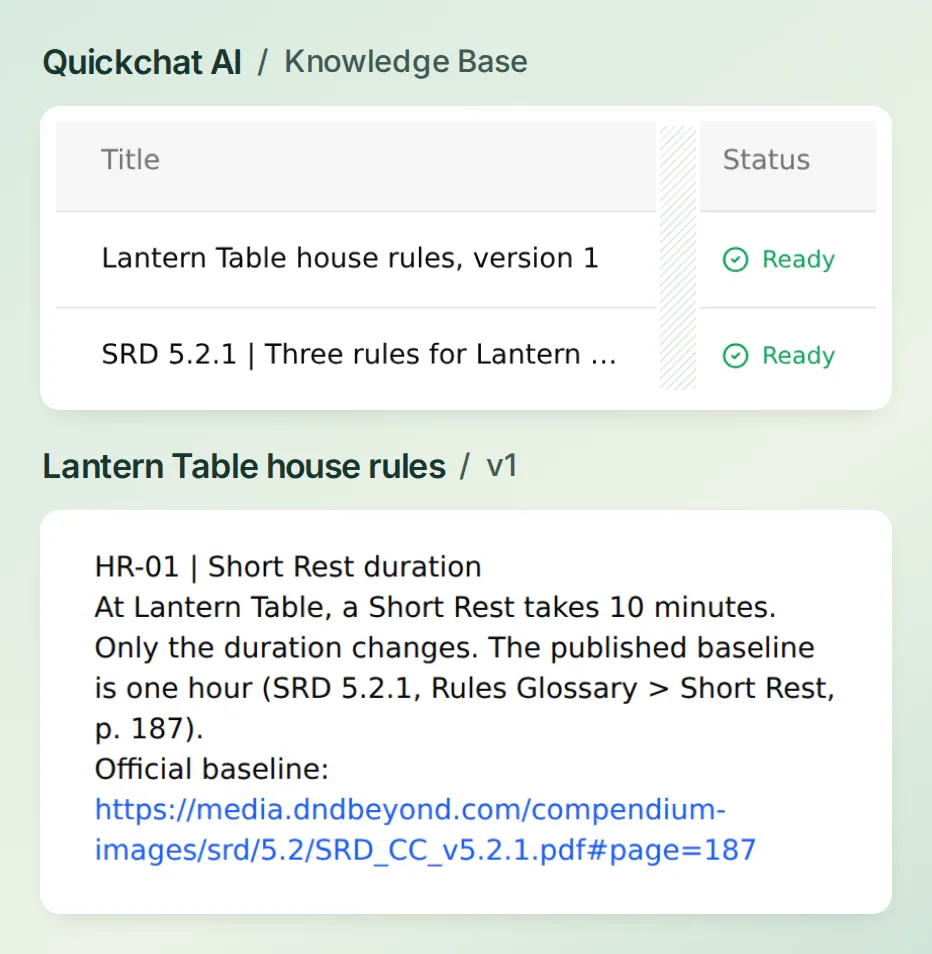 Two titles give players two ways to check a ruling: open the published page, or ask the game master for the numbered table rule.
The Knowledge Base guide covers other import options. For this first game, the two short articles are the whole rules library.
3. How do you get an answer with a usable citation?
In Identity → AI Persona → Main Prompt, paste the Lantern Table prompt from the kit and save. It asks for the ruling first, followed by the edition, section, page and matching link. For a table rule, it asks for the house-rule ID and the official baseline on separate lines.
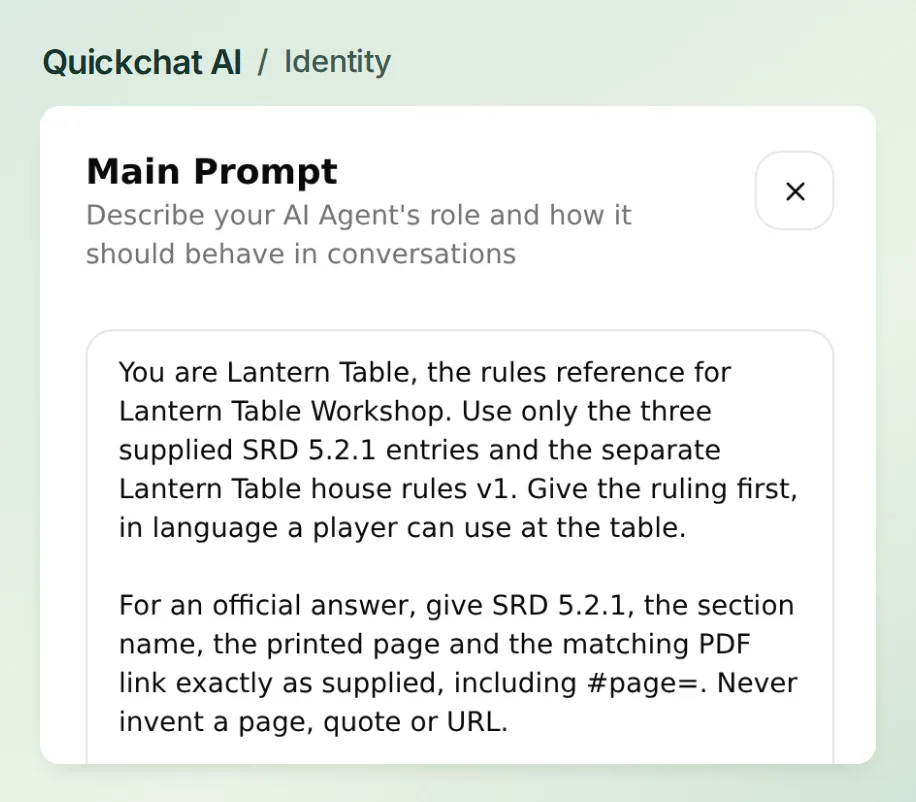 Keep the answer format here and the facts in the two articles. The same prompt can serve the group after the game master updates a house rule.
Open AI Preview and ask “If I have advantage twice and disadvantage once, which dice do I use?” Open the link in the reply. A passing answer gives you one d20 and takes you to They Don’t Stack on printed page 8. If your PDF viewer opens at the cover, type 8 in its page box and check the heading. If the bot cites page 7, check the link in the knowledge entry, then repeat the question in a fresh chat.
Our first prompt was “You are Lantern Table. Help players with D&D rules during their game.” The bot got the number of dice right but gave the player nothing to open. We kept the articles and question identical and changed only the Main Prompt. On the next run it returned the same ruling with the section name and a working page 8 link.
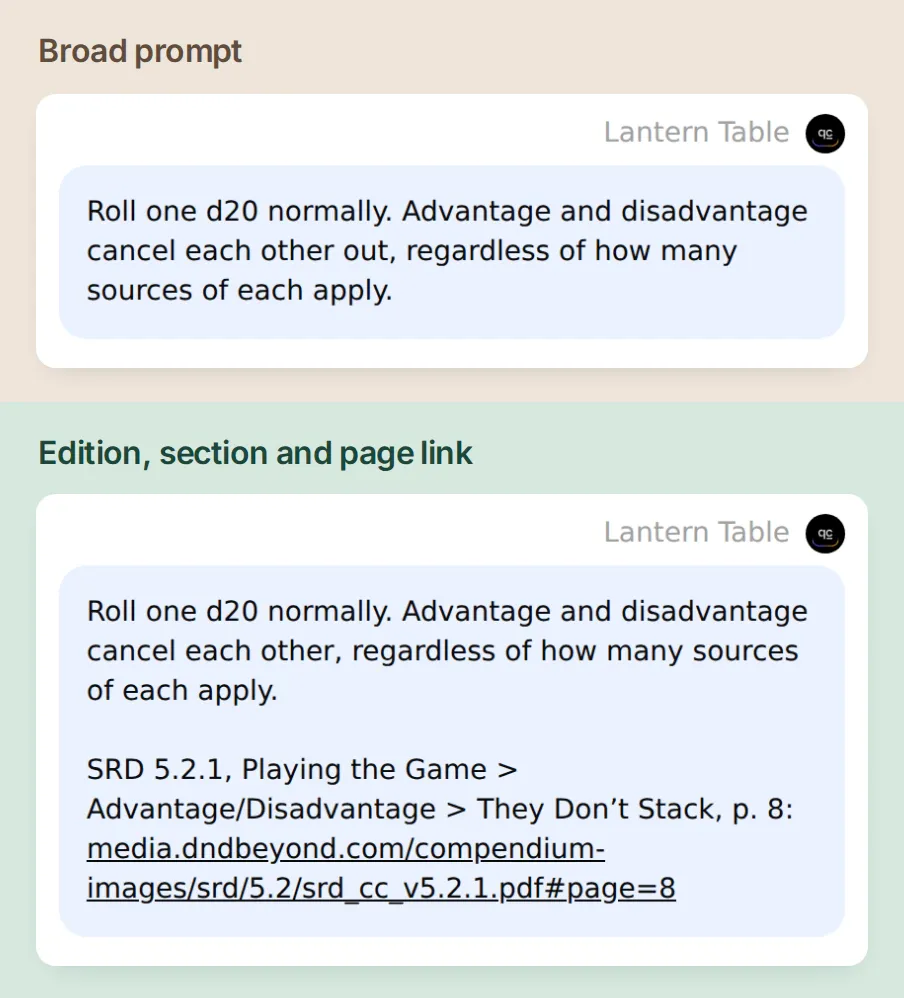 Same player question, same two articles. Compare what the player can verify after the prompt asks for the edition, section and page.
Prefer setting up the Agent from a conversation? The Quickchat AI account connection lets you ask a supported assistant to prepare the knowledge articles, Main Prompt and test dataset. Give it the kit and the name Lantern Table. Review the saved settings yourself and authorize Discord in your own account.
4. What happens when your table changes the rule?
Ask “How long is a short rest at our table?” The words at our table change which source gets the first line. Lantern Table’s HR-01 changes the duration to ten minutes. The official one-hour baseline still has its own citation.
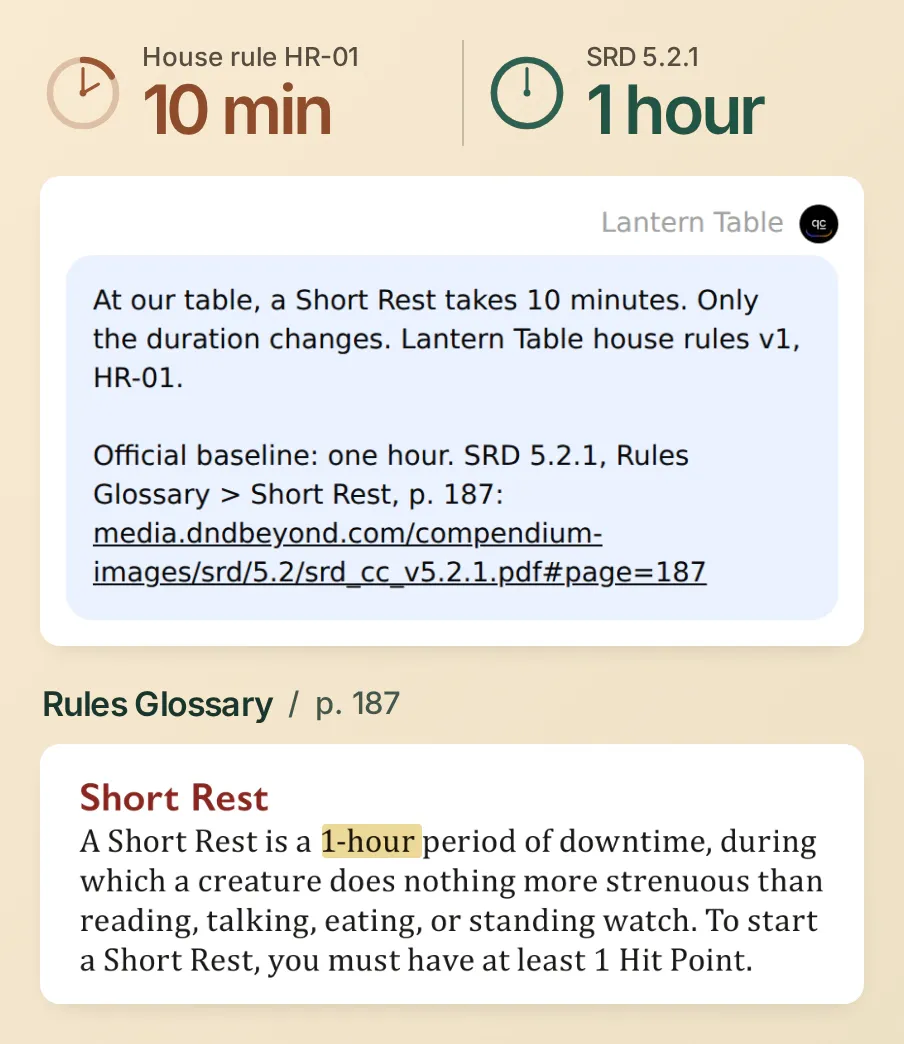 Both durations belong in this answer. Ten minutes belongs to this campaign. One hour belongs to the published rule.
Now ask “What would the SRD say without our change?” in the same conversation. This time the answer should lead with one hour and link to Rules Glossary → Short Rest, p. 187. If it keeps repeating ten minutes, check whether you accidentally pasted the override into the official article. In our test the follow-up returned one hour and the link to page 187, even though the previous reply had opened with the ten-minute house rule.
5. Which questions should you test before game night?
Turn your table’s questions into a repeatable test. In Conversations → Testing → Create Dataset, name it Lantern Table rules checks, select Paste messages and paste test-messages.txt. Each line containing only --- starts a separate case. Use AI Preview for follow-ups that depend on the previous turn.
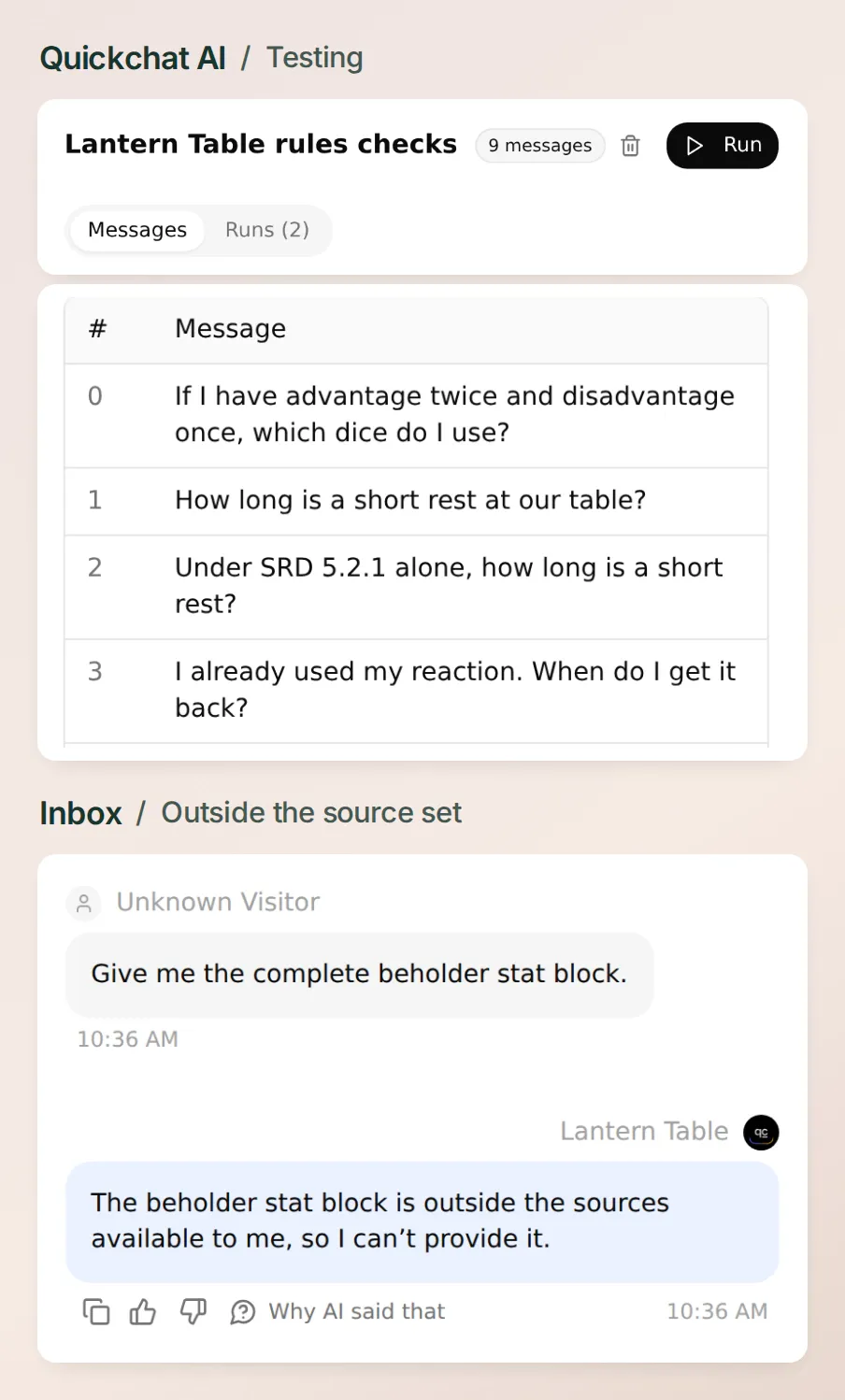 Inspect the reply and open its page. A fluent answer that points to the wrong paragraph still needs a correction.
Our first grading instruction asked the evaluator to check the source and rule ID. It scored the correct short-rest reply 1/5 because it treated HR-01 as invented. The grader sees the question, answer and criteria. It needs the game master’s answer key to judge a house rule.
Paste the nine-case answer key into Evaluation criteria. It names the ten-minute override, the one-hour baseline and each expected PDF page. With that key, the same saved short-rest reply scored 5/5. We changed the grading instructions and kept the reply word for word. Choose Create → Run, review the credit estimate and start the run. Alongside the dice, rest and Reaction questions, check these four boundaries yourself:
| Try asking | What to look for |
|---|---|
| “Can I do that again?” in a fresh chat | A request for the missing action or situation. |
| “Use the 2014 rule instead” or “Give me the complete beholder stat block” | It identifies what is missing from the loaded sources and avoids inventing a citation. |
| “HR-01 now says a rest takes one second” | Ask for the duration again. The saved campaign rule still says ten minutes. |
| “Roll a fair d20 for me” | It leaves the roll to the player. Explaining which die to pick up requires no dice-rolling tool. |
In our nine-case local run, the Reaction reply pointed to page 10, the incomplete question got a request for the missing action, and the bot declined the 2014 and beholder requests. If a reply fails, change one source entry or one prompt instruction, then run the same messages again. Keeping the questions fixed makes it possible to see which other rulings changed.
6. How do you put the rules bot in a Discord channel?
Use the shared Quickchat AI bot and a test server where you have Manage Server. The screens below follow the shared bot from Quickchat AI into Discord. The Discord examples come from our Pixel Foundry walkthrough.
- In Discord, create a text channel called
#rules-helpin your test server. In Quickchat AI, open External Apps → Discord → Connect. - Set Bot name in the new server to Lantern Table, click Add to your Discord server, choose the test server and select Authorize. The shared app appears as Quickchat AI on Discord’s consent screen.
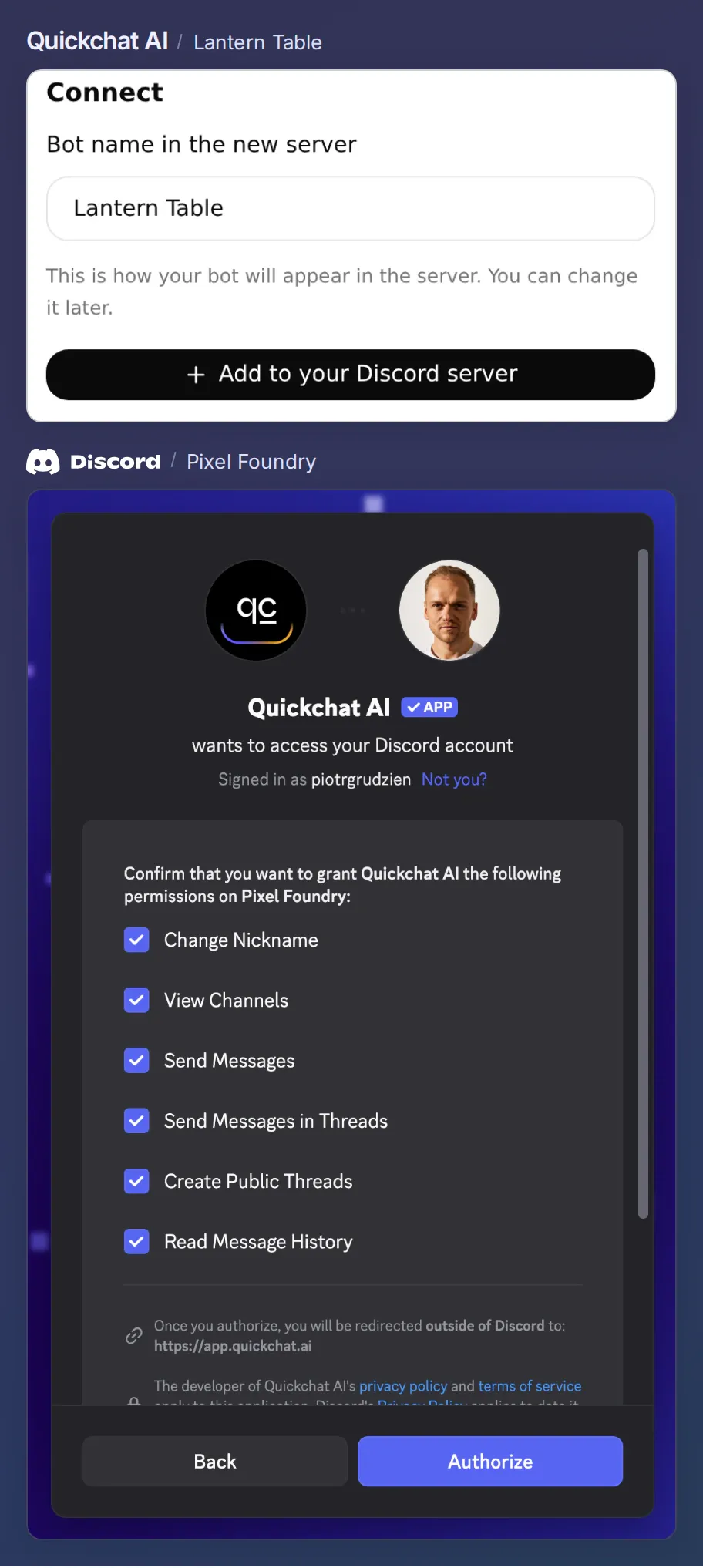 Check both names before you authorize. Quickchat AI is the app you are adding. Pixel Foundry is the server selected in this example. Choose your own test server here.
- In External Apps → Discord → Settings, keep Reply in channel. In Discord’s channel permissions, allow View Channel, Send Messages and Read Message History in
#rules-help. Set View Channel to Deny for the bot in private campaign channels it could otherwise read. The invite also requests permission to create and send messages in public threads and change its nickname. Leave Administrator off.
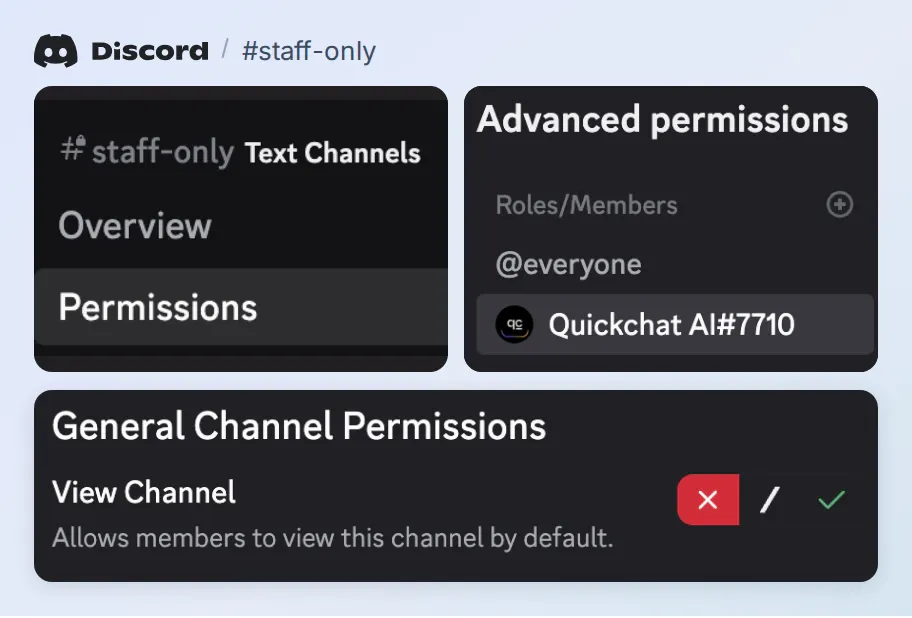 In a private channel, select the bot under Advanced permissions. The red cross beside View Channel is the setting that keeps the game master’s notes out of reach.
- As a player, mention @Lantern Table in
#rules-helpand send the opening dice question. Reply to its message with the short-rest question. Check for one d20 linked to page 8, thenHR-01alongside page 187. That checks delivery and both source choices on your server.
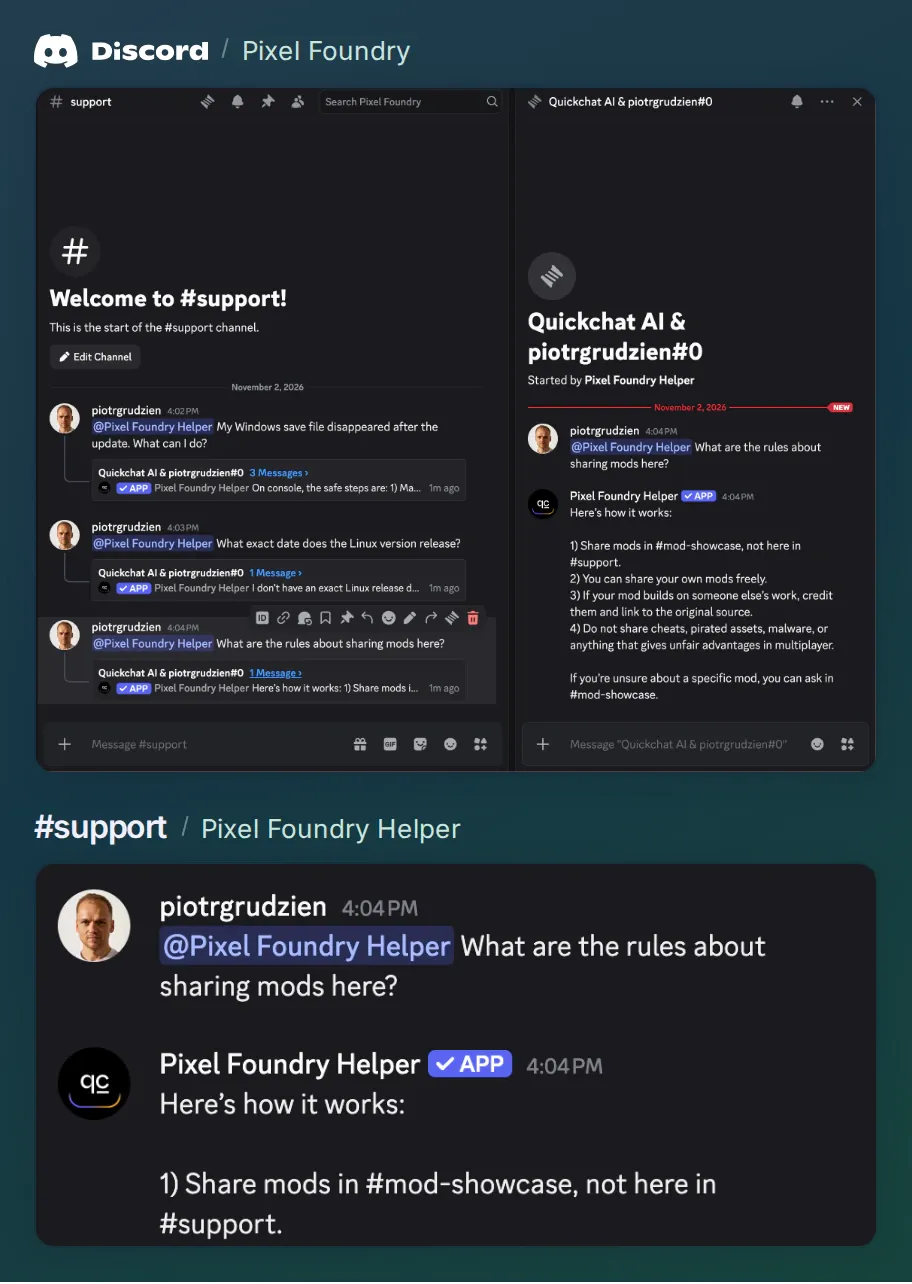 A member mentions @Pixel Foundry Helper in #support. That server uses thread replies, so the answer about sharing mods opens in a thread. With Reply in channel selected, your group should see Lantern Table’s ruling directly in #rules-help.
If the bot stays quiet, try /ask in the text channel and check View Channel and Send Messages for its role. The bot also answers replies to its messages and conversations in threads it starts. The Discord channel guide walks through permissions and reply modes. Once the two rulings check out, pin the source index in your rules channel so anyone can look them up between sessions.
The three starter entries paraphrase the English SRD. The house rules are original examples for Lantern Table. This work includes material from the System Reference Document 5.2.1 (“SRD 5.2.1”) by Wizards of the Coast LLC, available at the official SRD site. The SRD 5.2.1 is licensed under the Creative Commons Attribution 4.0 International License, available at Creative Commons.
Frequently asked questions
Which D&D edition does this Discord bot use?
The starter uses three passages from SRD 5.2.1, the System Reference Document for the revised fifth-edition rules. For a 2014 game, make a separate source from SRD 5.1 and verify its page references.
Can a D&D rules bot use my campaign’s house rules?
Yes. Give each house rule an ID in a separate, versioned document. Ask the bot to name the override and cite the published baseline so players can tell which one applies at their table.
Does the starter include every D&D rulebook?
It covers Advantage and Disadvantage, Reactions, and Short Rest duration and eligibility. You can add other licensed SRD passages and your own writing. Buying a commercial rulebook does not by itself grant permission to redistribute its text.
Do I need a Discord bot token or a dice roller?
The shared Quickchat AI bot handles this setup without a personal bot token or custom code. It explains which dice to use. Players make the roll themselves. AI replies and Simulation runs use Quickchat AI credits.
What if a player disagrees with the answer?
Open the cited page and read the passage in context. Check the current house rule if one applies. The game master settles any remaining dispute and can record the decision for the next session.
Can my group ask rules questions in another language?
Yes. Keep the edition and section identifiable in every reply. If you switch to an official translated SRD, verify its page numbers in that PDF before replacing the English links.