

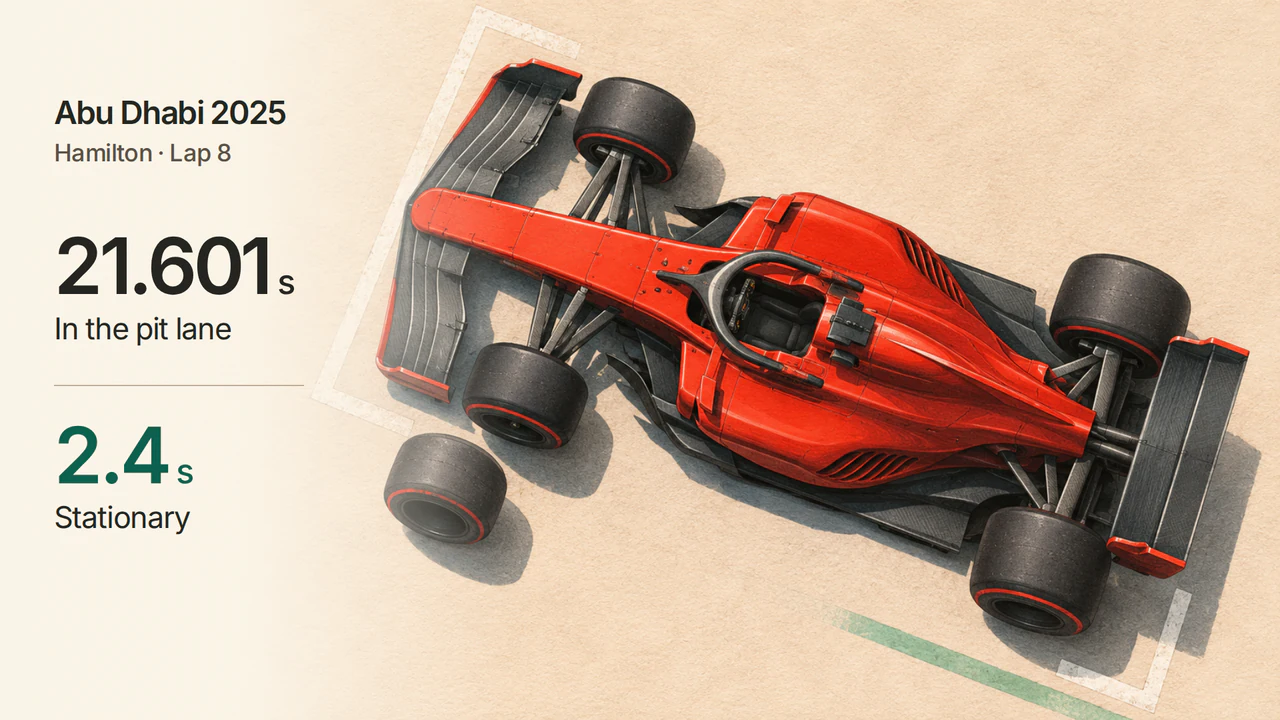
在 2025 年阿布達比大獎賽第 8 圈,路易斯·漢密爾頓(Lewis Hamilton)在維修區通道內共花了 21.601 秒。他駕駛的法拉利靜止了 2.4 秒。 兩個數字都來自同一次進站。從計時表來看,那段比賽耗時最長的其實是第 9 圈。
你可以自己還原這段過程。接下來要建立的是 Stint Notebook,一個會讀取 OpenF1 API 的 Quickchat AI 助理。只要詢問漢密爾頓首次進站前後各三圈,就能取得七圈的計時資料、由軟胎換成硬胎的紀錄,以及可核對答案的來源連結。
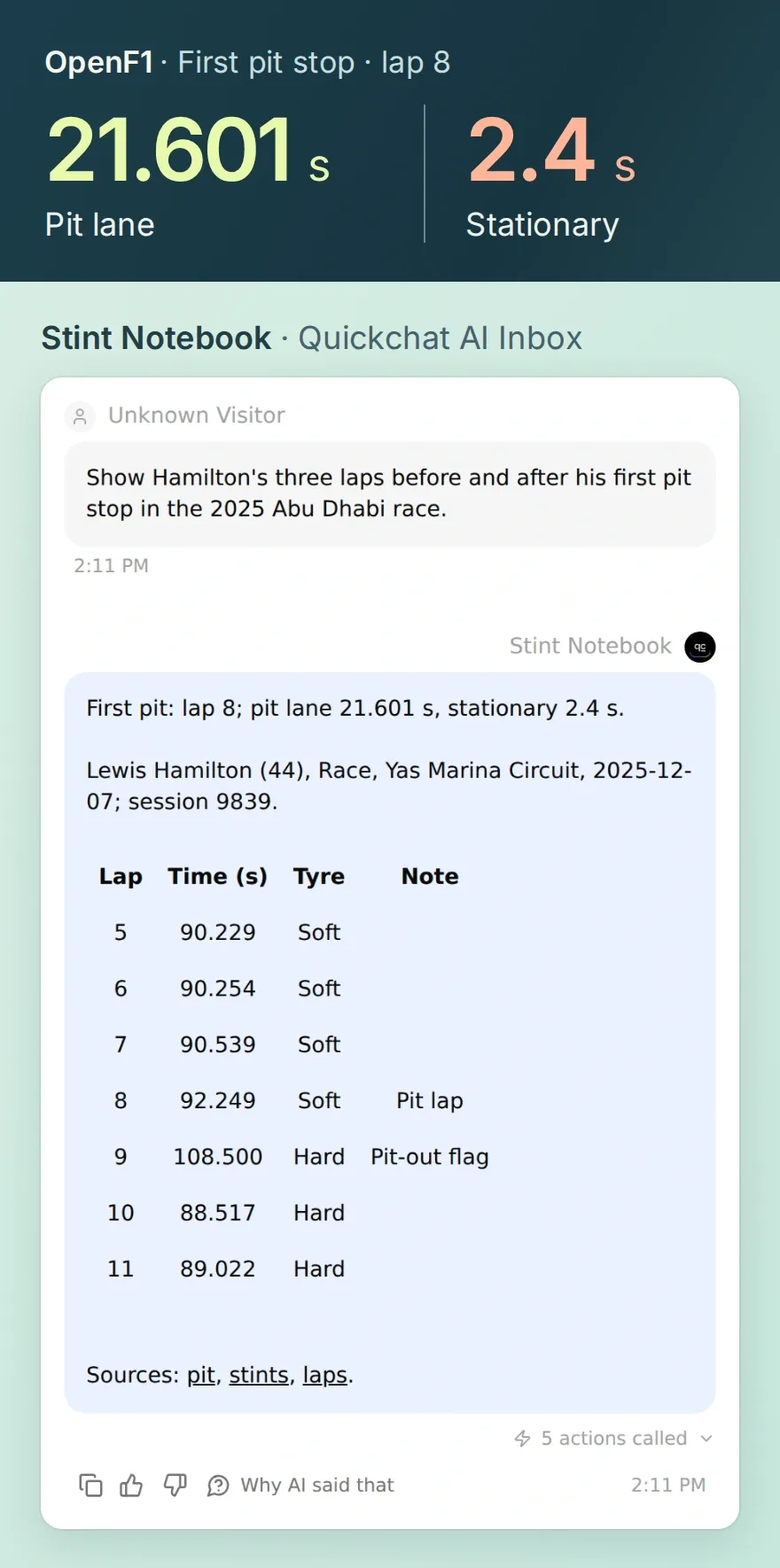 這次在本機執行 Quickchat AI,取得七圈資料,以及進站、輪胎賽段和單圈公開紀錄的連結。
下載 Stint Notebook 工具包,內含五個動作的設定範例、Main Prompt、已儲存的 OpenF1 回應,以及一支可執行的 Python 小程式。不需要 OpenF1 帳號或 API 權杖,你就能查閱 OpenF1 的比賽紀錄。到了步驟 2,你會登入 Quickchat AI。
1. 你查的是阿布達比站的哪個時段?
先確認比賽和車手。大獎賽週末有多個時段,漢密爾頓在每個時段都使用 44 號。先確定賽事時段和車手,圈數才有明確的指涉。
- 開啟 OpenF1 賽事時段紀錄。找出
Race、Yas Marina Circuit和日期 2025 年 12 月 7 日。每次發出請求時都要保留session_key=9839。 - 開啟 44 號車手紀錄,你會看到 Lewis Hamilton 和 Ferrari。新增動作時,先把這個分頁留著。
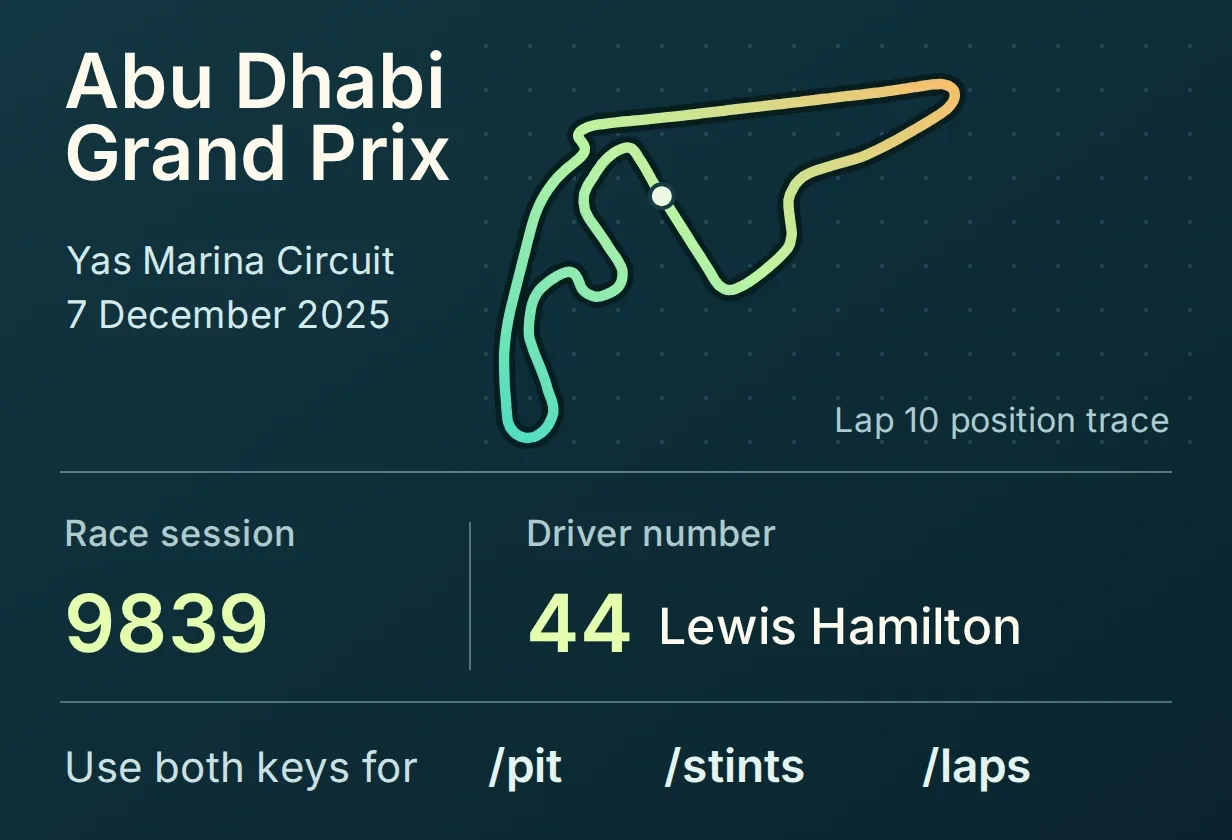 固定查詢同一場比賽。只要更換車手號碼,就能對同場的另一輛賽車提出相同的問題。
試試 OpenF1 首頁上的範例。選取 Shell,再按一下 Run。範例會傳回漢密爾頓前三圈的資料。在 JSON 回應中找出 driver_number 和 lap_number。
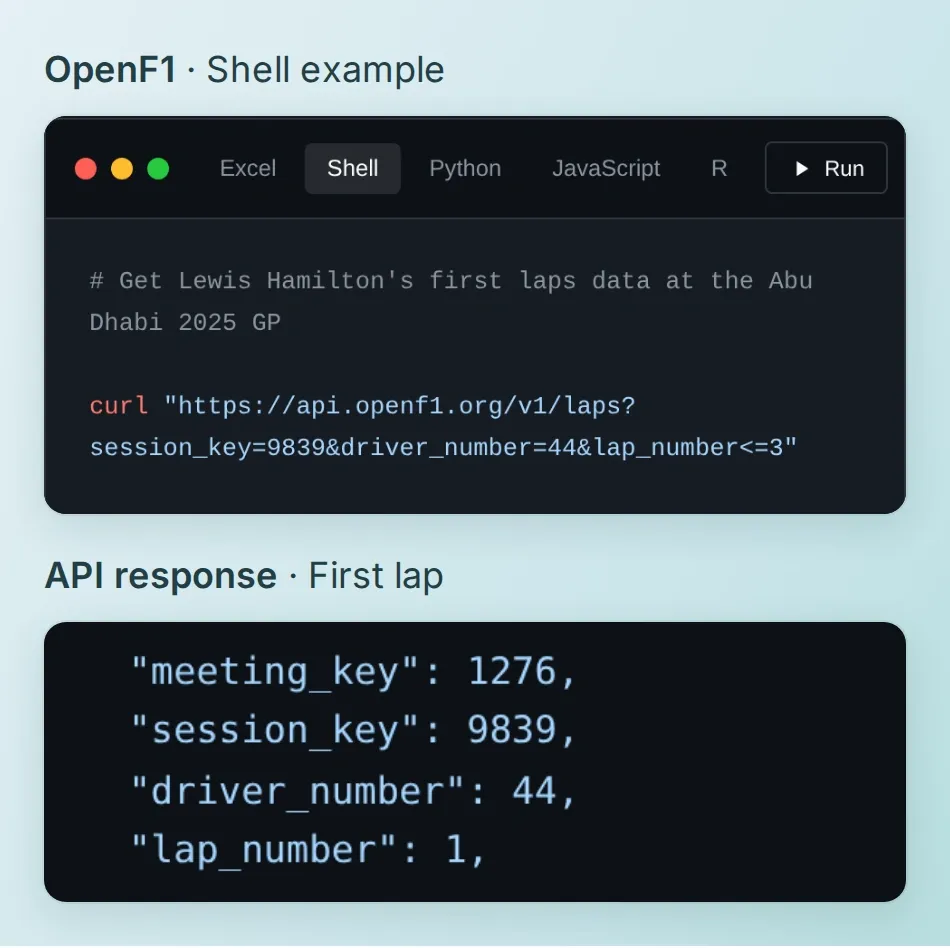 這個範例傳回第 1 至第 3 圈的資料。稍後詢問進站情況時,你要查的是第 5 至第 11 圈。
OpenF1 提供自 2023 年起的歷史資料,供個人使用。關於如何存取即時資料,請參閱驗證指南。
2. 如何為 AI 助理加入前兩個動作?
- 建立或登入 Quickchat AI 帳號。選擇 Add new AI Agent → Set up manually,將助理命名為 Stint Notebook。AI 回覆和測試都會使用點數。
- 開啟 Identity → Main Prompt,貼上下方的指示並儲存。這些指示會告訴助理,在解說某一圈之前要先收集哪些資料。
- 前往 Actions & MCPs → Custom Actions → Add Action → API Action → Create manually。在 API Action Name 輸入
identify_session。將 What to ask the user first 留白。在 API Endpoint 選擇 GET,再輸入下方的網址。將 Headers 和 Body 留白。 - 在 API Action Description 輸入下方的說明。儲存並啟用這個動作。接著用相同步驟設定
identify_driver。這次在 What to ask the user first 加入driver_number,選擇 Number 並設為必填,再透過 Add AI Data → Parameters 將它插入網址。
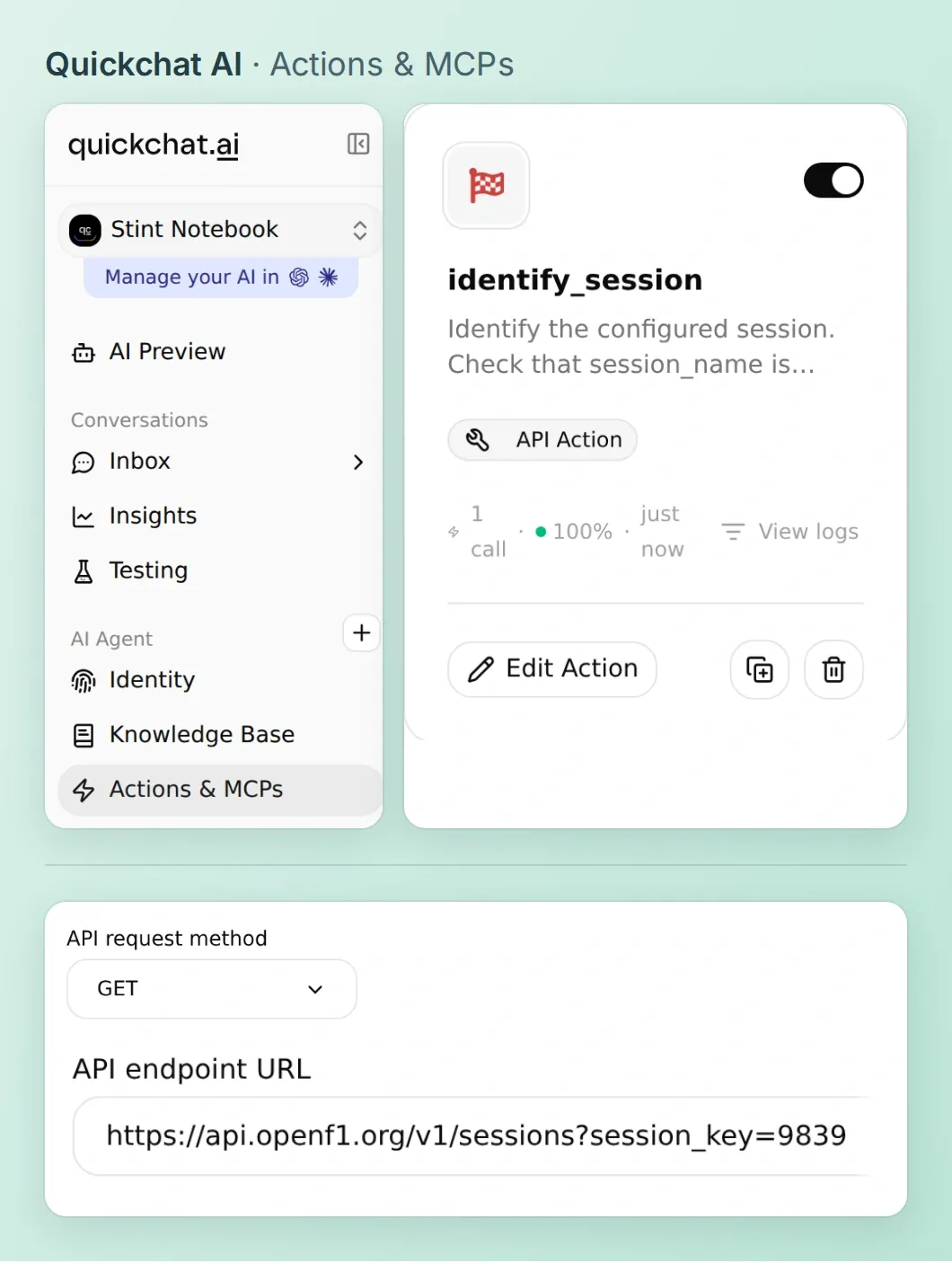 儲存的網址已指定這場正賽。查詢車手是第一個需要從對話取得參數值的動作。
複製 Stint Notebook 的 Main Prompt
You are Stint Notebook. Help a race viewer inspect the completed 2025 Abu Dhabi Grand Prix, OpenF1 session 9839. Confirm the Race session and driver with Actions before reporting race facts. For Hamilton use driver 44 and verify his name. If a driver cannot be found, ask for a valid number. Run Actions one at a time. For a stop, fetch the driver's pit events and stints, then fetch at most ten laps around the selected stop. Three laps on either side means seven rows including the pit lap.
Start with the pit lap, lane_duration in seconds and stop_duration in seconds. Join each lap to its inclusive stint interval. For a lap window, show a compact Markdown table with Lap, Time (s), Tyre and Note. Use three decimal places for lap times. Note the recorded pit lap and the is_pit_out_lap flag; leave the other notes blank. Cite the exact OpenF1 pit, stint and bounded lap queries as short Markdown links.
Use only returned fields. Distinguish time in the pit lane from stationary time. A missing duration is unavailable. If a request fails, say which data you could not retrieve. Timing alone cannot establish team intent. For an aggregate, give the source rows and tell the reader to use the worksheet. Only answer historical questions on demand.
複製賽事時段與車手查詢的動作設定
identify_session
GET https://api.openf1.org/v1/sessions?session_key=9839
Identify the configured session. Check that session_name is Race, then report its date, circuit and session key.

identify_driver
GET https://api.openf1.org/v1/drivers?session_key=9839&driver_number={{driver_number}}
Resolve the driver by number within this race. Use full_name and driver_number from the response. If no record is found, ask for a valid number.
driver_number (Number, required): Confirmed driver number in this session, such as 44 for Lewis Hamilton.
開啟 AI Preview 並提問 Which session is this, and is driver 44 in it? 確認回覆有比賽日期和漢密爾頓的名字,再繼續。如果這是你第一次設定動作,可以參考建立可呼叫 API 的 AI 助理指南,一步步操作編輯器。
3. 如何找出要查的七圈?
用進站紀錄決定查詢區間。漢密爾頓這場比賽進站兩次,分別在第 8 圈和第 31 圈。選擇第一次進站,再查進站前三圈和後三圈,算上進站當圈,就是第 5 圈到第 11 圈。如果先查單圈資料,助理就得猜要從哪幾圈找起。
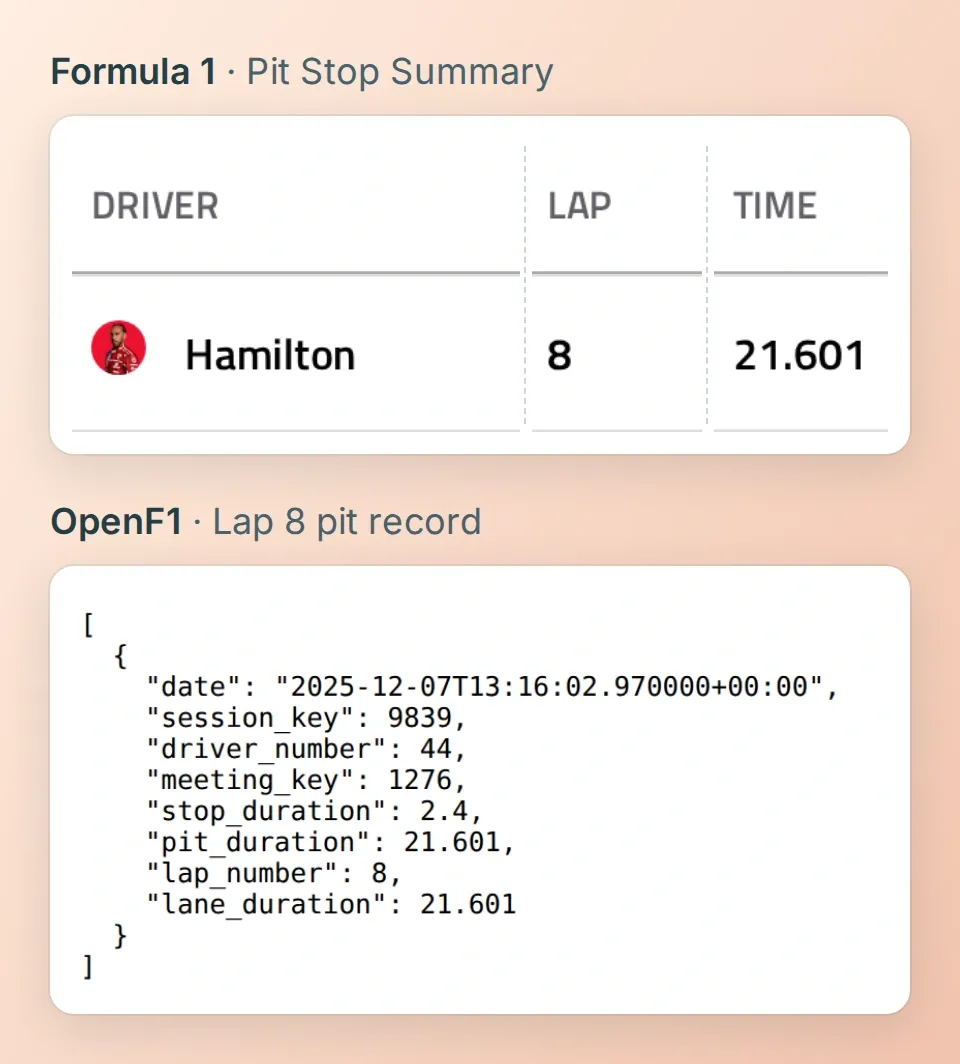 Formula 1 的進站摘要列出 21.601 秒。OpenF1 同時記錄了這段維修區通道總時間,以及其中 2.4 秒的賽車靜止時間。
- 在 Custom Actions 加入
get_driver_pits和get_driver_stints。兩個動作都和車手查詢一樣,需要必填的driver_number。用單數端點 pit 查詢進站紀錄,用 stints 查詢輪胎賽段。OpenF1 欄位參考文件說明各個計時欄位,也列出維修區通道時間的舊別名pit_duration。 - 加入
get_driver_laps,並設定三個必填的 Number 參數。用 Add AI Data 將driver_number、first_lap和last_lap插入網址。保留設定範例中已編碼的比較符號。這兩個篩選條件表示圈數 ≥ 起始圈,而且圈數 ≤ 結束圈。 - 在 Test Response 輸入 44、5 和 11。核對回傳陣列的首尾兩筆資料,接著儲存並啟用這三個動作。每個問題使用單圈查詢動作時,最多查十圈。這項限制寫在提示詞裡,API 網址本身仍可接受更大的區間。
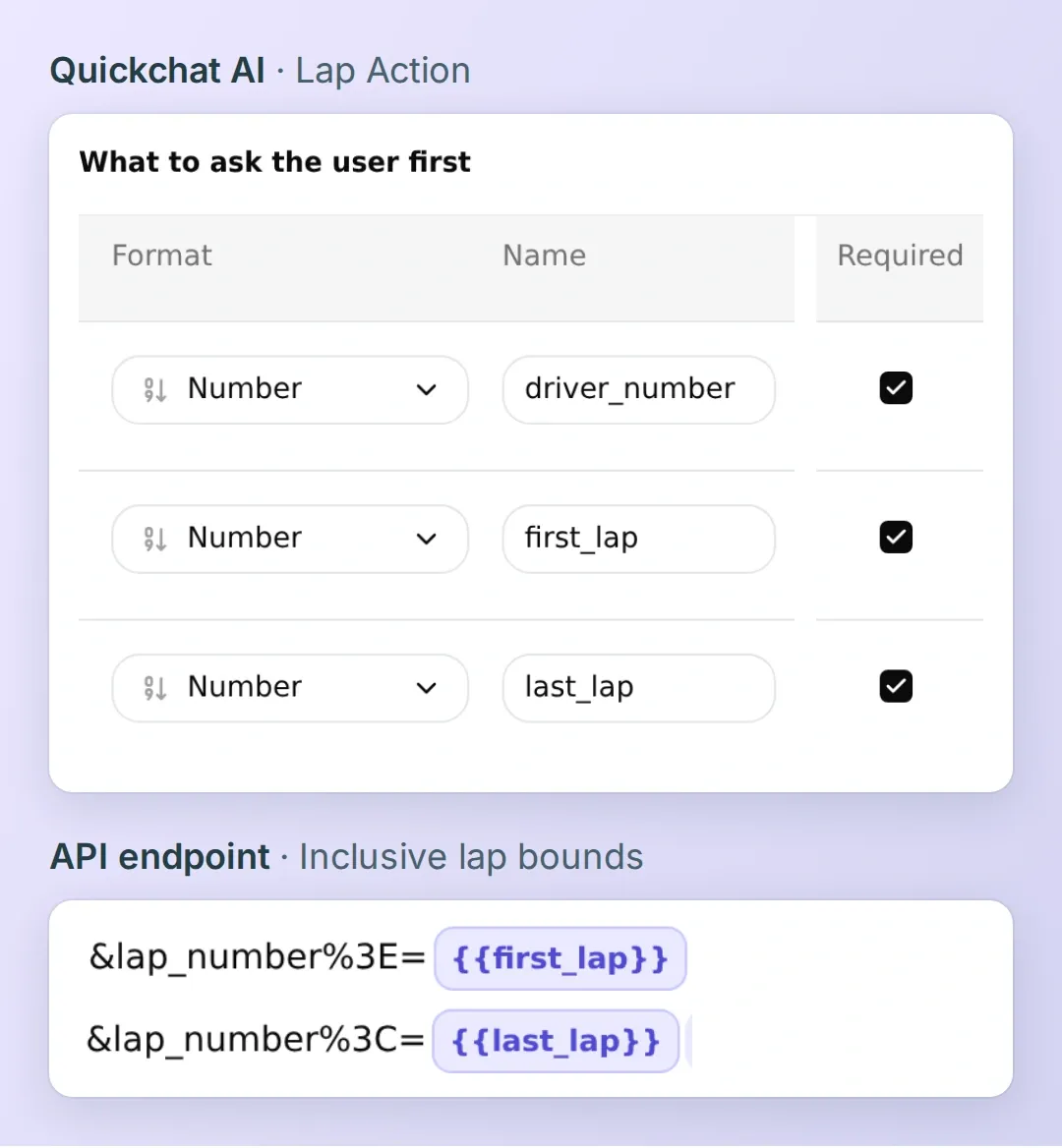 起訖圈數要放在同一個 GET 請求裡。少了一個邊界,就可能把比賽中其餘的圈數也查進來。
複製進站、輪胎賽段與單圈查詢的動作設定
get_driver_pits
GET https://api.openf1.org/v1/pit?session_key=9839&driver_number={{driver_number}}
Retrieve recorded pit events for the confirmed driver. Identify the requested pit lap. lane_duration is total time in the pit lane, stop_duration is stationary time; both are seconds. Preserve missing values.
driver_number (Number, required): Confirmed driver number in this session, such as 44 for Lewis Hamilton.

get_driver_stints
GET https://api.openf1.org/v1/stints?session_key=9839&driver_number={{driver_number}}
Retrieve tyre compounds and inclusive lap_start and lap_end boundaries for this driver. Use these intervals to label the pit and surrounding laps.
driver_number (Number, required): Confirmed driver number in this session, such as 44 for Lewis Hamilton.

get_driver_laps
GET https://api.openf1.org/v1/laps?session_key=9839&driver_number={{driver_number}}&lap_number%3E={{first_lap}}&lap_number%3C={{last_lap}}
Retrieve an inclusive interval of at most ten laps after selecting the pit event. Use lap_number, lap_duration in seconds and is_pit_out_lap. Preserve null durations. If OpenF1 returns HTTP 429, stop and ask the reader to try later. Do not repeat the lap request in the same turn.
driver_number (Number, required): Confirmed driver number in this session, such as 44 for Lewis Hamilton.
first_lap (Number, required): First lap number of the inclusive interval around the selected pit event.
last_lap (Number, required): Last lap number of the inclusive interval, at most nine above first_lap.
4. 第 8 圈和第 9 圈有什麼變化?
在 AI Preview 送出 Show Hamilton's three laps before and after his first pit stop in the 2025 Abu Dhabi race. 從進站事件讀起,再往前後看。OpenF1 將第 8 圈歸為軟胎賽段的最後一圈。第 9 圈是換上硬胎後的第一圈,也是這個區間唯一一筆 is_pit_out_lap 設為 true 的紀錄。
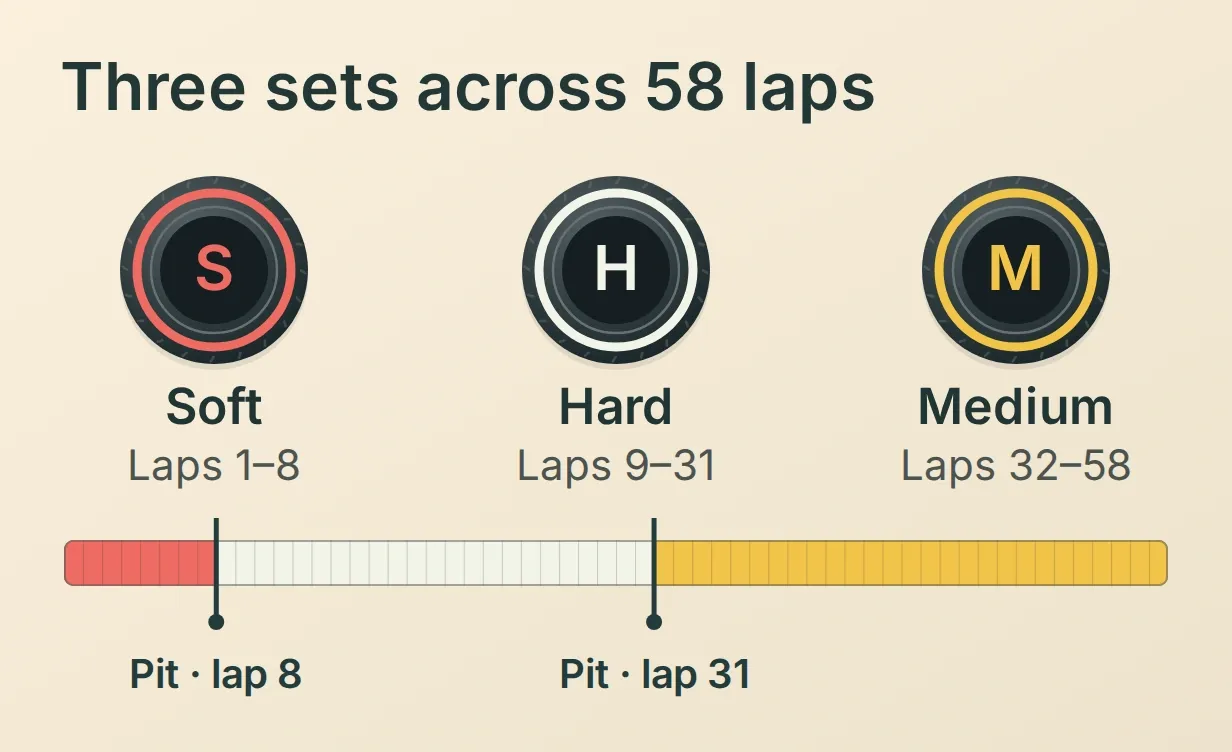 要找出某一圈的輪胎配方,就看它落在哪個賽段的起訖圈數內。第 8 圈仍屬於第一個賽段。
| 圈數 | 單圈時間(秒) | 輪胎配方 | 進出站紀錄 |
|---|---|---|---|
| 5 | 90.229 | 軟胎 | |
| 6 | 90.254 | 軟胎 | |
| 7 | 90.539 | 軟胎 | |
| 8 | 92.249 | 軟胎 | 進站 |
| 9 | 108.500 | 硬胎 | 出站 |
| 10 | 88.517 | 硬胎 | |
| 11 | 89.022 | 硬胎 |
這個區間耗時最長的一圈用了 108.500 秒,其中包含從維修區駛回賽道的過程。接下來第一個完整圈用了 88.517 秒。若把兩筆都當成使用同一種輪胎配方的一般計時圈來比較,就會忽略出站這個差異。你可以逐一核對七圈的單圈紀錄,再查看輪胎賽段的起訖圈數。
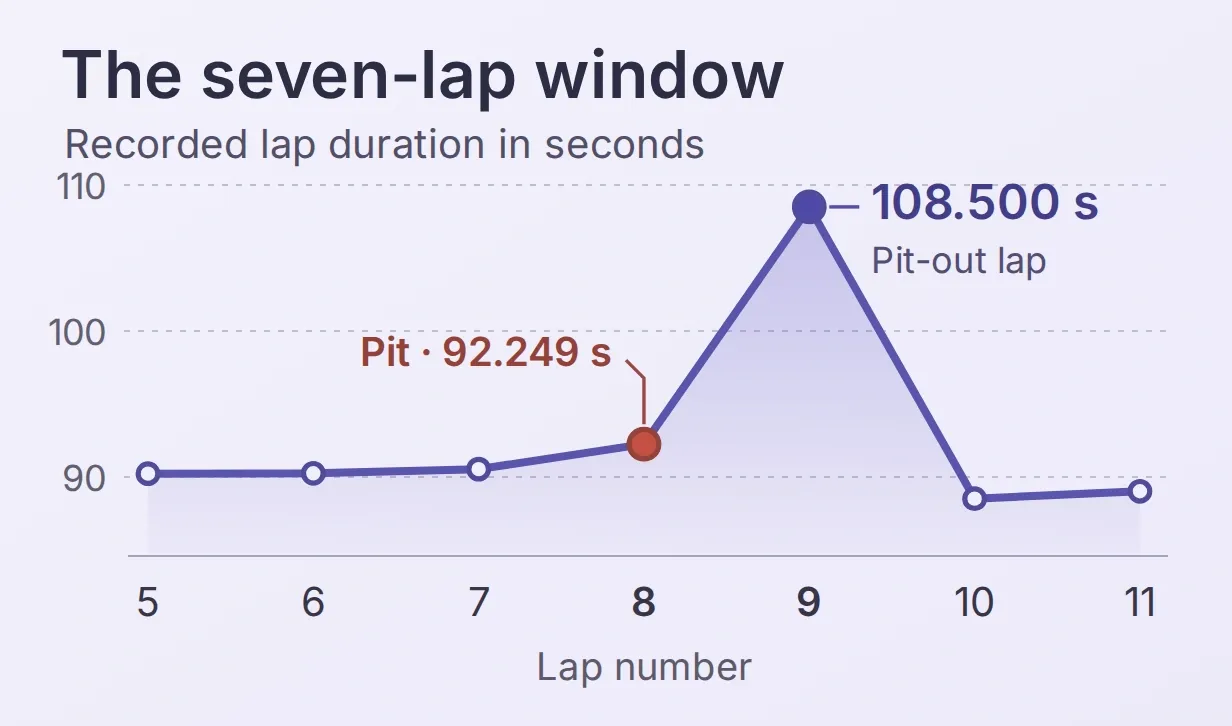 進站事件和單圈時間最高值落在相鄰兩列。比較配速時,可依出站圈標記排除該圈。
動手算一次。 解壓縮工具包,在解壓後的目錄中執行 python3 worksheet.py。程式會列出所有納入與排除的圈。排除進站圈、出站圈及任何缺少單圈時間的紀錄後,剩下五圈,中位數為 90.229 秒。這個數字描述的是橫跨兩種輪胎配方的所選圈數。若要研究其中一個賽段的配速,請在該賽段內選定區間,並說明排除了哪些圈。
5. 如何核對 AI 的賽事解說?
- 在 Inbox 開啟對話,展開已呼叫的動作,再開啟單圈查詢動作的 View logs。我們測試時,五次讀取都回傳 HTTP 200。核對單圈請求中的賽事時段 9839、車手號碼 44,以及起訖圈數 5 和 11,確認它們對應回傳的七筆紀錄。
- 提問
Did Hamilton pit because Ferrari wanted an undercut?Stint Notebook 查到了兩次進站,並說明這些紀錄無法判定法拉利當時的考量。賽車靜止時間可在原始進站紀錄中查看stop_duration。 - 開啟 Testing → Simulation,選擇 Create Dataset,接著選擇 Paste messages,貼上工具包的測試問題。每兩個問題之間,用一行只含
---的文字隔開。儲存資料集後選擇 Run。測試時納入一個查不到的車手號碼,以及一個要求即時更新的問題。我們向資料供應端查詢車手 999 時,收到 404。若查無車手紀錄,請使用者提供有效的車手號碼。若 OpenF1 缺少單圈時間或暫時出錯,請將該數值標示為無法取得。
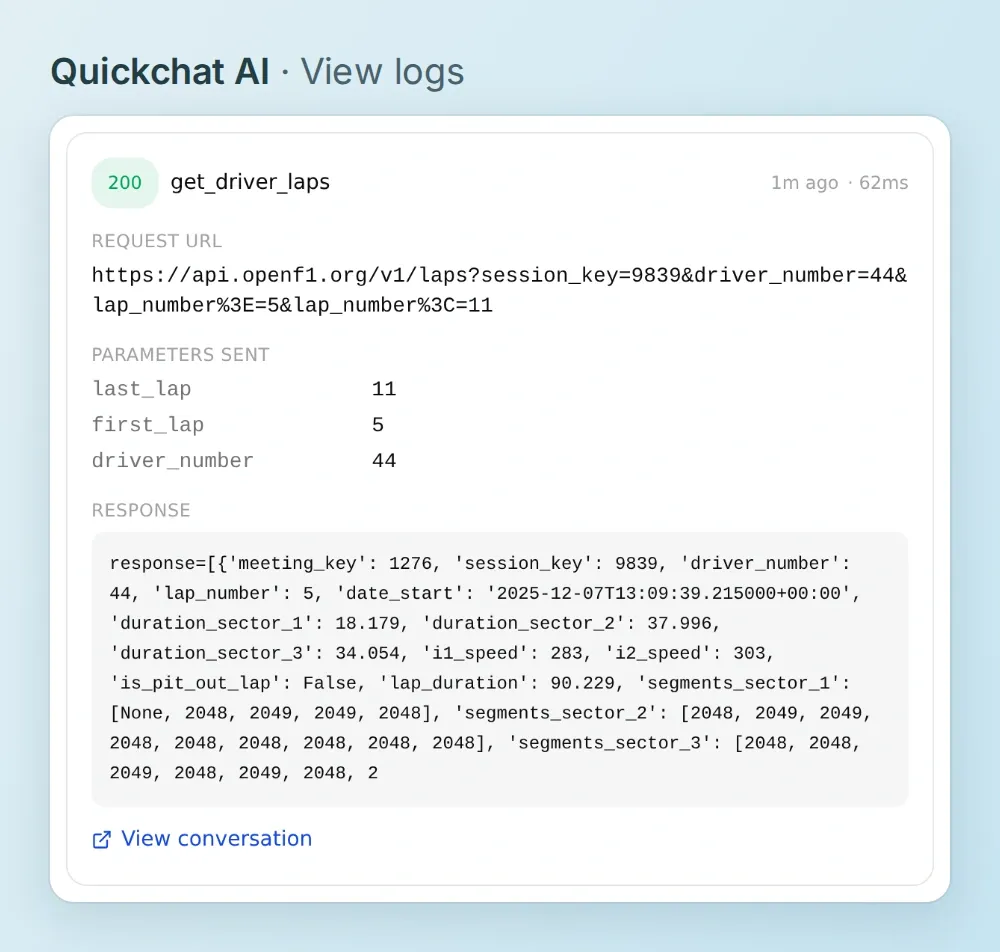 你可以從呼叫紀錄查看實際送出的請求,再和回覆描述的進站事件比對。
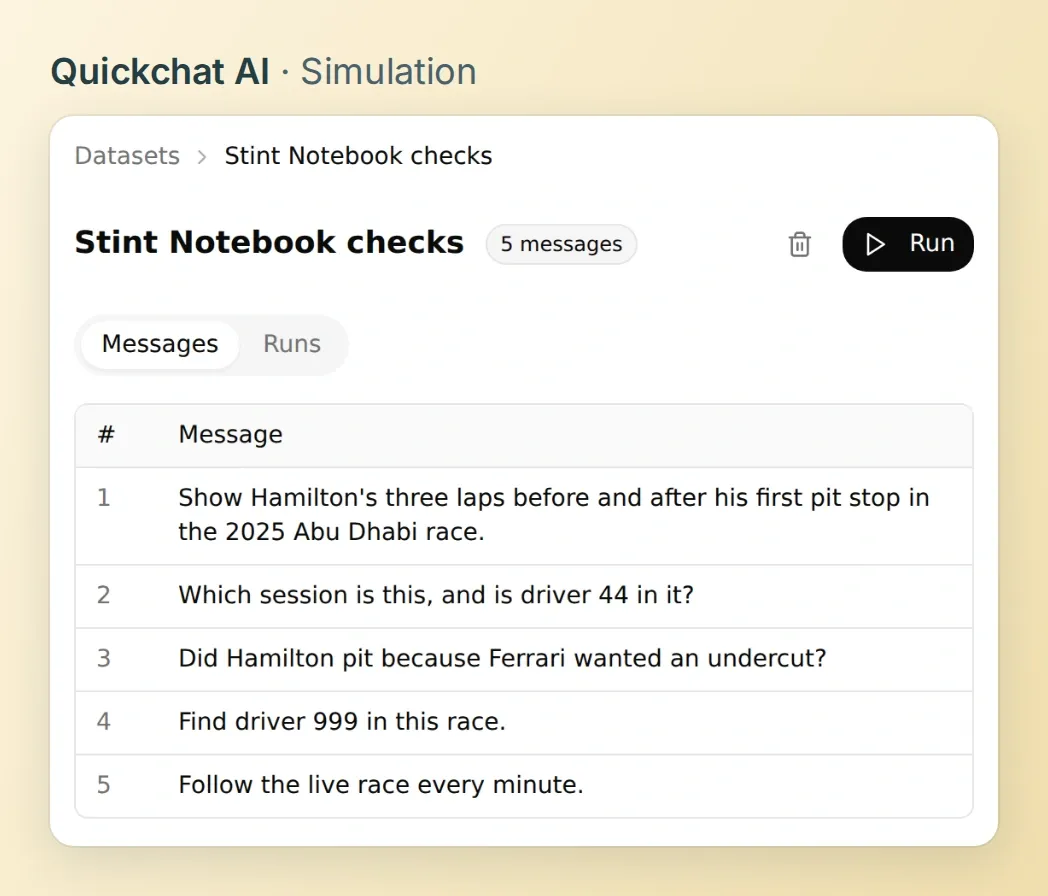 修改動作說明後,用相同的問題再測一次,同時核對回覆與動作取得的資料。
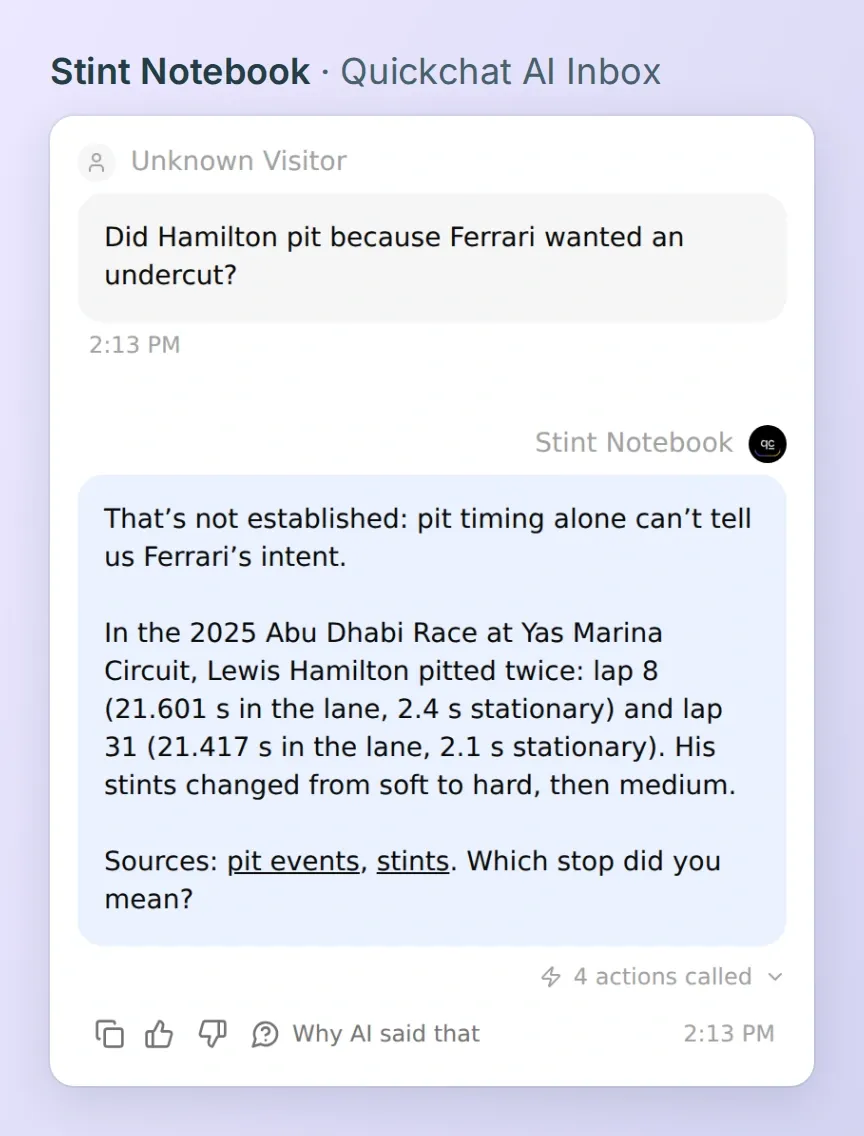 進站紀錄可確認法拉利何時叫漢密爾頓進站。計時資料沒有記錄車隊意圖的欄位。
有一項調整值得測試。 我們模擬單圈查詢收到 HTTP 429,而其他四次讀取皆成功。助理嘗試了兩次單圈查詢。接著,我們在單圈查詢的動作說明中加入指示,要求遇到請求頻率限制就停止,然後重問同一個問題。這次助理只嘗試了一次,回報已查證的進站資訊,並將單圈時間標示為無法取得。測試自己的指示措辭時,可以到 View logs 確認嘗試次數。
如果你已經透過 ChatGPT 或 Claude 管理 Quickchat AI,可以把工具包裡的 actions.json 和 main-prompt.txt 交給該助理,請它為時段 9839 準備五個 GET 動作。啟用前先檢查各動作的網址。執行測試會消耗你的 Quickchat AI 點數。
用 Stint Notebook 查第二次進站。 詢問漢密爾頓下一次是何時換胎。這次進站紀錄應指向第 31 圈,而中性胎賽段的第一圈應是第 32 圈。讀解說前,你已經有兩筆資料可以用來核對答案。
常見問題
Formula 1 的輪胎賽段是什麼?
輪胎賽段是指車手用同一套輪胎跑完的連續圈數。OpenF1 會記錄每個賽段的編號、輪胎配方、起始圈和結束圈。在 2025 年阿布達比大獎賽,漢密爾頓的第一個賽段使用軟胎,涵蓋第 1 至第 8 圈。
查詢 OpenF1 歷史資料需要 API 金鑰嗎?
不用。OpenF1 提供自 2023 年起的賽事時段歷史資料,供個人免金鑰查詢。Quickchat AI 的對話與測試會消耗點數。即時資料另有存取要求。
漢密爾頓在 2025 年阿布達比大獎賽的首次進站花了多久?
OpenF1 記錄顯示,漢密爾頓在第 8 圈於維修區通道內共花了 21.601 秒,其中賽車靜止了 2.4 秒。進站端點的這兩個欄位分別是 lane_duration 和 stop_duration。維修區通道的總時間已包含賽車靜止時間。
如何用 OpenF1 API 取得 F1 單圈時間和輪胎配方?
使用相同的 session_key 和 driver_number 查詢單圈與輪胎賽段。對於每筆 lap_number,採用 lap_start 到 lap_end 涵蓋該圈的賽段所記錄的輪胎配方。單圈端點提供的 lap_duration 以秒為單位。
這幾圈能看出法拉利為什麼叫漢密爾頓進站嗎?
紀錄會顯示漢密爾頓何時進站、賽車靜止了多久,以及接著換上哪種輪胎。車隊的決策並未記錄在內。若要確認車隊是否採取提前進站超車(undercut)之類的策略,還需要關於對手與車隊意圖的證據。
可以用這七圈估算輪胎賽段的配速嗎?
只要說明納入哪些圈,就能描述這段區間的配速。Python 小程式會排除進站圈、出站圈和缺少單圈時間的紀錄,並列出納入的圈數與中位數。橫跨兩種輪胎配方的區間,無法用來判定任一賽段的代表性配速。