

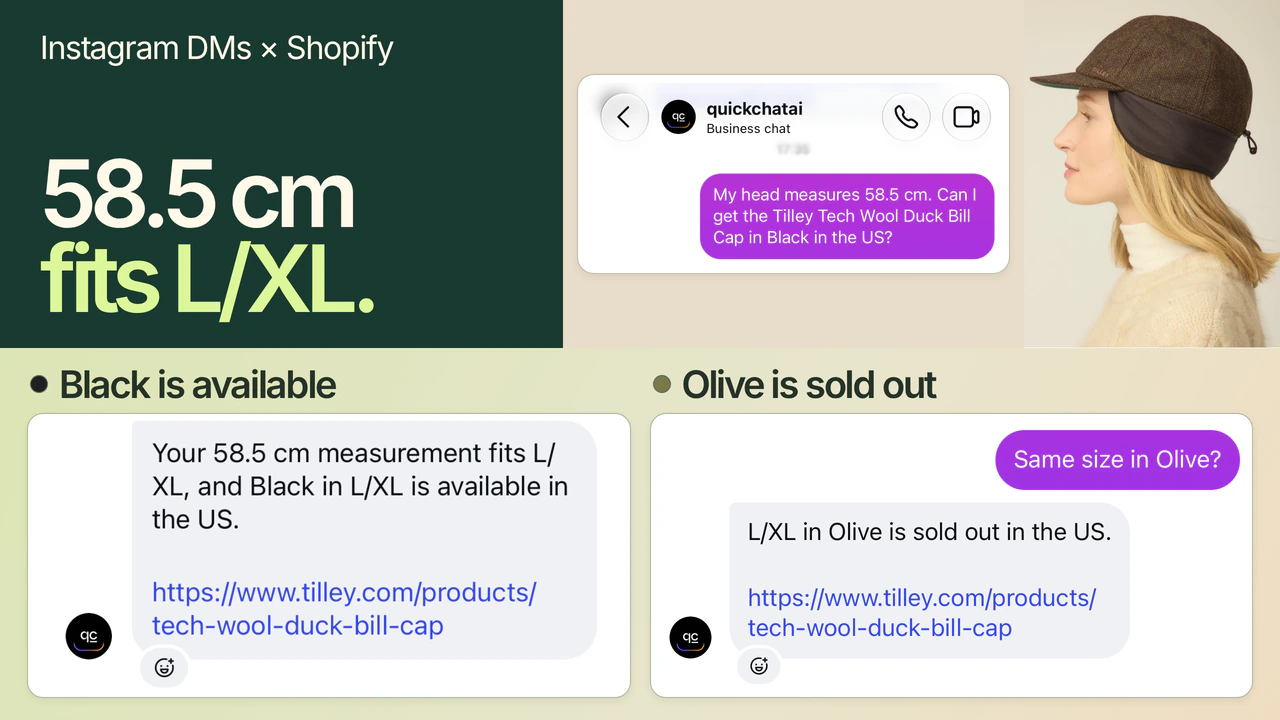
“Same size in Olive?” That was the shopper’s entire second Instagram message. In the first, they’d given a 58.5 cm head measurement and asked about Tilley’s Tech Wool Duck Bill Cap in Black. Our test Agent recommended L/XL and said Black was available in the US. For Olive it kept the size and replied, “L/XL in Olive is sold out in the US.”

To automate Instagram DMs about size and stock, give your Agent two sources. The product’s size chart tells it what fits. A fresh Shopify lookup tells it whether the shopper can order that color and size in their market. You can follow along with your own Instagram test handle and Tilley’s public US Shopify catalog. We ran the conversation through @quickchatai, our independent demo account. To try changing the stock yourself, you can also import the fictional Quarry Fold Cap into a shop you control.
Start with a Quickchat AI account with credits for test replies, an Instagram Business or Creator account you manage, and a second account to play the shopper. The public-catalog walkthrough needs no Shopify admin login. Commercial use requires a paid plan. Create an Agent · Plans and commercial use
1. Which size fits a 58.5 cm head?
Open Tilley’s Tech Wool Duck Bill Cap and choose Size Chart → CM. Find Head circumference. S/M covers 53–58 cm and L/XL covers 58–60 cm. The 17 cm figure is the cap’s crown height in both sizes. A shopper’s 58.5 cm head measurement falls in just one band. Tilley’s product and size chart
- In Quickchat AI, create an Agent with Set up manually, or open a spare Agent. Under Identity, give it the name Quarry Cap Studio.
- Open Knowledge Base → Add Article. For the public store, set the title to Tech Wool Duck Bill Cap | independent fit check, US. Paste the chart below into Content and choose Save.
- Wait for Ready. In AI Preview, ask “My head measures 58.5 cm. Which size of the Tech Wool Duck Bill Cap fits?” Check that the reply names L/XL. You’ll connect stock in step 3. How Knowledge Base articles become available
Copy the Tech Wool Duck Bill Cap size chart
Tech Wool Duck Bill Cap, Tilley US. Use head circumference in centimeters to choose a size. S/M fits 53 to 58 cm inclusive. L/XL fits 58 to 60 cm inclusive.

At exactly 58 cm both sizes fit. Ask whether the shopper prefers a closer S/M or roomier L/XL. A 58.5 cm head fits L/XL.

The crown is 17 cm high in both sizes. Crown height does not select a band. Outside the chart, say a fit cannot be verified. Check current availability separately for the selected color and size.
If you’re building the practice shop instead, add Quarry Fold Cap | measuring and choosing a band using its own chart. Quarry calls the size for 58.5 cm M/L. Keeping the product name in the article prevents one maker’s size labels from creeping into another maker’s answer.
Copy the Quarry Fold Cap size chart
Measure around the head just above the ears, where the cap will sit. Use the circumference measured around the head.

S/M fits 54.0 to 57.0 cm inclusive. M/L fits 57.0 to 60.0 cm inclusive.

At exactly 57.0 cm both bands are in range. Ask whether the shopper prefers a closer fit (S/M) or a roomier fit (M/L).

Both sizes have a 7 cm brim. The brim measurement does not select a band. Outside these ranges the chart cannot give a size recommendation.
2. Check the selected variant on the Shopify storefront
Open the store as the shopper, in the same market they named in the DM. If Tilley offers a regional redirect, stay on the US storefront. Keep L/XL selected while changing Black to Olive. On November 25 the button changed from Add to cart to Sold out. When we switched Olive to S/M, the store offered Add to cart again. Open Black L/XL · Open Olive L/XL · Open Olive S/M

Make a four-variant practice product in your own shop
You can experiment with the fictional Quarry caps before importing anything. Leave the size checker at 58.5 cm and switch Moss to Cider. Three Moss M/L caps are available. The two remaining Cider caps are both S/M. Try the interactive size checker
- In a single-location Shopify test shop, choose Products → Import → Add file. Select the four-variant CSV, leave matching-handle overwrite off, and choose Upload and continue → Import products. To enter the product manually, create Quarry Fold Cap, priced at $38 in a USD store, with options Color (Moss, Cider) and Size (S/M, M/L). Download the CSV · Shopify’s import instructions
- Open the product’s Variants section, select the location that fulfills online orders, and expand each color group to see its size rows. Turn inventory tracking on and leave Continue selling when out of stock off. Compare the four quantities below. Editing Shopify variants
- Set the product to Active and publish it to the Online Store for your test market. On the storefront, select Cider S/M and then Cider M/L. Only S/M should allow an order with these quantities. Shopify’s out-of-stock settings

Check the four SKUs and quantities
| Color | Size | SKU | Available quantity |
|---|---|---|---|
| Moss | S/M | QF-MO-SM | 4 |
| Moss | M/L | QF-MO-ML | 3 |
| Cider | S/M | QF-CI-SM | 2 |
| Cider | M/L | QF-CI-ML | 0 |
3. How does the Agent check the exact Shopify variant?
In Quarry Cap Studio, open Actions & MCPs → Custom Actions → Add Action → Shopify MCP. Under Shopify store URL, enter https://tilley-us.myshopify.com for the public example, or the root address of your own practice store. Choose Save, then switch on Shopify Storefront MCP. If the card already exists, check its store address. Shopify shopping assistant setup

Open Identity → AI Persona → Main Prompt → Edit and paste the instructions below. They tell the Agent what to carry into the second message. When the shopper changes only the color, the product, size and market still apply.
Copy the Main Prompt
Help shoppers choose a cap size. Use the Knowledge Base chart for the specific product they name. Ask which product they mean if it is unclear. Ask for the unit when a measurement has none. At the overlap, ask whether they prefer a closer or roomier fit.

Once you know the color and size, look up the cap in the Shopify catalog for the shopper’s market. On a color-only follow-up, carry over the product, size and market and run the lookup again. Check that both options appear on the same variant and that its availability is explicit. If the exact variant is missing from the results, repeat the product lookup with the same selected options and include unavailable variants. With Shopify's get_product tool, set catalog.filters.available to false. Say it is unavailable only when the matching variant explicitly says so. If the combination or its availability is still missing, tell the shopper you could not verify it. Ask before suggesting another color or size.

Include the product URL returned by the store when available. Report a price only with its verified currency. Leave cart, ordering and payment to the shopper.

Write plain text only, with no Markdown, bold, or named links. Put the returned product URL on its own line.
Prefer to set this up from ChatGPT or Claude? Connect your Quickchat AI account, give the assistant the chart and Main Prompt above, and paste the setup request below. You grant Instagram access yourself in step 5. Quickchat AI for ChatGPT · Quickchat AI for Claude · Account setup guide
Copy an account setup request for the public-store example
Set up a dedicated Agent called Quarry Cap Studio. Save the Tilley Tech Wool Duck Bill Cap chart below as a Knowledge Base article, and save the supplied Main Prompt under Identity.

Use Tilley’s public US Shopify catalog. For a remote MCP Action, connect https://tilley-us.myshopify.com/api/ucp/mcp and enable only search_catalog and get_product. Add these call details to the Agent’s instructions: the product ID for the Tech Wool Duck Bill Cap is gid://shopify/Product/15426286813352. Use the selected Colour and Size, the US English market, and USD. For get_product, include unavailable variants with catalog.filters.available=false. The meta.ucp-agent.profile value is https://app.quickchat.ai/shopify/ucp/agent-profiles/2026-04-08/quickchat-shopping-v1.json.

Save test cases for an in-range measurement, the shared endpoint, a missing unit and a change of color. Before running tests, tell me how many AI credits they use. Give me the Agent’s Instagram setup link so I can approve my test handle.
Use one storefront connection per Agent. The dashboard’s Shopify MCP dialog takes the root store address. We used the remote MCP connection for the photographed Instagram conversation. It takes the catalog endpoint and limits the Agent to two read-only tools. If your assistant lacks that setup tool, use the dashboard instructions above.
In AI Preview, ask “My head measures 58.5 cm. Can I get the Tilley Tech Wool Duck Bill Cap in Black in the US?” Wait for the reply, then send “Same size in Olive?” If you use the Quarry practice shop, substitute Moss Quarry Fold Cap and Cider.

How can you tell a sold-out variant from a missing result?
Open the conversation in Inbox. If the reply shows 1 action called, expand it and look for get_product. Our hosted Instagram replies each had this control. The first call selected Black + L/XL and the second selected Olive + L/XL. Open Why AI said that to see the chart the Agent used for fit. If your Shopify connection has no expandable action on the reply, open its product link and check the purchase button for those exact options.

Result → Show full expands the saved preview when available. In these two calls it ended before the variant rows, so we checked Shopify separately. With Olive + L/XL selected, a default product lookup returned zero variant rows. Including unavailable variants returned the matching row with availability set to false. Olive S/M still returned true. If an Agent has only an empty result, it can give the chart size and say it couldn’t verify stock. Shopify’s Storefront Catalog

We tested that distinction on the Quarry practice catalog. On the first pass, the Agent kept M/L but said it couldn’t verify Cider. We added one instruction to repeat an empty lookup with the same selected options and include unavailable variants. With the same shopper question and history, the next run found Cider M/L marked unavailable. The store’s four quantities stayed the same.

4. What happens when the shopper fits two sizes?
On Tilley’s chart, try “My head measures exactly 58 cm. Which size of the Tilley Tech Wool Duck Bill Cap should I choose?” Both bands include 58 cm. The next useful question is whether the shopper likes a closer S/M or roomier L/XL. The Agent can check the chosen color once the shopper picks a band.
For the practice cap, try “My head is exactly 57 cm. Which Moss Quarry Fold Cap size should I choose?” This time the choice is S/M or M/L. The overlap moves with the product.


For independent questions, open Conversations → Testing → Create Dataset. Name it Quarry Fold Cap fit checks, add one starting message per line, and choose Create → Run → Start Run. Keep the two-turn tests in one AI Preview chat so the second message has a measurement to refer to. Compare the answers with the chart and storefront. These examples use Quarry.
| Send this | What to look for |
|---|---|
| “58.5 cm, Moss please.” Then “Same size in Cider?” | M/L both times. A fresh check of Cider M/L, even though Cider S/M is available. |
| “Exactly 57 cm.” Then “Roomier, in Moss.” | A fit-preference question first, then a lookup for Moss M/L. |
| “Mine is 58.5.” | A question about units before a size recommendation. |
| “My head measures 62 cm.” | The chart ends at 60 cm. The reply leaves the size open. |
| “Will the Moss M/L arrive by Friday?” | The reply keeps purchase availability separate from a delivery estimate that needs a destination and shipping terms. |

For a final stock test on your own Quarry demonstration product, change just Moss M/L to zero. Wait until your storefront shows the new status and repeat the original 58.5 cm message in a fresh chat. The fit should stay M/L and the purchase answer should change. Restore the three units after the test.
5. Test the reply in Instagram DMs
The shopper should see the answer and a tappable product URL in one conversation. Check the Knowledge Base in AI Preview first. Ask which two sizes overlap at 57 cm on the Quarry chart, or 58 cm on the Tilley chart. An answer naming both bands tells you the Agent has the right chart before you open Instagram.
Connect Instagram after the Preview tests pass. The successful connection can enable replies immediately, so use the Professional account you prepared for this test.
- In External Apps, choose Instagram → Connect to Instagram. Use a spare Business or Creator handle. A handle can connect to one Agent at a time. Instagram uses the account already signed in to your browser, so choose Sign in as a different account if you see the wrong handle.
- On Instagram’s permission screen, keep Access and manage messages on and choose Allow. Back in Quickchat AI, verify the @username, Connected since date and Enable Instagram switch. If the browser blocks the popup, use Continue in this tab. Instagram connection guide

- On a phone, switch to a second Instagram account and start a fresh DM with your own connected test handle. Choose the row below that matches the store your Agent uses. Send the first message and wait for the full reply before sending the second in the same thread.
| Connected store | First message | Follow-up |
|---|---|---|
| Tilley US public catalog | “My head measures 58.5 cm. Can I get the Tilley Tech Wool Duck Bill Cap in Black in the US?” | “Same size in Olive?” |
| Your Quarry test shop | “My head measures 58.5 cm. Can I get the Moss Quarry Fold Cap?” | “Same size in Cider?” |
- Tap the product link from the reply. In our thread, Instagram displayed the same Tilley photo on both turns because both URLs opened the general product page. Stay on the US storefront, select Black L/XL, then Olive L/XL, and compare each purchase button with its reply. If you imported Quarry, use Moss M/L and Cider M/L instead. Stock can change between the lookup and the tap.
- Open Quickchat AI → Inbox. Select the thread and look for Channel → Instagram in Details. Match the question, short answer and product URL with what reached the phone. Instagram auto-reply walkthrough

A shopper who says “I need a rain hat under $60” has given you a different problem. Start with their budget and use case to find a product, then check its fit and stock. Build a product recommendation chatbot
Frequently asked questions
How can I automate Instagram DMs about Shopify sizes and stock?
Give your Agent the product’s size chart and connect it to the Shopify catalog. Use the chart to find the size, then look up that size and color together in the shopper’s market. Test a second color from another Instagram account to confirm the Agent checks stock again.
What should the Agent do if the shopper is between sizes?
Follow the product’s own chart. For the Quarry Fold Cap, 57 cm is in both bands. Ask whether the shopper wants a closer fit (S/M) or a roomier fit (M/L), then check the chosen color and size together.
Can a Shopify product be available when the shopper’s size is sold out?
Yes. Each color and size combination can have its own availability. A shop can sell Cider S/M while Cider M/L is sold out. The Agent needs a purchase status for the exact variant in the shopper’s market.
What if Shopify leaves the requested variant out of the result?
Keep the size recommendation if the chart supports it. Look up the same options with unavailable variants included when the catalog supports that filter. If the result still gives no purchase status for that combination, say you couldn’t verify availability and share the product link returned by the store.
Why can a shopper still order a Shopify variant with zero stock?
A merchant can enable Continue selling when out of stock, for example to accept preorders. Report whether the storefront accepts an order for the variant. Warehouse quantity and delivery date need their own evidence.
Does an Instagram DM reserve an item in Shopify?
The reply reports availability at the time of the lookup. The shopper follows the link to the storefront and completes the store’s checkout. This setup creates no cart, reservation or order.
Why do different Shopify variants show the same photo in Instagram DMs?
In our test, both replies linked to the same Shopify product page. Instagram displayed the same link preview for Black and Olive. Tap the link, select the color and size in the shopper’s market, and read the purchase button for that variant.