

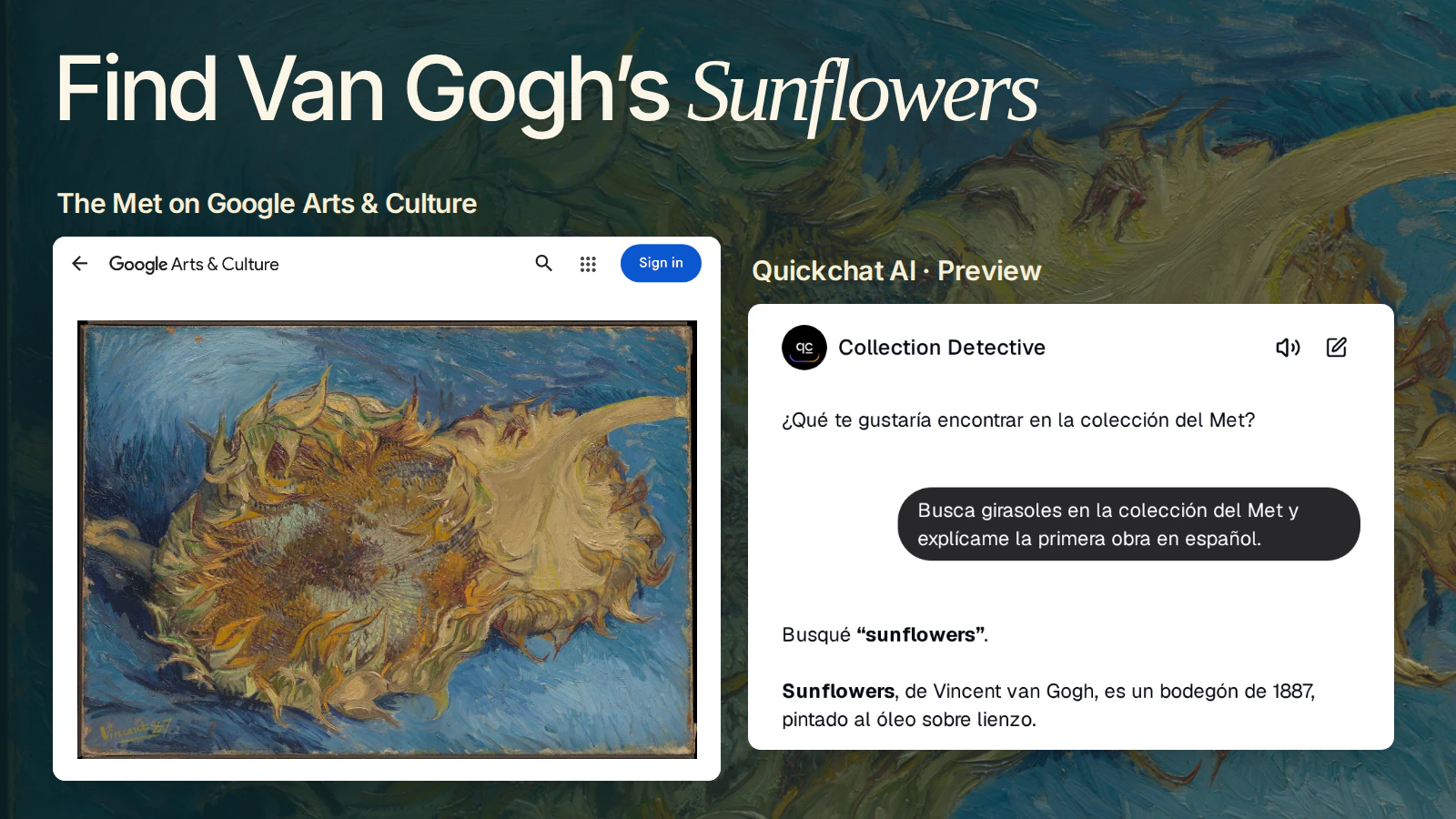
Two cut sunflowers lie on a bed of blue paint. Ask for them in Spanish and you can get a wall label for Vincent van Gogh’s Sunflowers, complete with the year, the material and a link to the original. Add cats to the clue and the trail leads to a French silk fan.
You’ll build Collection Detective, a multilingual museum chatbot that searches The Met Collection API and writes a short label from the artwork it finds. Start with the painting below. By the end you’ll be able to follow either clue in Quickchat AI and check the answer against the museum’s own catalogue.
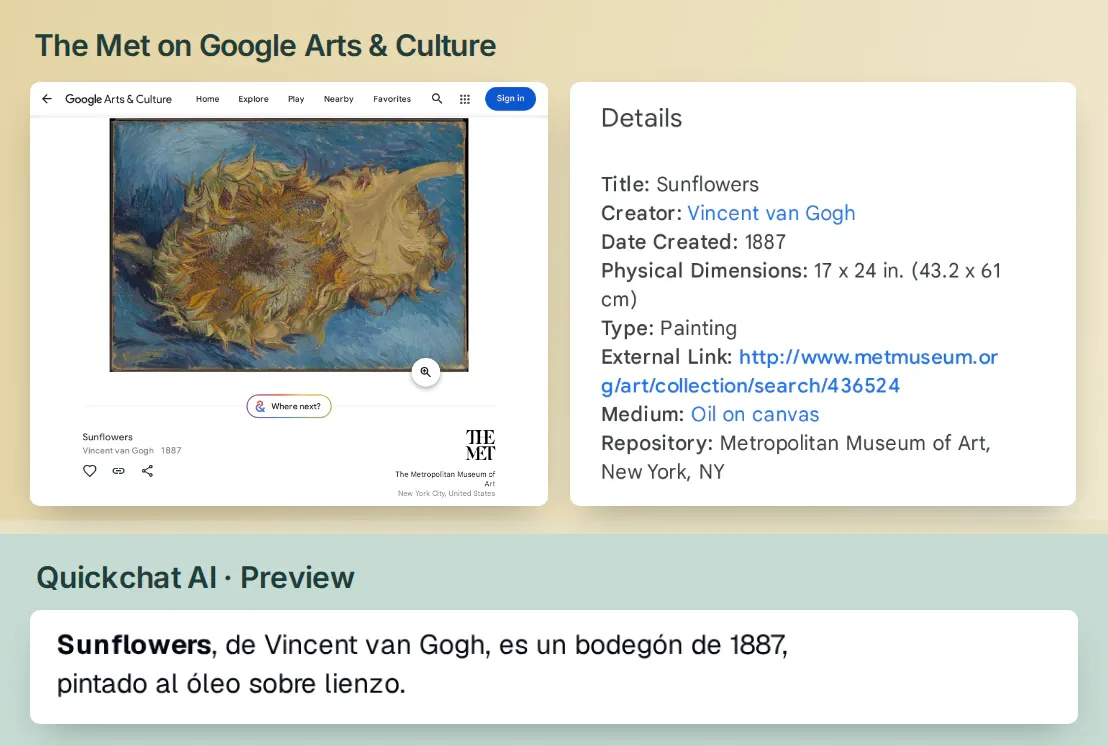 Quickchat AI kept the title Sunflowers and translated the medium to “óleo sobre lienzo.” Compare the answer with the museum label in Google Arts & Culture. The Met, Rogers Fund, 1949. Open the museum record.
1. Give your museum chatbot its first clue
The visitor supplies a theme and a language. The detective makes two lookups. The first finds candidate object IDs. The second opens one ID and brings back the artist, title, date, medium and source link. Only then does the detective write the label.
- Sign in or create a Quickchat AI account. Use an empty Agent or select Add new AI Agent → Set up manually. Name it Collection Detective. You’ll need enough credits for a few test conversations. The museum lookups work without a Met account or API key.
- Open Identity → AI Persona → Main Prompt. Paste the instructions below, then close the panel. Identity saves your edits automatically. They tell the detective how to choose a record and which details to keep when it changes languages.
Copy the Main Prompt for Collection Detective
Guide visitors through The Met’s online collection. Reply in the visitor’s requested language. For a theme, search the catalogue with a short English equivalent and tell the visitor which term you used. For an explicit object ID, go straight to the object lookup. Fetch the first returned record unless the visitor selects another. Use the record before stating any facts.
Keep original titles and artist names. Translate attribution qualifiers and approximate dates into the visitor’s language, preserving their uncertainty. Give dates and materials in that language. Link the returned objectURL with a short label. If isPublicDomain is true and primaryImageSmall or primaryImage is present, offer a short link to the image. Otherwise give the museum record only. Keep each answer to a short museum label.
For a comparison, check both records and compare their recorded materials. Empty fields are unknown. If a search is empty, ask for a broader term. If a request fails, say which lookup failed. For meaning, intent or today’s gallery location, explain what the record can establish and refer the visitor to the museum.- In Identity → Languages, add English and Spanish. We also added Japanese for a second-language check. The first language is the fallback for ambiguous messages. How language hints work
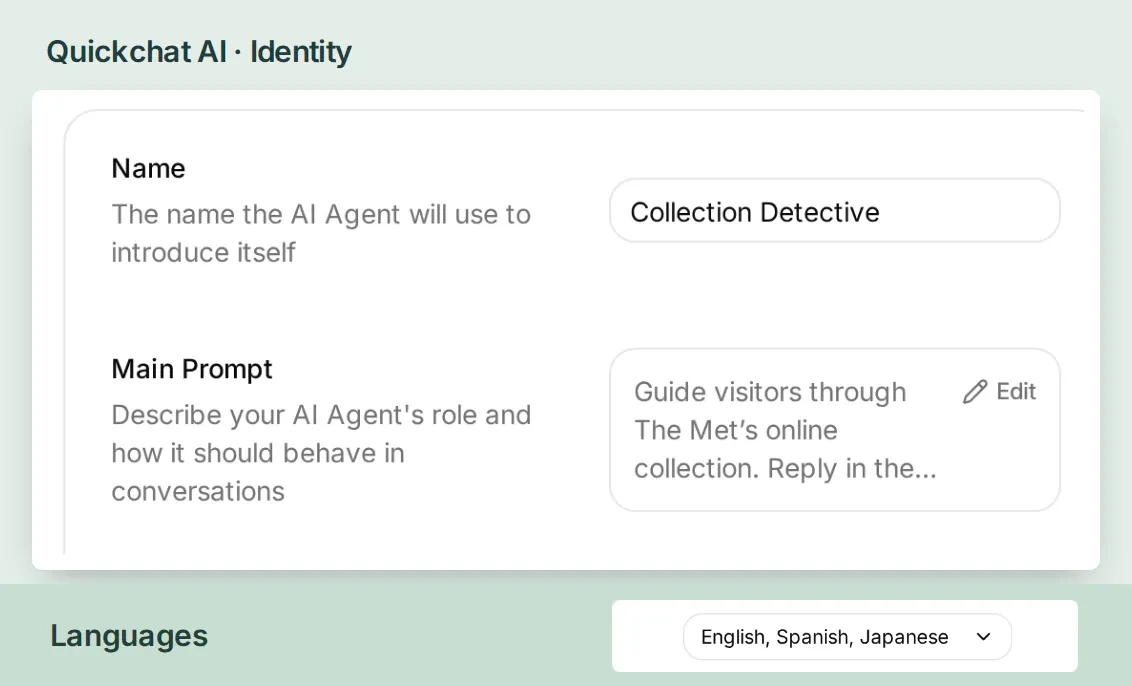 The Agent’s name and instructions live in Identity. The catalogue lookups go in Actions & MCPs in the next step.
- Keep this first visitor message for AI Preview once both Actions are enabled. The visitor is asking to find sunflowers and explain the first work in Spanish.
Busca girasoles en la colección del Met y explícame la primera obra en español.
The language of the search matters. On 19 November 2026, the museum returned zero matches for girasoles and 153 for sunflowers with the same filters. Let the visitor ask in Spanish, search for the short English catalogue term and tell them which word you used.
2. How do you search The Met Collection API?
Give the first Action one input, the theme. Keep the search small enough that a visitor can follow the trail. Three candidates let you open the first work and still have another to investigate.
- In Actions & MCPs, choose Add Action → API Action → Create manually. Set API Action Name to
search_met_collectionand When to run to AI decides. The API Actions walkthrough shows the same editor with a simpler request. - Under What to ask the user first, add a required Text parameter called
theme. For its description enter “A short English catalogue search phrase, such as sunflowers or cats and sunflowers.” - In API Endpoint, choose GET and enter
https://collectionapi.metmuseum.org/public/collection/v1.1/search. In Query Params, create these four rows. Use Add AI Data → Parameters for the first value so the visitor’s theme is inserted into the request.
| Query key | Value to enter |
|---|---|
q | Insert the theme parameter chip. |
hasImages | true |
limit | 3 |
offset | 0 |

q takes the visitor’s theme. The other three values stay fixed. Read The Met’s Search (v1.1) reference.
- Under Headers, enter
Acceptwith valueapplication/json. Leave Body empty. Paste the following into API Action Description, choose Save changes and check that the Action’s switch is on.
Copy the search Action description
Search The Met’s online collection for a visitor’s theme, using a short English catalogue term. Return up to three candidate object IDs. Call get_met_object for a selected ID before describing any work. For an empty result, ask for a broader theme.Open the sunflower search in your browser. Here is the whole response from our search. The count covers every match. The list contains only the three IDs we requested, and their order can change as the catalogue changes.
{"total":153,"objectIDs":[436524,480725,484935]}3. Turn an object ID into a Spanish museum label
Start with 436524, the first ID in that response. The second Action looks it up directly. The Met uses v1.1 for search and v1 for individual objects. If an older search example returns HTTP 410, change the search route and leave the object route at v1. The Met Collection API reference
- Create another API Action. Set API Action Name to
get_met_objectand When to run to AI decides. Under What to ask the user first, add a required Number namedobject_id. Describe it as “The integer Met object ID from a search result or the visitor.” - In API Endpoint, choose GET. Enter
https://collectionapi.metmuseum.org/public/collection/v1/objects/, leave the final slash in place and use Add AI Data → Parameters to append theobject_idchip. With our first ID, the address ends in/objects/436524. - Leave Query Params and Body empty. In Headers use
Acceptwithapplication/json. Paste the description below into API Action Description, choose Save changes and check that the Action’s switch is on.
Copy the object Action description
Retrieve one Met object by a returned or visitor-supplied object ID. Use its title, names and qualifiers, date, medium and objectURL for the label. Offer an image only if the public-domain flag is true and an image URL is present.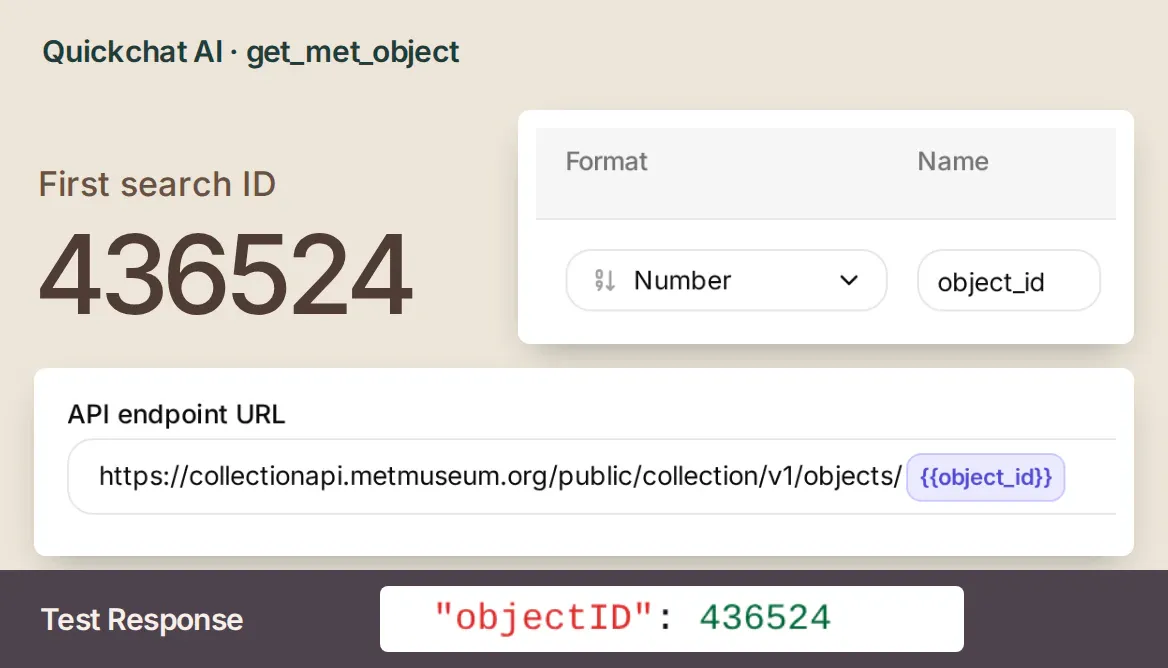 In the search Action the visitor’s word goes in a query row. Here the number becomes part of the address itself.
Open AI Preview and send the first clue. Look for the original title Sunflowers, Vincent van Gogh, 1887, and óleo sobre lienzo. Follow the museum link in the answer. The page also lists 49.41 as its Object Number. That is the museum’s accession number. Use 436524 in the API. The year 1949 in the credit line belongs to the Rogers Fund acquisition. The painting itself dates to 1887. Read the object data
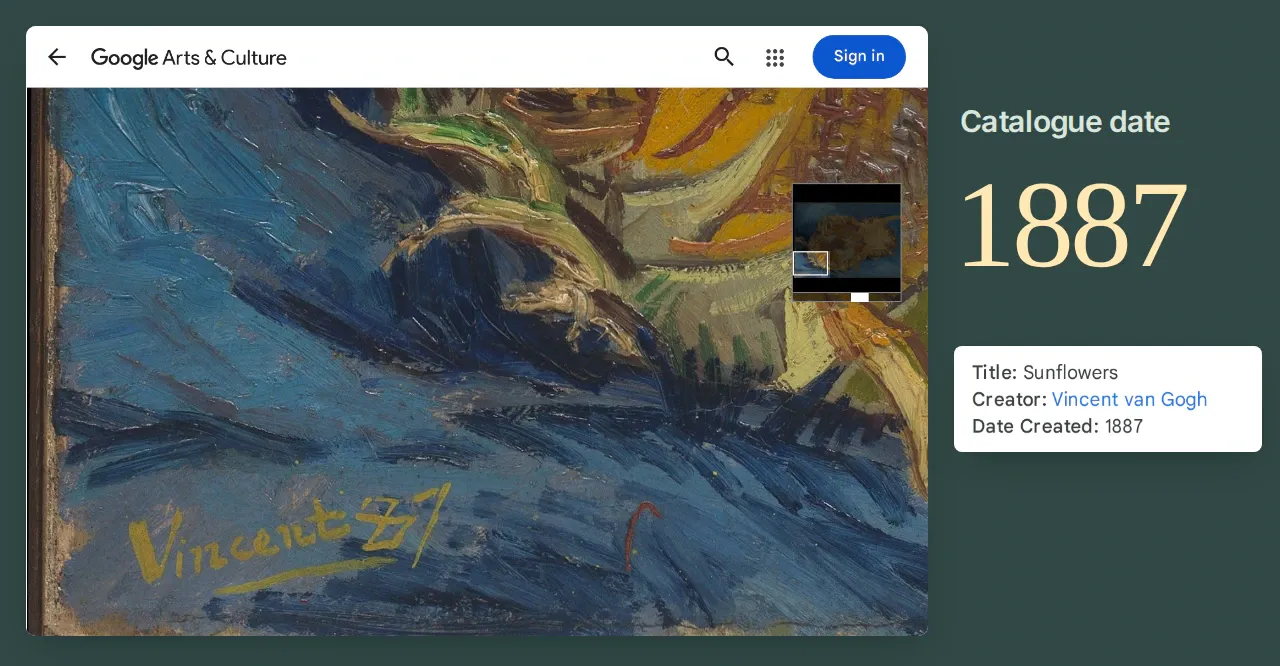 Open the painting with the magnifying glass and find “Vincent 87” in the lower-left corner. On the artwork page, scroll to Details and compare the signature with the year under Date Created. Explore The Met’s Sunflowers on Google Arts & Culture.
Set up the same two Actions from a connected AI assistant
If you manage Quickchat AI through ChatGPT or Claude, you can also use the two recipes above with this setup request. Review the generated fields, then run the first clue yourself. Account connection instructions
Draft the two API Action configurations for my Collection Detective agent here first. Use the supplied names, URLs, required parameters and descriptions. Bind the theme to the search query and the numeric object ID to the object path. Neither request needs authentication or a body. After I approve both configurations, create the Actions.4. How do you check a translated artwork label?
In Inbox, open the conversation and expand 2 actions called beneath the answer. For the request details, go to Actions & MCPs → Custom Actions and select View logs for each Action. Find 436524 in the search response and at the end of the next request. Matching those numbers lets you trace the Spanish label back to one object even if another work has the same title.
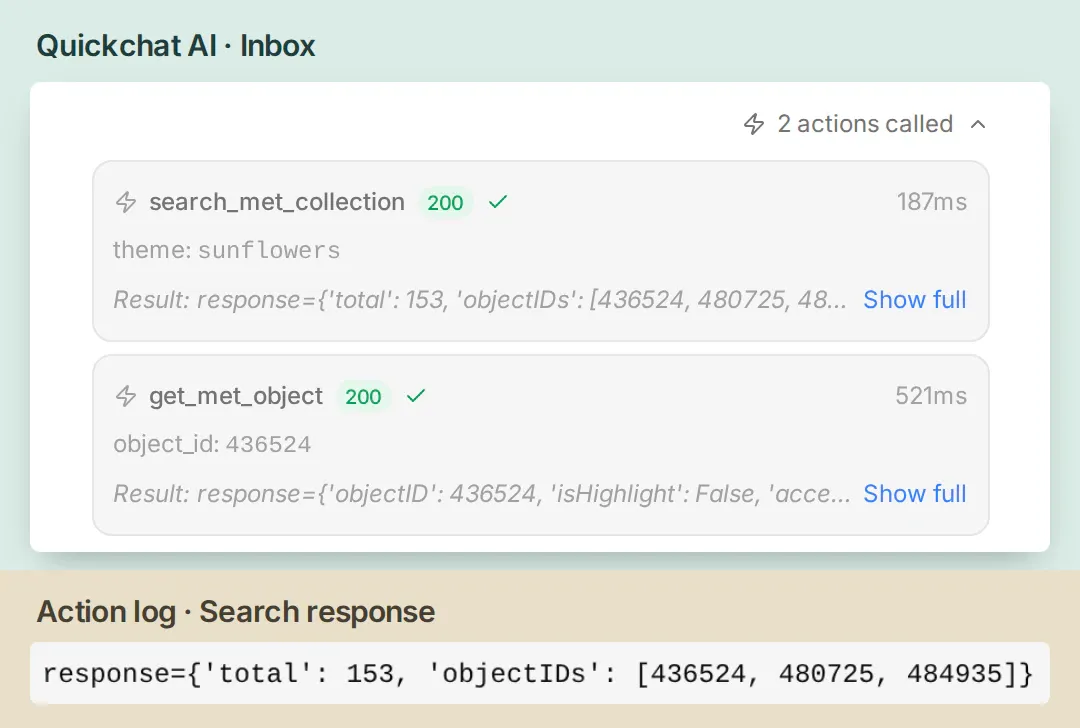 Follow the first ID from the search result into the object lookup. That handoff is what ties the answer to the painting.
Try these clues in fresh conversations. To repeat them after editing the prompt, open Testing → Create Dataset, name the dataset and enter the questions. Select Run Tests → Start Run, then View on a completed result to open its conversation in Inbox.
Check the attribution. Ask for a Spanish label for object 437406. Its record gives Rembrandt as the name and Follower of as the prefix. Our first reply explained the attribution in Spanish but left the artist line in English. We changed one instruction to translate the qualifier as well as the medium. The next reply gave un seguidor de Rembrandt and kept the uncertainty in the date, probablemente hacia 1658–62. Read The Auctioneer’s catalogue entry.
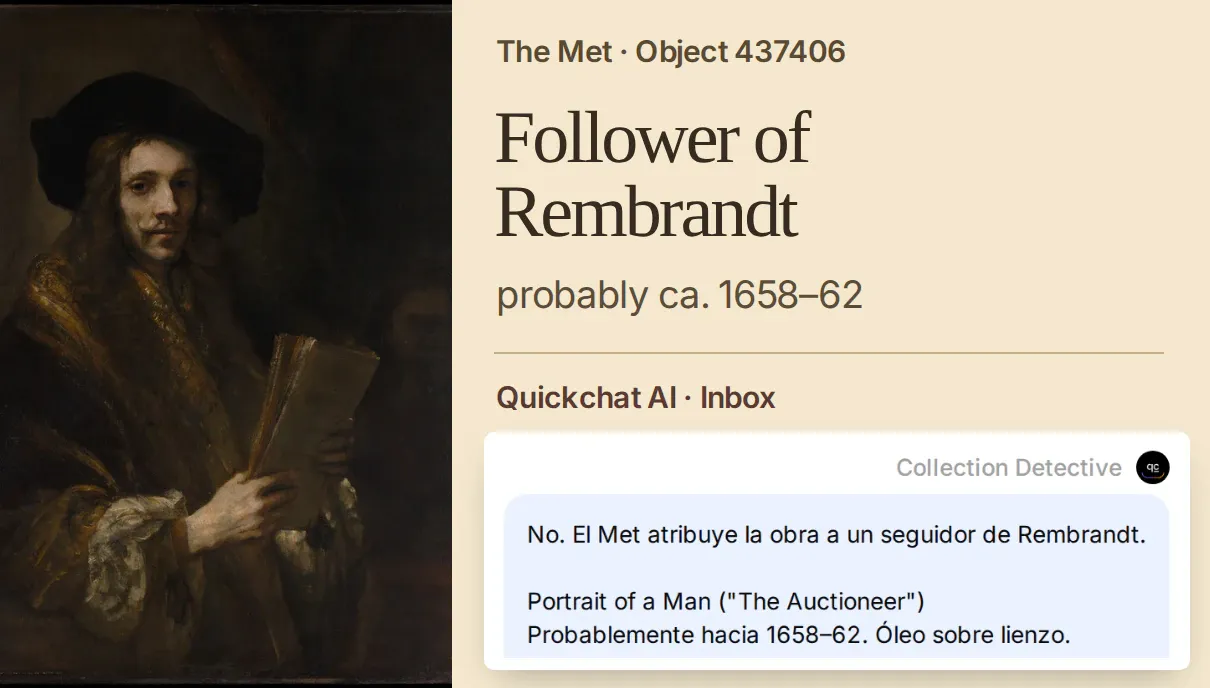 Two words carry the attribution. “Follower of” belongs with the artist’s name in both languages. The Met, Bequest of Benjamin Altman, 1913.
Check the image. Ask to see object 480725, the second sunflower match. Emil Nolde’s Large Sunflowers is dated 1928 and painted on panel. Its record has isPublicDomain: false and empty image URLs. Give the visitor the catalogue link and the material. This example is why hasImages=true alone cannot decide which image to show. Read the Nolde record.
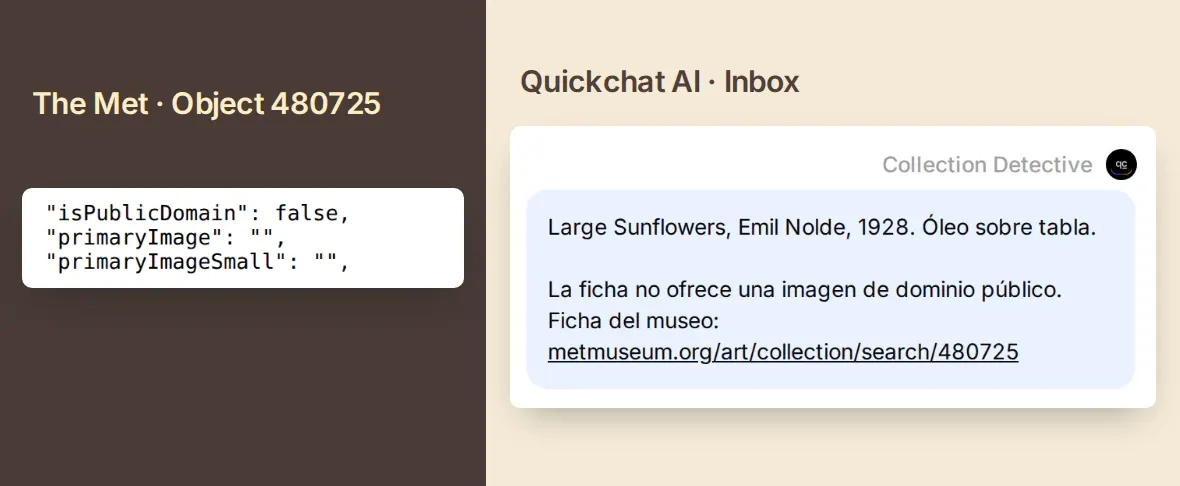 The museum can share the catalogue details even when the API supplies no reusable photograph. The Met’s Open Access image policy.
Check an empty search. Ask for the exact term zzzxxyycollectiontest. The API returned {"total":0,"objectIDs":null}. The detective can ask for a broader clue. A failed lookup needs a different answer. When we simulated an HTTP 503, the detective asked the visitor to try again later and made no object request.
5. Follow the sunflowers onto a silk fan
Keep the flowers and add an animal. Give Collection Detective a second clue and ask which surface each artist worked on. You can use this message as written.
Busca «cats and sunflowers» y compara el soporte de la primera obra con el de Sunflowers (436524).
Try the second search. Our first two IDs were 705155 and 436524. The Met catalogues the first work as a drawing. On Wikimedia Commons, choose Open in Media Viewer beneath the museum’s photograph. Follow the white cats along the ribs and look for the glint between the sunflowers. Inspect the fan on Wikimedia Commons.

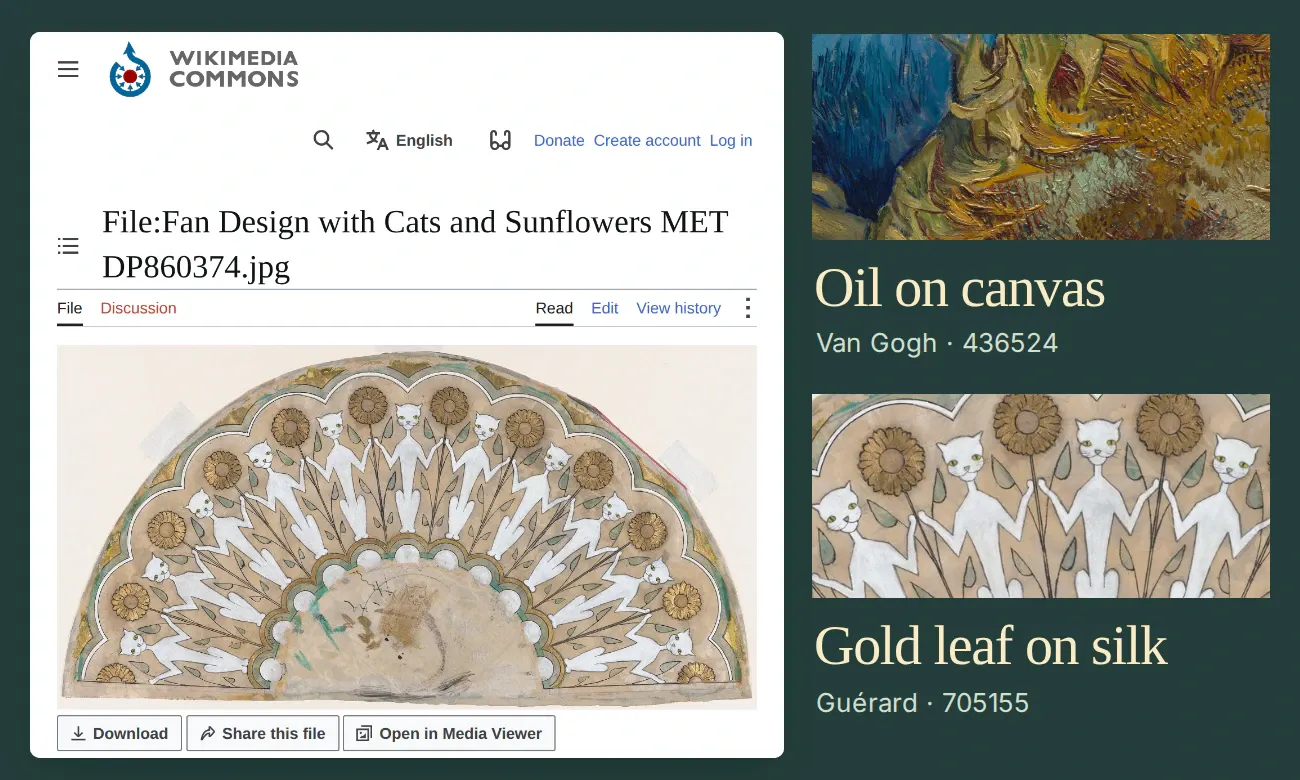 Henri Charles Guérard, Fan Design with Cats and Sunflowers, ca. 1885–90. The Met, Gift of Robert Tuggle and Paul Jeromack, 2015. Explore the fan at The Met.
Van Gogh worked on canvas. Guérard worked on patterned silk. The glint among the sunflowers has a material explanation. The museum lists gold leaf alongside the ink and gouache. The date stays approximate, ca. 1885–90. To make your own two-stop hunt, choose a detail from the first work, add it to the next clue and ask the detective for one difference you can verify on both object pages.
Museum chatbot FAQ
Do I need an API key to search The Met collection?
The Metropolitan Museum of Art provides public search and object endpoints without registration or an API key. You can open both requests in a browser. Quickchat AI uses account credits for the chatbot conversation.
Which Met API endpoint returns an artwork and its image?
Use /public/collection/v1.1/search to get candidate object IDs. Pass one ID to /public/collection/v1/objects/{id} for the title, artist, date, medium, museum link and any available Open Access image URLs.
Can the museum chatbot answer in Spanish or another language?
Yes. Ask in the visitor’s language, search with a short English catalogue term and translate the explanation. Keep the original title, names and attribution qualifiers so the visitor can check the museum record.
Can I reuse every image returned by a Met search?
Check the individual object record. The Met makes its Open Access images available under CC0. This chatbot offers an image only when isPublicDomain is true and a primary image URL is present. Otherwise it links to the museum page.
Can the chatbot tell me whether a work is on view today?
For a visit, open the current museum object page and check its display information. A collection search finds catalogued works, including works in storage.
Can the chatbot explain what an artist intended?
The object record gives you catalogue facts such as the medium and date. To explain an artist’s intentions or a symbol in the work, use an additional source, such as a curator’s essay about that particular artwork.