

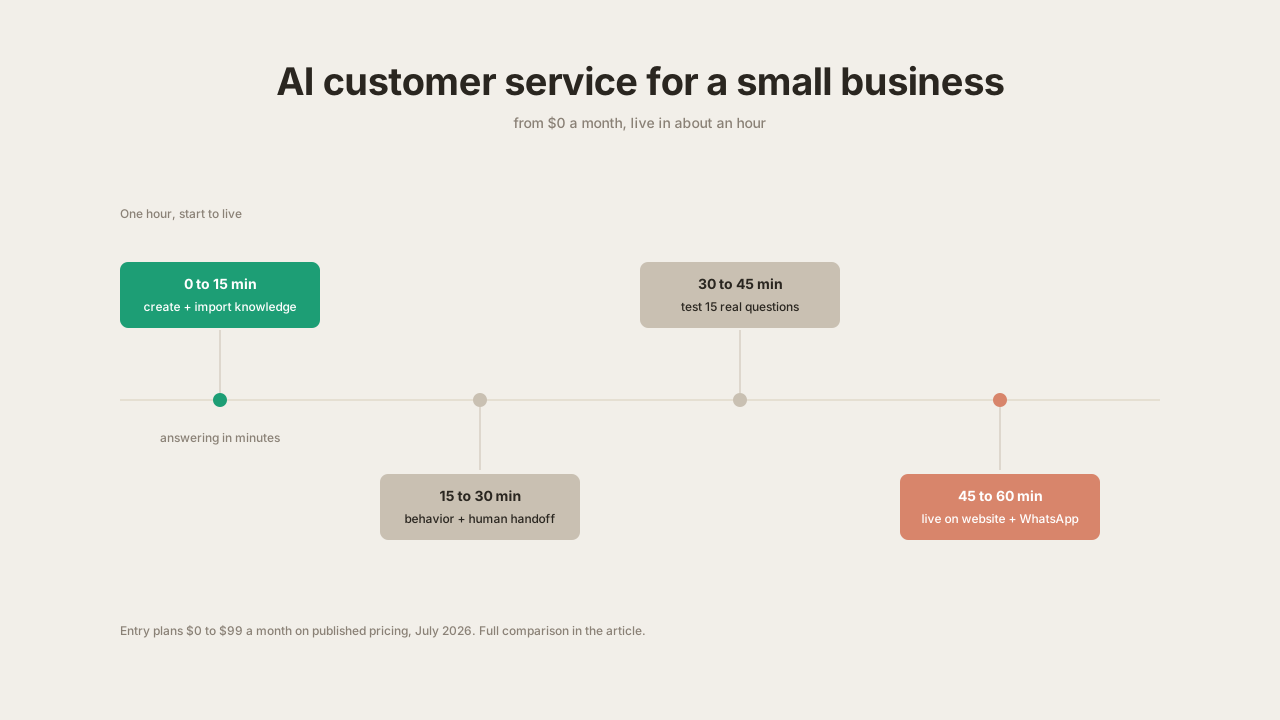
An AI customer service agent for a small business costs between $0 and $99 a month on current published pricing, and takes about an hour to set up if your answers already exist somewhere: on your website, in an FAQ, or in a folder of documents.
That is the whole answer in one sentence, and the rest of this guide is the detail behind it. It is written for the smallest support teams there are, the one-person shop where the owner is also the support department, and the five-person company where “support” means whoever saw the email first. The pricing is real and dated, the hour is counted honestly in 15-minute blocks, and the trade-offs are stated plainly.
Optional example checks
-
Compare replies per credit budget. Calculate the maximum whole AI replies for each supported model from a supplied credit budget. This does not check your balance or model eligibility.
-
Check plan requirements. Compare declared usage, content, team and feature needs with public Quickchat AI plan bundles. This is not a price quote or account check.
What an AI support agent does for a small business team
An AI customer service agent is software that answers customer questions automatically from your business’s own content and hands the conversation to a human when it should not answer alone. It runs on your website, on WhatsApp or Messenger, and after hours, which is when a large share of small-business questions arrive.
For a large company, an AI agent sits in front of a support team and deflects tickets. In a small business there is no team to deflect for: the agent handles the front line on its own, and the human it escalates to is you. That changes what matters in a product. Ticket routing, shared queues and agent seats matter very little. Three things matter a lot:
- Answer quality from your content. The agent should ingest your website or documents directly and answer from them, not from the model’s general knowledge.
- Handoff that reaches you where you are. An escalation is only useful if it lands in your email or on your phone, with the conversation attached.
- Every channel from one setup. You should not rebuild the agent to add WhatsApp later.
A longer treatment of the category is in our guide to AI for customer support. This post stays on the two small-business questions: price and effort.
What does an AI customer service agent cost for a small business?
The table below is entry-level pricing for tools a small business would realistically shortlist. Every figure was read off each vendor’s own public pricing page on 28 July 2026. Plan details change often, so check the vendor’s current pricing page before deciding.
| Tool | Free tier | Entry paid plan | What the entry plan includes | Pricing model |
|---|---|---|---|---|
| Quickchat AI | Yes, 50 AI credits/mo, all channels, unlimited AI Actions | $9/mo (Starter, 150 credits), then $29 and $99 tiers | Knowledge base, human handoff, website + WhatsApp + Messenger | Usage (AI credits), not seats |
| Tidio | Yes, 50 conversations, one-time AI allowance | $24.17/mo (Starter, 100 conversations) | Live chat focus; Lyro AI conversations billed separately, standalone from $32.50/mo | Conversations + separate AI quota |
| Chatbase | Yes, 50 credits, agent deleted after 14 days of inactivity | $32/mo (Hobby, 500 credits) | Website agent; branding removal costs $1,188/yr extra | Usage (message credits) |
| Intercom | Trial only | $29/seat/mo (Essential) plus Fin at $0.99 per resolution | Full helpdesk with AI layered on top | Seats plus per-resolution |
| Zendesk | Trial only | $55/agent/mo (Suite Team), automated resolutions roughly $1.50 to $2.00 each | Full helpdesk with AI agents included | Seats plus per-resolution |
Two structural patterns are worth noticing before comparing headline numbers.
Seat-plus-resolution pricing compounds. Intercom and Zendesk are helpdesks first. You pay for at least one seat whether or not you need a ticket console, and then pay again for each conversation the AI resolves. At 200 AI-resolved conversations a month, Intercom’s entry configuration is $29 for the seat plus $198 for Fin, so $227 a month. The same volume fits inside Quickchat AI’s $99 Essential plan with room left over, and inside the $29 Basic plan if conversations are short.
Usage pricing scales down as well as up. For a business doing 30 customer conversations a month, a $9 plan or a free tier is a correct amount to pay. Seat-based products have no way to charge you $9.
This table covers entry pricing only. For the full cost picture across the market, including what building your own would cost, see our AI chatbot pricing guide. For a feature-level comparison of the tools themselves, see the best AI agents for customer service comparison.
Is there a free AI customer service agent for a small business?
Yes, and for a small business the free tier is usually the correct place to start, because it is enough to answer the only question that matters: does this thing answer your customers’ actual questions correctly.
The free tiers in the table are not equivalent, though, and the differences decide whether you can really evaluate a tool or only glance at it.
- Quickchat AI: 50 AI credits a month, 50 knowledge base articles, unlimited AI Actions, and every channel except the API. The agent stays alive whether or not you use it, and nothing needs a card. That is enough to complete the full one-hour setup below and run a real test pass.
- Chatbase: 50 credits a month, but the agent is deleted after 14 days of inactivity, so an evaluation you pause for two weeks has to start over.
- Tidio: 50 conversations and a one-time AI allowance that does not refresh monthly, so the free tier functions as a trial rather than a plan you can sit on.
- Intercom and Zendesk: no free tier at all, only a time-limited trial, and both expect a paid seat before the AI does anything.
The practical difference is whether the free tier is a plan or a countdown. If you run a low-volume site, or a shop where a handful of people a week ask about delivery and returns, a genuine free plan can stay your permanent AI answering service rather than a step toward a paid one.
The honest limits are worth stating: free tiers carry the platform’s branding on the widget, cap the number of knowledge base articles, and meter replies, and your own testing spends the same allowance a customer would. Those are the constraints, not hidden ones. You can create a free agent and have it answering questions before deciding whether any of them matter to you.
The costs that are not on the pricing page
Four costs show up in practice that no pricing table states.
Your time to assemble the knowledge. The agent answers from what you give it. The one-hour setup below assumes those answers already exist on your website or in a document. If your FAQ lives in your head, writing it down is the real setup cost, and it is the one part that does not fit in the hour. Budget two to three hours if your website is thin, close to zero if it already answers most questions.
Testing consumes your allowance. On usage-metered plans, every reply the agent generates counts, including replies to you during testing. A thorough test run of 40 to 60 questions can use most of a free tier’s monthly allowance. This is normal; budget for it rather than being surprised by it.
Branding removal is a tier feature. Most platforms show their own branding on the widget at entry tiers. On Quickchat AI, hiding branding starts on the Professional plan; on Chatbase it is a $1,188-a-year add-on. If white-labeling matters to you on day one, check the tier before committing.
Channel math elsewhere. Some products price channels or AI quotas separately, as Tidio does with Lyro conversations. Check that the channel you actually need, usually WhatsApp for a small business, is in the plan you are pricing.
What to look for in AI customer service solutions for a small business
A shortlist for a small team reduces to six criteria.
Worth requiring: a free tier to test on real questions, usage-based pricing rather than seats, knowledge import from a URL so setup starts from your existing website, human handoff to email or phone rather than to an agent console you will not sit in, multi-channel deployment of the same agent, and no helpdesk dependency, meaning the product works standalone.
Safe to skip: ticket routing rules, shared inboxes with assignment workflows, SLA management, and per-agent analytics. These solve coordination problems between human agents. With zero to two humans in support, there is nothing to coordinate.
How to set one up in an hour
The plan below is four 15-minute blocks. It uses Quickchat AI on the free plan, and the same shape applies on any platform that imports knowledge from a URL. The click-by-click version with screenshots is in our 15-minute setup tutorial; this section is the plan around it.
Those two numbers are not in conflict. The agent starts answering within minutes of importing your content. The rest of the hour goes to checking what it says before customers do, which is the part most setup guides leave out.
Minutes 0 to 15: create the agent and give it your knowledge
Create an account, name the agent, and point it at your content. The fastest path is importing your website URL, which pulls your pages into the knowledge base automatically. If your answers live in PDFs or internal documents instead, upload those; the process is the same one described in creating a support agent from documentation.
Have ready: your website URL, any FAQ or policy documents, and a plain-text list of the fifteen questions customers ask most. The import itself takes minutes; reviewing what was imported and deleting stale pages is the part that deserves attention. An agent trained on an outdated shipping policy will confidently state the outdated policy.
If you would rather not click through a dashboard at all, this step can be done in conversation instead. The Quickchat AI app for ChatGPT and Quickchat AI connector for Claude let you create an agent, load its knowledge base and check its analytics by asking in plain language, on the free tier. The setup is covered in managing your AI agent from ChatGPT.
Minutes 15 to 30: set behavior and human handoff
Two settings do most of the work here. First, the agent’s instructions: what it is, what tone it uses, and what it must not do. Keep the first version short and factual, three or four sentences. Second, handoff: define when the AI should transfer to your team’s Inbox, who monitors it and whether email notifications are needed. Refund requests, complaints and anything involving a specific order are sensible starting triggers for a small business.
The goal of handoff configuration is that a customer who needs you reaches you with context attached, and a customer who asks about opening hours does not. Follow the step-by-step handoff setup and test to check both cases, send a human reply and verify what happens outside your working hours.
Minutes 30 to 45: test with your real questions
Take the list of your fifteen most common real questions and ask them, phrased the way customers phrase them, including the vague versions. Check three things per answer: is it correct, does it match your current policy, and does it stop instead of guessing when the answer is not in the knowledge base. Fix failures by editing the knowledge base, not by rephrasing your test question.
As noted above, testing spends AI credits from your allowance, and a first pass of fifteen questions is the intended use of a free plan. Fifteen questions is enough to catch the obvious failures, not enough to be thorough. The deeper test is reading real customer transcripts in week one, which costs nothing extra.
Minutes 45 to 60: go live on your channels
Install the widget on your website, which is a script tag, and connect WhatsApp if that is where your customers are; the WhatsApp connection steps are covered in how to create an AI bot for WhatsApp. Start with the channel where questions actually arrive. Adding a second channel later does not require rebuilding anything.
Then leave it running and read the first week of conversations. The transcript review is where you find the questions you forgot you get asked, and it costs nothing but attention.
When to upgrade past the free plan
The upgrade decision is volume math. 50 credits a month covers evaluation and a very low-traffic site. At roughly 100 to 500 customer conversations a month, the $9 and $29 tiers apply. A business having more than 1,000 conversations a month is usually resolving enough repetitive volume that the $99 tier costs less than the time it replaces, which you can sanity-check against your own numbers with the chatbot ROI calculator.
The honest version of the upgrade advice is to start free, watch a week of real conversations, and let the transcript volume make the decision. An overview of how Quickchat AI fits small teams specifically is on the small business page.