


When LLMs Learned to Call Functions
In the GPT-3 era, interacting with an LLM meant feeding it a prompt and getting text back. The model’s knowledge was large but static, frozen at whatever the training data contained. You could ask it to explain quantum computing or draft an email, and it would produce plausible text. But it could not check today’s weather, query a database, or take any action in the real world.
The feature that changed this gets surprisingly little credit. It gave the model a choice between generating text and calling a function. Instead of always producing the next token, the model could now output a structured JSON object specifying a function name and its arguments. The runtime would execute that function, feed the result back to the model, and the model would continue from there. The ReAct paper (Yao et al., 2022) formalized this as the Thought-Action-Observation loop. The model reasons about what to do, takes an action (calls a tool), observes the result, and repeats. Every serious AI agent in 2026 runs on some version of this pattern.
The Loop
Claude Code, OpenClaw, Codex, Devin, and dozens of other agentic systems all run the same way. Call a tool, observe the result, decide what to do next, repeat. Simon Willison put it well: “An LLM agent runs tools in a loop to achieve a goal.”
Claude Code, for example, uses a single-threaded master loop with no multi-agent swarm or complex orchestration graph: while(tool_call) -> execute -> feed results -> repeat.

Anthropic’s research on agent autonomy shows that turn durations in Claude Code nearly doubled over three months, from 25 to over 45 minutes. Users increasingly trust the loop to run on its own. The data shows that experienced users interrupt more often (shifting from per-action approval to strategic monitoring), while the agent itself asks for clarification more than twice as often as users interrupt it.
This loop pattern shows up everywhere, in coding agents, customer support bots, and robotics controllers alike.
What Counts as a Tool?
LLMs give us considerable freedom in deciding what level of abstraction a tool should operate at. At one extreme, you have highly specific API endpoints: “create a HubSpot contact with these 12 fields.” At the other, you have tools like “run this bash command” or “execute this Python code,” which are essentially “do whatever you want.”
Devin operates with three tools: shell, code editor, browser. Claude Code’s primary tool is also a shell. OpenClaw uses a dynamic skills plugin system. The trend in agentic coding tools has been toward fewer, more general tools rather than many specific ones.
Simon Willison observed that MCP “initially exploded but then felt less central” for coding agents because bash is the universal tool. Files and scripts are a lower-overhead primitive than full MCP server implementations. If the agent can write and execute code, it can do almost anything without needing a dedicated tool definition.
But general-purpose tools work for general-purpose agents. For domain-specific AI agents (customer support, sales, internal operations), you need domain-specific tools. Your support agent should not be writing Python to check an order status. It should call a well-defined API endpoint with clear parameters and predictable responses. The design of your tool set becomes a product decision.
| Approach | Example | Control | Flexibility | Use Case |
|---|---|---|---|---|
| General-purpose tool | Bash, Python interpreter | Minimal | Maximum | Coding agents, personal assistants |
| Protocol bundle (MCP) | Shopify MCP, GitHub MCP | Medium | Medium | Rapid integration, prototyping |
| Single API endpoint | ”Create HubSpot contact” | Maximum | Minimal | Production customer-facing agents |
What an API Endpoint Means Now
For AI agents, an API endpoint functions as a capability declaration. Publishing one says that you (or your AI agent) can now do something that wasn’t possible before.
This works in both directions. A software vendor publishes an API so others can integrate with their product. But an AI agent can also discover endpoints on its own by searching documentation, reading OpenAPI specs, or literally googling for how to accomplish a task.
An MCP server is a curated bundle of API endpoints with a preconceived notion of how they should be used. The MCP creator already made decisions about which endpoints to expose, how to name them, what parameters to surface, and implicitly what workflows to support. That curation is both the strength (convenience, standardization) and the weakness (rigidity, opinionated scoping). Notion’s server is a concrete example: it publishes 28 tools, and a help-center agent needs four of them, split across two connections.
MCPs trade control for ease of use. In 2026, AI writes most of the integration code. If an agent can read API documentation and write the integration itself, the “ease of use” argument for MCP gets weaker. The MCP layer may matter most during the transition period, while tooling hasn’t caught up to the model’s capability. Anthropic’s guide on tool use design patterns is a practical reference for structuring tool schemas regardless of whether you use MCP or individual endpoints.
A related development: llms.txt is a proposed standard where websites publish a /llms.txt file to guide AI models toward high-value resources. Anthropic, Cloudflare, Docker, and Stripe have adopted it. MCP standardizes tool invocation; llms.txt standardizes documentation discovery. Both try to make the web more legible to machines, from different angles.
What is an API endpoint in the context of AI agents?
An API endpoint is a specific URL that accepts structured input and returns structured output. For AI agents, each endpoint represents a discrete capability, something the agent can do in the real world. The endpoint’s description, parameter definitions, and error responses serve as the agent’s instruction manual. The better documented the endpoint, the more reliably an agent can use it.
Unlike human developers who can read tutorials and debug iteratively, an agent relies on the endpoint’s schema and description to make a single correct call. This is why API documentation designed for AI consumption matters more than ever. Only 24% of developers currently design APIs with AI agents in mind, despite 89% using AI in their workflow.
What is MCP (Model Context Protocol)?
MCP is an open protocol introduced by Anthropic that standardizes how AI agents connect to external tools and data sources. Think of it as USB-C for AI. A single connector that any tool provider can implement and any AI agent can consume. An MCP server exposes a set of tools (essentially API endpoints) with standardized schemas, and an MCP client (the agent) can discover and call them without custom integration code. For a deeper technical explanation, see our MCP Explained post. For a practical account of MCP in production, see our analysis of real-world challenges building on Shopify’s MCP.
The Spectrum of Control in Quickchat AI
Quickchat AI gives you three ways to equip an AI Agent with external tools. They sit on a spectrum from most automated to most controlled. Each approach makes a different tradeoff between speed of setup and precision of behavior.
Remote MCP: Plug In and Go
Remote MCP is the fastest way to connect an AI Agent to external functionality. You provide an MCP server URL, Quickchat AI connects to it, discovers all available tools, and lets you select which ones your agent should use.
How to set it up:
- Go to AI Actions in the Quickchat AI dashboard
- Click “Add Remote MCP”
- Paste your MCP server URL (e.g.,
https://mcp.example.com/sse) - Optionally add an authentication token or custom headers (the two are mutually exclusive)
- Click “Connect.” Quickchat AI discovers all available tools and displays their names
- Toggle individual tools on or off to control which ones your agent can use
- Set the “default tool is active” flag to control whether newly discovered tools are automatically enabled or disabled
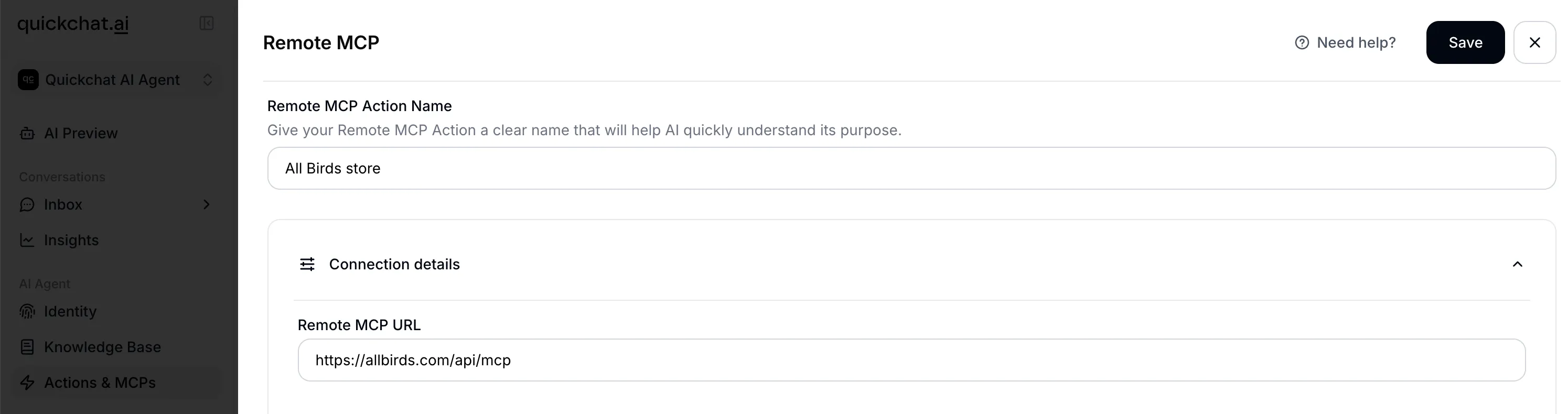
What happens under the hood:
When you click Connect, Quickchat AI auto-detects the transport protocol from the URL. If the URL contains sse, SSE transport is used; otherwise streamable_http is the default. When you provide an auth token, it is sent as a Bearer token in the Authorization header.
Tool filtering works through a three-tier system. Each tool from the MCP server is checked against two sets: explicitly enabled tools are always included, explicitly disabled tools are always excluded, and any tool not in either set falls back to the “default tool is active” setting you chose. This means that when an MCP server adds new tools, you control whether they are automatically available to your agent or require explicit activation.
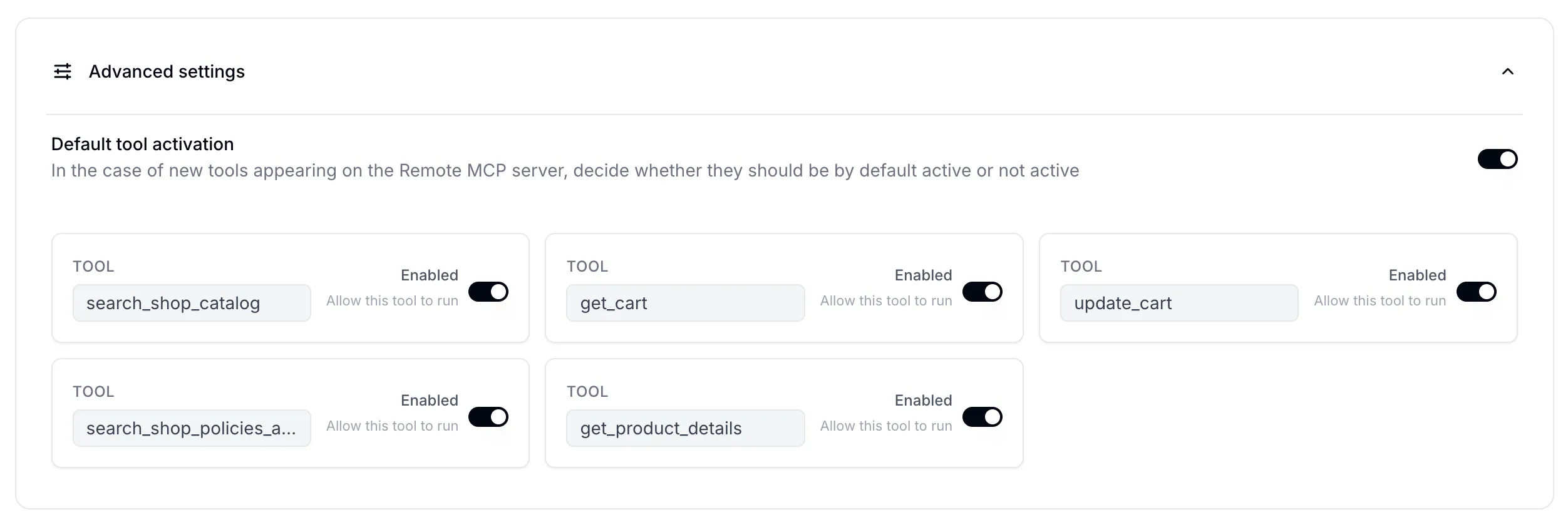
At runtime, when a conversation starts, all active Remote MCP connections for the agent are loaded. Tools are fetched and filtered per each connection’s configuration, and tool name uniqueness is verified across all sources (with a warning if duplicates are found).
The tradeoff: you get immediate access to everything the MCP exposes, but you have limited control over tool descriptions, parameter definitions, or how the agent decides to use them. As we found when building an AI Agent on Shopify’s MCP, going from demo to production requires careful tuning that MCP’s bundled approach can make difficult.
See also: connect your agent to a remote MCP server, How to Launch Your Quickchat AI MCP, MCP security considerations, Quickchat AI docs: MCP channel.
AI Actions (HTTP Request): One Endpoint, Full Control
An AI Action in Quickchat AI is a single HTTP API endpoint that you configure individually for your AI Agent. Where MCP imports a bundle of tools at once, each AI Action gives you full control over one specific capability. For a complete worked example, four actions that create and enrich contacts, log deals, and open tickets in a CRM, see the HubSpot AI Actions tutorial.
Configuring an AI Action:
- Name (max 64 characters): this becomes the tool name the LLM sees. It is normalized to a valid identifier (e.g., “Check Order Status” becomes
Check_Order_Status) - Description (max 1,000 characters): this is the most important field. The description tells the LLM when to use this tool. Good descriptions specify under what conversational circumstances to call it, what information to gather from the user first, and how results should be communicated back
- HTTP method: GET, POST, PATCH, DELETE, or PUT
- URL (max 10,000 characters): can contain
{{parameter_name}}placeholders for dynamic values - Headers: key-value pairs for authentication and content type
- Body items / Body JSON: request body with parameter injection
- Query parameters: URL query string values
- Parameters (max 10): each with a name, description (max 500 characters), type (
str,int,float,bool, orcustom), a required flag and an optional default value
The {{parameter_name}} placeholders are the key mechanism. When the LLM calls the tool, it provides values for each parameter based on the conversation context. Quickchat AI then injects those values into the URL, headers, body, and query string templates before making the HTTP request. There are also four built-in variables that can be injected this way: scenario_id, conversation_id, conversation_channel, and conversation_url.
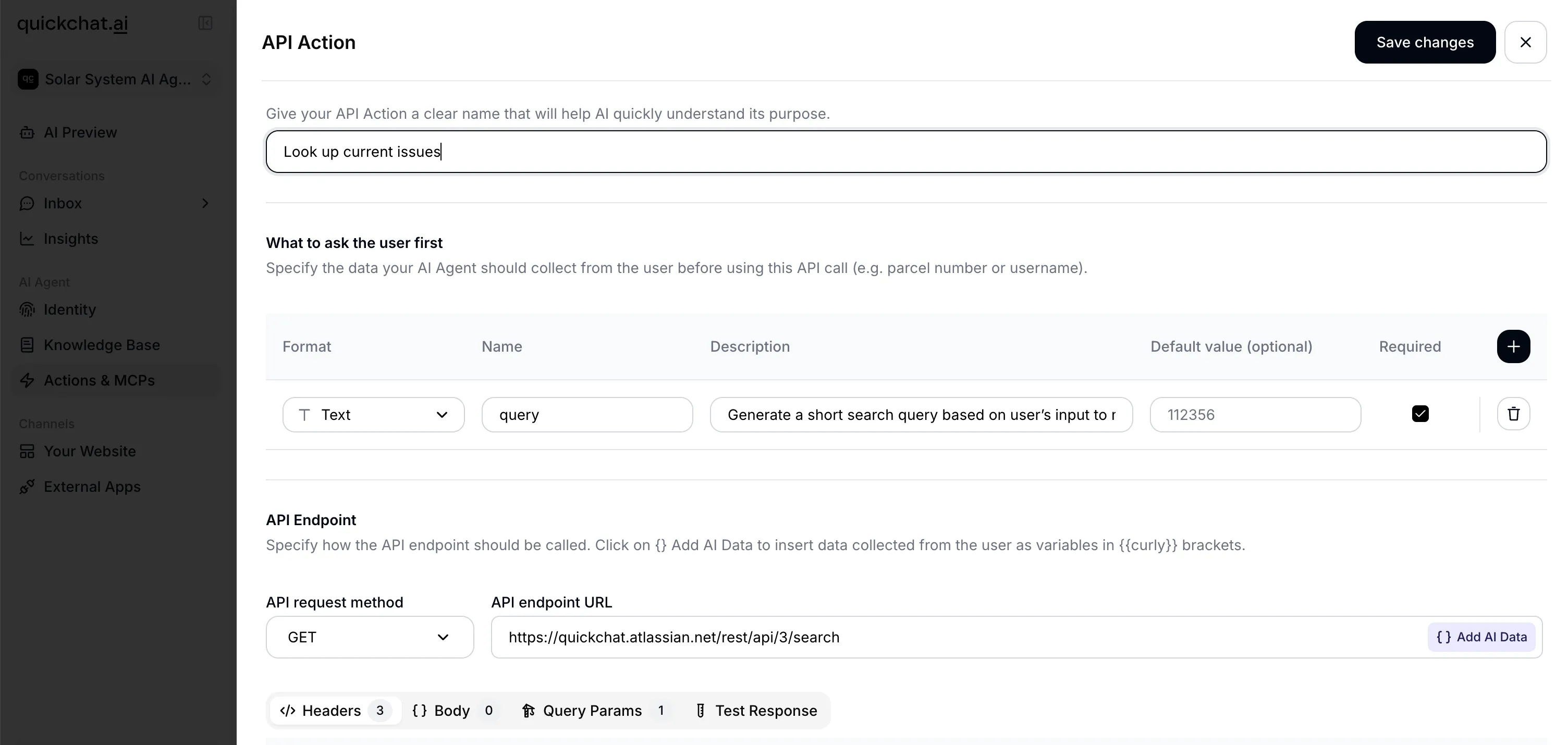 An AI Action configured to check order status, showing URL template with parameter placeholder, headers, and parameter definitions.
Under the hood: Quickchat AI dynamically builds a typed schema from your parameter definitions for each AI Action. The five supported types (str, int, float, bool, custom) are mapped to their native equivalents, and this schema is used to validate the LLM’s inputs before making the HTTP request.
An example AI Action for checking order status:
{
  "name": "check_order_status",
  "description": "When the user asks about their order status and has provided an order number, call this endpoint to retrieve the current status. Report the status, estimated delivery date, and tracking number (if available) back to the user.",
  "method": "GET",
  "url": "https://api.example.com/orders/{{order_id}}",
  "headers": [
    { "name": "Authorization", "value": "Bearer YOUR_API_KEY" },
    { "name": "Content-Type", "value": "application/json" }
  ],
  "parameters": [
    {
      "name": "order_id",
      "description": "The order ID provided by the user (e.g., ORD-12345)",
      "type": "str",
      "is_required": true
    }
  ]
}
Testing: The dashboard has a “Test” button that lets you provide sample parameter values and see the actual HTTP request (including a generated curl command) and response before deploying.
Tips for writing effective AI Action descriptions:
- Be specific about when the agent should call it: “When the user asks about their order status and provides an order number, call this endpoint”
- Mention what information to collect first: “Before calling, ensure you have the user’s email address and order ID”
- Describe how to handle the response: “If the status is ‘shipped’, tell the user the tracking number from the response”
- For multi-step workflows, describe the sequence in the agent’s main system prompt rather than in individual action descriptions, and to carry a value between actions and gate the write on it, use Save to memory plus a run-condition
A worked example: for a step-by-step AI Action that logs leads, unanswered questions, and demo requests straight into a spreadsheet, see how to connect an AI agent to Google Sheets.
Generate from Text: Let AI Figure It Out
The third option is for users who know what they want their agent to do but don’t know which API endpoint (or even which service) to use.
How it works:
- You type a natural language description of what you want, e.g., “I want my AI Agent to be able to start a user’s Tesla when they ask”
- Quickchat AI sends this to an LLM with the
web_searchtool enabled - The model researches the web to find the right API, reads official documentation, and generates a complete AI Action specification including URL, method, headers, parameters, and authentication requirements
- The result comes back with the full action configuration, citations to the documentation it used, and an explainer message noting assumptions and gaps
- You review, fill in your credentials, and activate
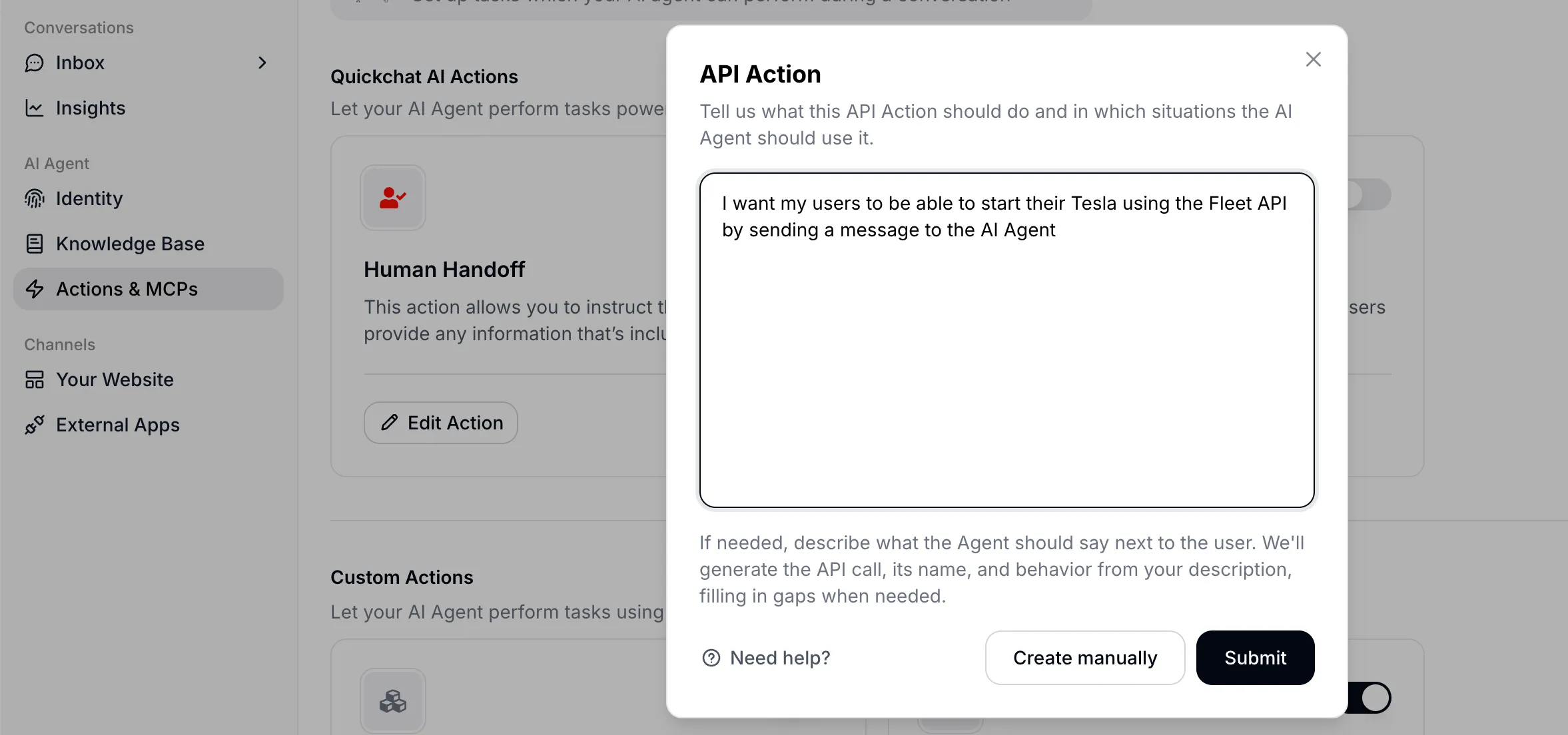 Entering a natural language description of the desired capability.
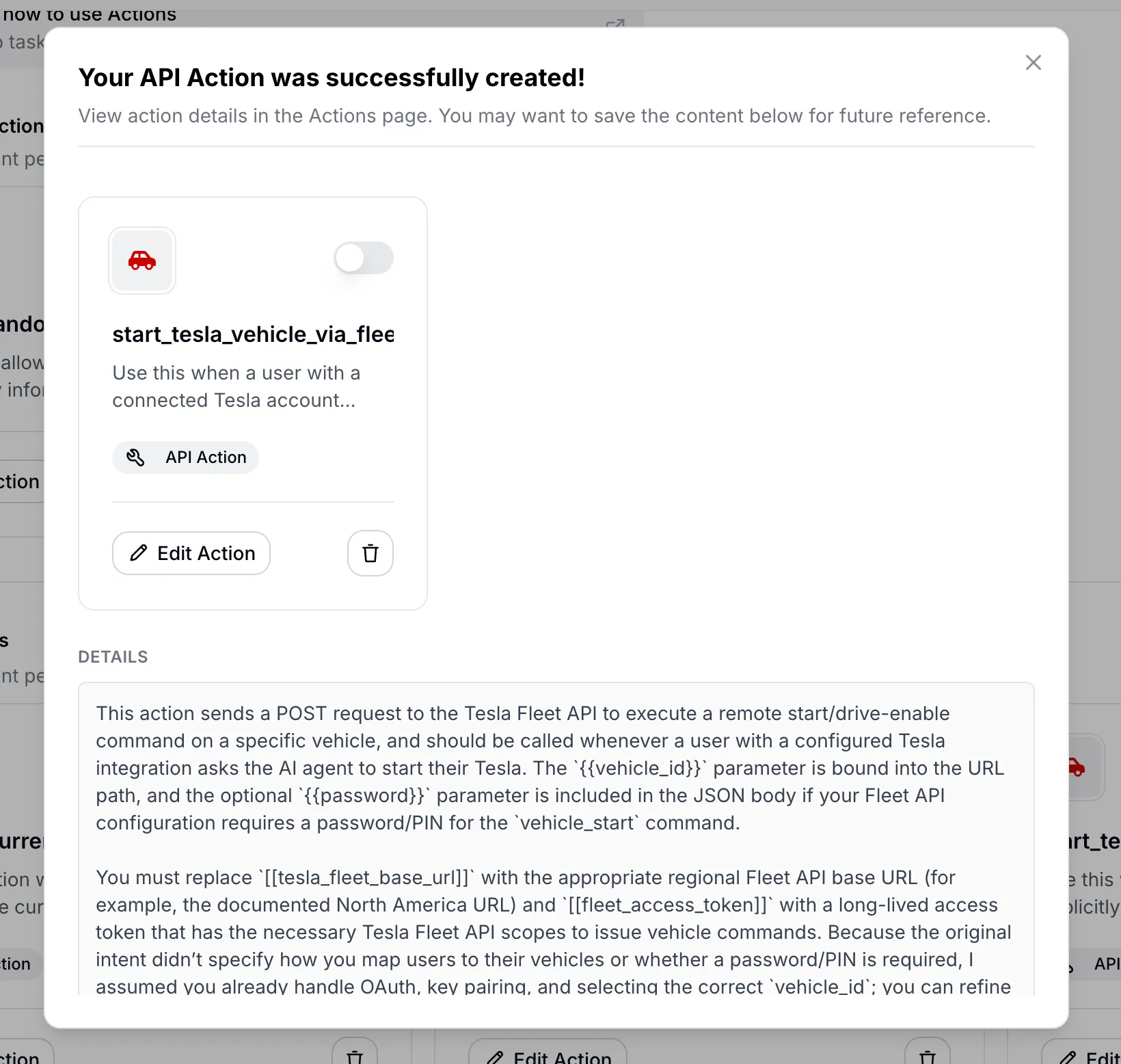 The generated AI Action configuration with citations to the API documentation used.
Automated AI Action generation is structured around three priorities:
- Priority 1: Understand intent. Identify the exact capability the developer wants and the specific API endpoint that provides it
- Priority 2: Ground in documentation. Use web search to find official vendor documentation, not guesses
- Priority 3: Design conversation-first semantics. The generated name and description should be about when in a conversation this tool gets used, not just what the API does technically
The prompt uses two placeholder conventions. {{param}} marks runtime parameters that the LLM fills from conversation context. [[secret_name]] (double square brackets) marks developer constants like API keys and account IDs that must be configured manually before activation. Every parameter name must appear as a {{that_exact_name}} placeholder somewhere in the request definition, and no orphan placeholders are allowed.
The system uses a fail-closed policy. If the model cannot confirm a critical piece of information from the documentation (the HTTP method, URL, authentication scheme, or required payload structure), no action is created. Instead, the system returns a concise explanation of what’s missing rather than guessing.
This is where the philosophical point about AI agents discovering APIs connects to a concrete product feature. The Generate from Text feature is literally an AI agent (an LLM with web search) building a tool definition for another AI agent (the Quickchat AI agent that will use it in conversations).
A worked example: for the full tutorial that turns two typed sentences into two live, tested actions (a keyless weather lookup and a keyed NASA one, including the fail-closed refusal), see how to connect your AI agent to any API in plain English.
At runtime, all of these tool types are assembled together. Quickchat AI collects HTTP request AI Action tools, Shopify MCP tools, knowledge base tools, remote MCP tools, Discord tools, and other custom tools into a collection to be presented to the LLM. The model sees no distinction between them. A Remote MCP tool and a manually configured AI Action look identical once they’re in the tool list.
Open APIs as the New SEO
If AI agents are going to be discovering and using APIs autonomously, then having a well-documented, easy-to-use API becomes a distribution asset. Gartner predicts that over 30% of API demand increase will come from AI agents by 2026.
Companies that have open APIs with minimal credential barriers may find that their APIs become their best acquisition channel. Instead of Google search impressions, the “impressions” are AI agents choosing to use your service over a competitor’s.
The same logic applies one level up. An AI agent that answers from your documentation can itself be exposed as an MCP server that ChatGPT, Claude and Cursor call as a tool, which makes your knowledge, not just your API, discoverable by the agentic web.
The quality of your API documentation determines whether an AI agent can successfully integrate with you in a single attempt. Parameter descriptions, error messages, and example responses serve the same function as meta descriptions and structured data in traditional SEO. A confusing error response or an undocumented required field means an agent will fail, and there is no human on the other side to debug it.
Companies whose APIs are undocumented or gated behind heavy credential requirements may find themselves invisible to the agentic web, the same way companies without websites became invisible to Google in the 2000s.
Computer Use vs. APIs
There is significant investment in teaching AI models “computer use” (clicking buttons, filling forms, navigating UIs). Anthropic, OpenAI (Operator), and open-source projects like Browser Use all offer versions of this.
But browser use is a workaround for a missing API. A POST /orders call takes milliseconds and returns structured data. A browser agent navigating a checkout flow takes minutes and can break when a button moves three pixels to the left. APIs are faster, more deterministic, and cheaper to execute.

The counterargument is real: APIs don’t exist for everything. Legacy systems, enterprise software with no API surface, physical devices controlled through GUIs. Computer use fills a genuine gap in those cases.
The better long-term response to “we don’t have an API for this” is probably to build the API rather than teach AI to use the GUI. As more software gets written by AI agents for AI agents, the cost of building and maintaining APIs drops. The economic calculus that made it cheaper to scrape a UI than to build an API is shifting.
There is also a security angle. Simon Willison’s “lethal trifecta” describes the dangerous combination of private data access + untrusted content exposure + external communication. This applies to both approaches, but API-based tools are easier to audit and constrain. You can log every API call, validate every parameter, and rate-limit every endpoint. Doing the equivalent for a browser agent that can click on anything is much harder.
Tools for the Physical World
Everything discussed so far is about software. The same pattern shows up in the physical world.
Google DeepMind’s RT-2 and Gemini Robotics use the same architecture, except the tools dispatch to actuators instead of APIs. The SPCA (Sense-Plan-Code-Act) framework formalizes this for robotics: scan the environment, plan the approach, generate executable code, execute it, observe the results.
There is no API for “move the plant on my desk to the right.” But a robot with a camera could define move_object(object_id="plant_01", direction="right", distance_cm=15) as a tool on the fly and then call it. The tool definition serves as the interface between the reasoning layer and the physical execution layer, the same role API endpoints play in software.
The LLM + tools + loop architecture is general-purpose. It happens to be easiest to implement in software today, but robotics is catching up.

APIs Written by AI, for AI
In roughly two years (2024 to 2026), we have gone from most code being written by humans to most code being written by AI. This is a good moment to reconsider what an API endpoint is. Increasingly, an endpoint is a capability declaration designed to be discovered and executed by machines, not a technical interface for human developers to read docs about and then manually integrate.
MCPs are a useful standardization layer, but they are also a curation layer that introduces bias. The MCP creator decides what tools to expose and how to frame them. For production AI agents, that framing may not match what you actually need. (We wrote about this in detail when analyzing the challenges with Shopify’s MCP.)
The spectrum we walked through in Quickchat AI Agents reflects a broader point. The right level of control depends on your use case. Remote MCP works well for rapid prototyping. Individual AI Actions give you fine-grained control for production customer-facing agents. Generate from Text lets AI research the API and build the tool definition for you when you’re still exploring.
And at every level the underlying pattern is the same. An LLM, a set of tools, a loop. Whether the tools are bash commands, API endpoints, MCP servers, or robot actuators, it is tools all the way down.