

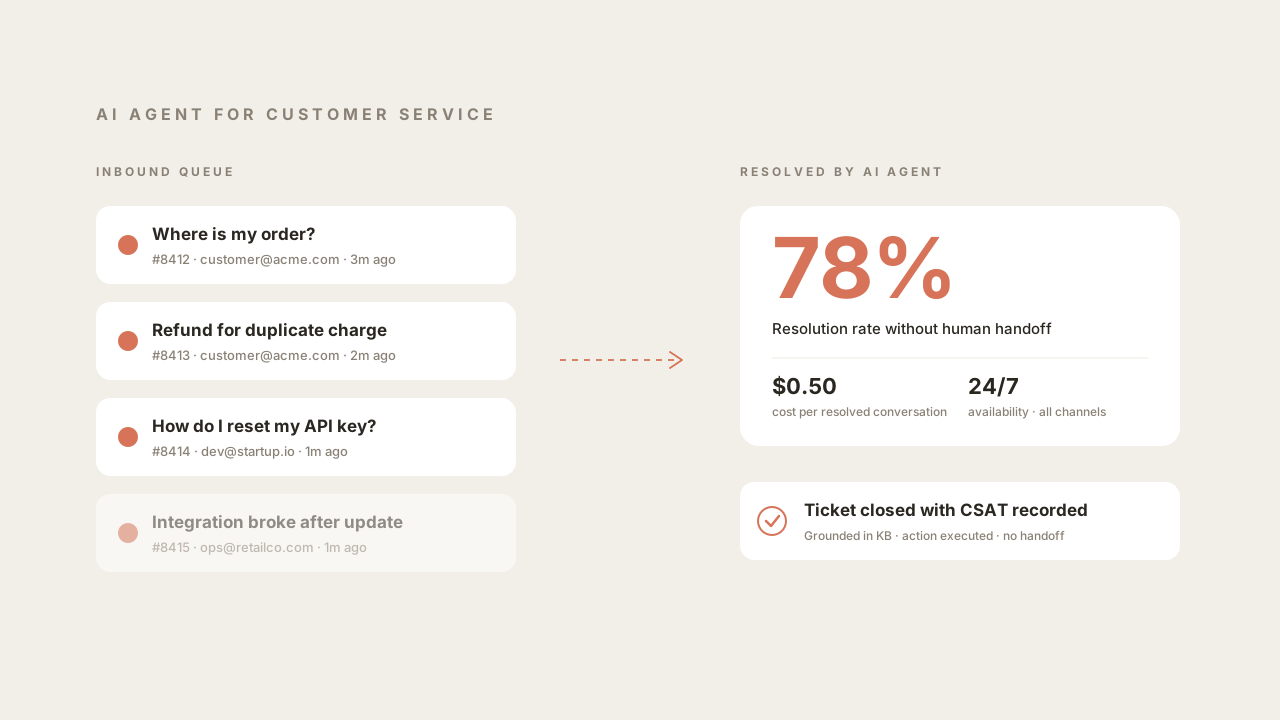
Customer service is the most mature deployment surface for AI agents in 2026. It has a clear input (a ticket or chat message), a clear output (a resolution), well-understood metrics (first response time, resolution rate, CSAT), and volume that scales with customers rather than revenue. Every support leader has felt the pressure to do more with the same headcount. AI agents are how that is being done this year, and the tooling has matured enough that a Head of Support running a 20-person team can make a realistic decision about vendor, budget, and deployment model in an afternoon rather than over a quarter.
This guide is written for support leaders, implementation engineers, and anyone responsible for evaluating an AI agent for customer service. It covers what the category actually is in 2026, which jobs these systems do well, how deployment works in practice, how to think about budget across per-resolution and per-seat pricing models, an 8-question checklist for vendor selection, and where AI agents should not replace humans.
What is an AI agent for customer service?
An AI agent for customer service is a system built around a large language model that reads a support request, retrieves relevant context from your knowledge base and backend systems, calls tools to perform actions (look up orders, issue refunds, update CRM records), and composes a direct reply to the customer, escalating to a human only when it cannot resolve the request on its own. In 2026, the category covers both customer-facing chat agents and internal agents that draft responses for human support staff.
There is a real difference between a chatbot and an AI agent, and the distinction matters for customer service specifically because chatbots resolved a narrow slice of support volume while AI agents resolve a much wider one. For a full architectural breakdown, see AI Agent vs Chatbot. The short version: a chatbot follows scripted flows built from intents and slots. An AI agent uses a language model inside a reasoning loop, with access to your knowledge base, your CRM, your order system, and any other tool you expose to it.
For customer service, the practical implication is this. A chatbot could answer “what are your shipping times?” because that mapped to a scripted intent. An AI agent can answer “my order number is 8412, it was supposed to arrive yesterday, what happened?” because it can look up the order, check the carrier status, read the customer’s account history, and compose a specific answer. The first is a single-turn retrieval. The second is a multi-step workflow that previously required a human.
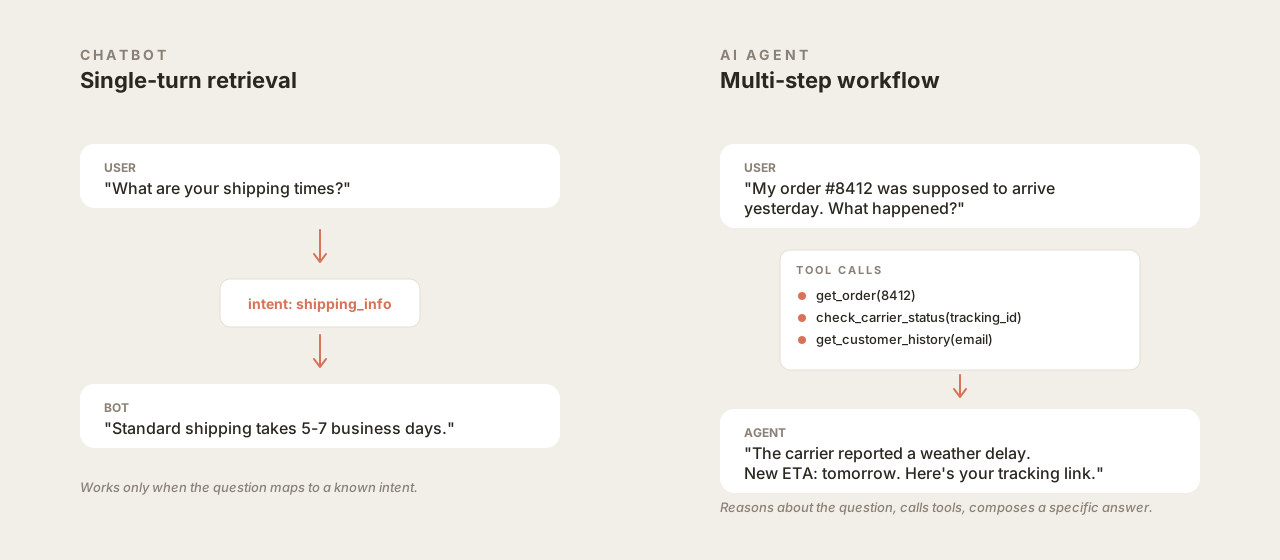 Chatbots resolve intents. AI agents reason, call tools, and compose specific answers.
The most common way this plays out in production: roughly 70-85% of inbound support volume is made up of questions the AI agent can resolve end-to-end once it has been trained on the knowledge base and given access to the right actions. The remaining volume is routed to humans, usually with the full conversation context and a recommended next step already in the handoff. Numbers vary by vertical (SaaS tends higher than ecommerce, ecommerce higher than financial services), but the pattern is consistent.
The jobs to be done
Support teams sometimes approach AI agents with a binary framing: either the agent handles the whole ticket or it does not. That framing leaves value on the table. There are five distinct jobs an AI agent does in a modern support org, and most deployments use several of them at once.
Deflection. The agent answers the customer’s question in-channel and closes the ticket. This is the largest and most visible category. Examples: “Where is my order?”, “How do I reset my password?”, “Do you ship to Canada?”, “What’s your return policy?”. Deflection works when the answer exists somewhere retrievable (knowledge base, order system, account page) and the customer is willing to accept a machine-authored answer for that specific question. For most consumer-facing verticals, both conditions hold for the majority of inbound tickets.
Triage. The agent categorizes the ticket, enriches it with context, and routes it to the right human queue. This is a less glamorous job than deflection but it is where a lot of the operational improvement comes from. A triaged ticket that reaches a human with the customer’s account history, the relevant KB articles, the suspected root cause, and a draft response cuts handle time in half compared to a cold ticket. Triage is also where most of the CRM integration work earns its keep: the agent pulls data from the CRM, writes a summary back, and updates tags and priority fields before a human ever sees the ticket.
Handoff. Somewhere between pure deflection and pure triage sits the case where the agent tries to resolve, recognizes it cannot, and hands off to a human mid-conversation. The quality of this handoff matters more than most teams initially realize. A bad handoff feels like the customer is starting over and is a common source of CSAT drops even when the final human response is good. A good handoff transfers the full conversation, flags what the agent already tried, and tells the human what the customer is waiting on. Quickchat AI customers configure this in the Inbox, where conversations tagged for handoff land in a dedicated queue with the AI’s own notes visible to the agent picking it up.
Proactive outreach. The agent initiates a conversation based on a signal from another system. Order delayed by the carrier? Send the customer a proactive message with the updated ETA and a link to track it. Payment failed? Reach out with a link to update the card. Subscription about to churn? Offer a support touchpoint before the cancellation button gets clicked. Proactive outreach is the highest-leverage use of an AI agent because it catches problems before they become tickets. It requires more engineering work to set up (your event pipeline needs to fire the webhook that kicks off the outreach) but it reduces total ticket volume more than deflection.
Post-resolution work. The agent handles the follow-up after a conversation closes: sending the CSAT survey, tagging the conversation, updating the CRM, notifying the right person on the engineering team if it looks like a bug. This is low-visibility but high-volume work that used to consume agent time at the end of every shift. Modern support platforms let you chain these post-resolution actions so they fire automatically.
If a vendor only pitches deflection, they are selling you an LLM chatbot, not an AI agent. A real AI agent for customer service does all five jobs, and the resolution rate you will actually see in production depends on how well the vendor supports the other four.
Deployment model in practice
A production AI agent for customer service has three main components that need to be set up before it goes live: knowledge, actions, and handoff.
Knowledge ingestion
The agent needs something to answer from. In 2026, the typical sources are:
- Help center articles. Usually scraped or exported from Zendesk Guide, Intercom Articles, Help Scout Docs, or a custom CMS. The agent treats these as its primary source of truth for policy questions and how-to guidance.
- Internal documentation. Notion, Confluence, or a Google Drive folder with internal macros, escalation playbooks, and the content that support agents actually reference. This is often richer than the public help center and is where the agent finds nuance.
- Past ticket resolutions. Exported from the helpdesk. Valuable because it captures the way real questions get phrased and the answers that actually worked. Some vendors will train a retrieval layer on this; others will use it as a reference.
- Structured data. Order databases, account status, subscription information. Not ingested as documents but accessed through actions at runtime.
Most vendors let you connect some combination of these as sources. The quality of the ingestion matters: chunking strategy, embedding model, reranking, and how the retrieved context is fed into the prompt all affect whether the agent gives accurate, on-policy answers or makes things up. Teams evaluating vendors should test their own edge-case questions, not the demo questions.
Actions
An AI agent without actions is a search-over-docs tool. With actions, it becomes something operationally useful. Typical customer service actions include:
- Look up order status by order number or email
- Verify account status by querying the product database or an internal API (e.g. a customer reports “feature X is not working on my account” and the agent checks subscription tier, feature flags, and recent errors before replying)
- Call internal services over REST, GraphQL, or MCP to pull live context (user permissions, usage metrics, entitlements)
- Issue a refund up to a configured limit
- Reschedule a shipment
- Update a customer’s shipping address
- Reset a password or re-send a verification email
- Create a ticket in the helpdesk with specific tags and priority
- Write a note to the CRM record
- Escalate to a human and tag the conversation
Actions are what distinguish an AI agent from a fancy search box. They are also the riskiest part of the deployment because an action has real-world consequences. A hallucinated answer is embarrassing; an incorrectly issued refund is a financial loss. The right way to set this up is with hard guardrails: refund actions with hard dollar limits, address updates that require a confirmation step, any write action that is reversible-only. Most vendors expose action definitions as OpenAPI specs or through prebuilt connectors. For a deeper technical treatment of how actions are defined and called, see APIs for AI Agents: From MCP to Custom Endpoints. To keep a write action from firing at the wrong moment, gate it on a server-side condition the chat cannot bypass.
Handoff UX
The third piece is the human-in-the-loop experience. The AI agent should escalate when it is uncertain, when the customer explicitly asks for a human, when a policy says it must (refund over a threshold, dispute over a legal matter), or when the conversation has looped. Configuring when escalation happens is less interesting than configuring what it looks like on the agent side.
Good handoff UX has three properties. First, the human sees the full conversation history, including the AI’s internal reasoning and the tools it called. Second, the human can take over in the same interface the customer is already using, without asking them to switch channels. Third, the human can hand the conversation back to the AI once the complex part is resolved, so the AI can handle the wrap-up (confirmation email, CSAT survey, ticket tagging).
Teams sometimes under-invest in handoff UX because it is not visible in a demo. In production it is one of the biggest determinants of agent satisfaction, which is one of the biggest determinants of whether the AI agent project survives past its first quarter.
AI agent for customer service pricing in 2026
Pricing for AI agents in customer service and customer support has settled into three models in 2026, and the one you choose has second-order effects on how your team operates. Quickchat AI prices per resolution at $0.50. Fin publishes $0.99 per resolution. Salesforce Agentforce launched at $2.00 per conversation. Zendesk and Intercom layer AI add-on fees on top of per-seat helpdesk plans. The sticker number is less important than the model: what counts as a billable event, and whether the vendor’s revenue grows when your AI gets better or when your ticket volume grows.
Per-resolution pricing. You pay a fixed amount for each conversation the AI resolves without human involvement. Quickchat AI prices this at $0.50 per resolution at volume. Other vendors range from $0.99 to $1.50. The appeal is alignment: you only pay for value delivered. The risk is that “resolution” is defined differently across vendors. Some count any closed conversation; some require a positive CSAT response; some use a proprietary classifier. Read the contract carefully.
Per-seat pricing. You pay a flat monthly fee per human agent using the platform, and AI resolutions are either free or capped. This is how most legacy helpdesks have started pricing their AI add-ons. It is simpler to budget but it does not scale with value: if your AI resolves twice as many tickets this quarter, you pay the same. Most teams find that per-seat pricing is competitive with per-resolution only when resolution volume per seat is low.
Per-ticket or per-message pricing. You pay a fee per inbound ticket or message, whether resolved or not. This is unusual in 2026 but still appears in enterprise contracts. It disincentivizes proactive outreach (which creates outbound messages) and usually costs more over the life of a deployment.
Here is a worked example. A 15-person support team handling 12,000 tickets per month. Historical resolution rate for the AI agent in this vertical is 75%, so 9,000 tickets resolved by AI and 3,000 handled by humans.
- Per-resolution at $0.50: 9,000 resolutions × $0.50 = $4,500/mo. No seat costs for the AI itself. Human agents still need whatever helpdesk you use, but the AI cost is tied purely to outcomes.
- Per-seat at $80/mo: 15 seats × $80 = $1,200/mo in AI add-on fees. Looks cheaper until you notice that your team spends 3× as long resolving the 3,000 human-handled tickets because the AI agent is on a tier with no advanced triage or CRM write actions, both of which are usually limited on cheaper seat plans.
- Per-ticket flat fee: the vendor bills for every inbound ticket whether the agent resolves it or not. The nominal per-ticket price often looks attractive next to per-resolution, but the vendor’s incentive to keep improving resolution rate disappears because it does not affect your bill. Verify that renewal pricing is tied to outcomes rather than volume.
The per-resolution model works best when the vendor has a strong incentive to keep your resolution rate high, and the pricing naturally aligns over time as your ticket mix evolves. Most Quickchat AI deployments settle into per-resolution after a brief trial. For a more detailed cost breakdown across vendor types and team sizes, see How to Reduce Customer Support Cost with AI.
Vendor selection checklist
Heads of Support evaluating AI agents in 2026 should walk through these 8 questions with any vendor before signing. The answers separate real AI agents from repackaged LLM chatbots.
1. How is resolution rate measured and reported? Ask for a written definition. Does a resolution require a positive CSAT? Does a user who ghosts the conversation count as resolved? Is the rate measured against total inbound volume or against only the volume the agent attempted? A vendor that cannot give you a clear answer is pricing on a metric they control.
2. What tools does the agent have access to, and who writes the tool definitions? The agent is only as useful as the actions you expose to it. Ask whether actions are prebuilt for your helpdesk and CRM, whether you can add custom actions through OpenAPI, and whether your team writes those definitions or the vendor does. See the APIs for AI Agents post for what a good action definition looks like.
3. How does the agent handle uncertainty? When the agent does not know the answer, does it guess, escalate, or say it does not know? A production-ready agent has explicit uncertainty handling. A prototype agent hallucinates. Ask to see logs of real conversations where the agent escalated.
4. What does the handoff experience look like? Sit with one of your agents during a demo and walk through a handoff. Look at whether the human sees the full AI context, whether they can take over in the same channel the customer is using, and whether they can hand back to the AI once the hard part is done.
5. How is the knowledge base kept in sync? Support content changes constantly. Ask whether the vendor re-ingests your KB on a schedule, triggers on edits, or requires manual republish. A stale KB produces confidently wrong answers and erodes trust faster than any other failure mode.
6. What analytics does the platform surface? You need to know which questions the agent answered correctly, which it escalated, which it failed on, and which it got a low CSAT on. Ask for a demo of the analytics view. If it only shows aggregate numbers with no drill-down to individual conversations, the vendor cannot help you improve the agent over time. For what good analytics look like, see Chatbot Analytics: Metrics, Dashboards, and What Actually Matters.
7. What guardrails are in place for actions with real-world consequences? Ask whether refund amounts are capped, whether write actions to the CRM require confirmation, and whether there is an audit log of every action the agent took. A vendor without hard guardrails is asking you to trust the language model never to make a mistake.
8. What is the deployment timeline and who owns which parts? A realistic deployment for a mid-sized support team is 2 to 4 weeks from contract signing to production traffic, including knowledge ingestion, action configuration, human agent training, and a shadow-mode period. A vendor promising production launch in 48 hours is selling you something thin; a vendor quoting 6 months is selling you something over-scoped.
For organizations with procurement processes that demand detailed vendor comparisons, the Quickchat AI Enterprise page has the SOC 2, SSO, data residency, and SLA details that typically come up in these conversations. Pricing specifics are on the pricing page.
Where AI agents should not replace humans
Most of this post has been about what AI agents can do. A short section on where they should not.
Emotionally complex conversations. A grieving customer canceling a subscription after a family member’s death should reach a human within the first exchange. The content of the conversation might be straightforward (cancel the account, issue a refund) but the human presence matters and getting it wrong is expensive for the brand. These conversations are rare and easily identified by keyword filters plus explicit handoff cues.
Compliance-heavy verticals. In financial services, healthcare, insurance, and legal support, the content of a support conversation can be a regulatory matter. AI agents can still handle the logistics layer (appointment scheduling, document retrieval, account verification) but the substantive advice belongs to a licensed human. Vendors that claim otherwise should be evaluated carefully against the specific rules in your jurisdiction.
Escalations to executive-level complaints. A customer who has escalated three times and is threatening to post on social media is in a different emotional register than a normal support interaction. Route these to a human and give the human enough context to resolve quickly. The AI agent can still handle post-resolution work here: once a human has closed the loop, the agent can send the follow-up and CSAT.
High-ambiguity bug reports. If a customer describes a bug that could mean five different things and the diagnosis requires reading the customer’s code or reproducing the issue in a sandbox, an AI agent can gather initial context but should hand off before committing to a diagnosis. The cost of a confidently wrong answer about a technical bug is high because it wastes the customer’s time and delays the fix.
A useful framing: the AI agent should handle volume, the human should handle judgment. The best deployments draw this line explicitly and revisit it quarterly as the agent improves.
Frequently asked questions
Can AI agents replace human customer service reps? Partially. In most modern deployments, AI agents handle 60-90% of inbound volume (the repeatable questions and the common workflows) while human reps handle the remaining judgment-heavy, emotionally complex, or compliance-regulated conversations. A realistic outcome is that a support team keeps roughly the same headcount while handling 3-5× the volume, with humans focusing on the conversations that actually need them. Full replacement of human reps is neither achievable nor desirable with 2026 technology.
How much does an AI agent for customer service cost? Per-resolution pricing ranges from $0.50 (Quickchat AI) to $0.99 (Fin) to $2.00 per conversation (Salesforce Agentforce). Per-seat AI add-ons on legacy helpdesks run $50-$80 per agent per month on top of the base plan. For a 15-person team handling 12,000 tickets per month at a 75% resolution rate, per-resolution pricing lands around $4,500 per month with no per-seat cost. Per-seat pricing for the same team runs $1,200 per month but usually comes with weaker action and triage features. Full pricing for Quickchat AI is on the pricing page.
Do I need to replace my existing helpdesk to deploy an AI agent for customer service? No. Most production deployments integrate with an existing helpdesk (Zendesk, Intercom, Help Scout, Freshdesk, Gorgias) and sit alongside it. The agent reads from the helpdesk’s knowledge base, writes back to its tickets, and routes to its human queues. Replacing the helpdesk is a much larger project and is rarely necessary.
How long does a production deployment actually take? A basic deployment can go live in a few days if the knowledge base is ready and the initial action set is limited. For a mid-sized support team (10 to 50 agents) with a reasonably maintained help center and a standard helpdesk, 1 to 2 weeks is typical: knowledge ingestion and initial action configuration, internal testing and prompt tuning, then a short shadow-mode window where the agent drafts responses that humans approve before traffic ramps. Enterprise deployments with custom CRM integrations, multi-brand configurations, or strict compliance review take up to a month, mostly because of the additional rounds of testing and sign-off rather than the setup work itself.
What resolution rate is realistic? In SaaS, 70-90% after the first month of tuning. In ecommerce, 60-80%. In financial services and healthcare, 40-60% because more volume requires regulated human review. These are reasonable expectations for a well-deployed agent with complete knowledge ingestion and full action access. A resolution rate below these ranges usually indicates incomplete knowledge base coverage or missing actions (the agent cannot actually do the thing the customer is asking for, only talk about it).
Does 24/7 coverage mean I can eliminate my overnight shift? Often yes, for the deflection-heavy portion of overnight volume. Overnight tickets in most consumer verticals are disproportionately “where is my order” and password reset questions, which the agent resolves directly. Complex overnight tickets are queued for morning review rather than handled cold by an under-rested human. For a detailed breakdown of how teams restructure shift coverage after deploying AI, see How 24/7 Support AI Transforms Customer Service.
What happens if the agent gives a wrong answer? Depends on the wrong answer. A factual error on a how-to question is recoverable: the customer asks a follow-up, the agent corrects, the conversation continues. An incorrect action (refunding the wrong amount, updating the wrong account) is worse and is why write actions should have hard guardrails and audit logs. In practice, AI agents with good knowledge ingestion and conservative action permissions have a lower error rate on factual answers than the median human agent, because humans fatigue and agents do not. The remaining errors are concentrated in edge cases the KB does not cover, which is also where humans would have struggled.
Can I see what my AI agent is doing in production? Yes, and you should. Every reasonable vendor exposes a conversation log, an analytics dashboard with resolution rate and CSAT, and a way to audit the actions the agent took. If a vendor does not expose these, you cannot improve the agent over time and you cannot diagnose failures. The Quickchat AI Agents product page walks through what the analytics surface looks like in practice.
Customer service is the best deployment surface for AI agents in 2026 because the jobs are well-defined, the metrics are mature, and the pricing models have settled into something rational. The hard part is not the technology. It is picking a vendor whose incentives align with your resolution rate, configuring actions with appropriate guardrails, and building a handoff UX that your human agents do not hate. Teams that get these three right are seeing 70%+ automation of inbound volume with CSAT that matches or exceeds their pre-AI baseline. Teams that get them wrong spend a quarter fighting their vendor and end up where they started.