

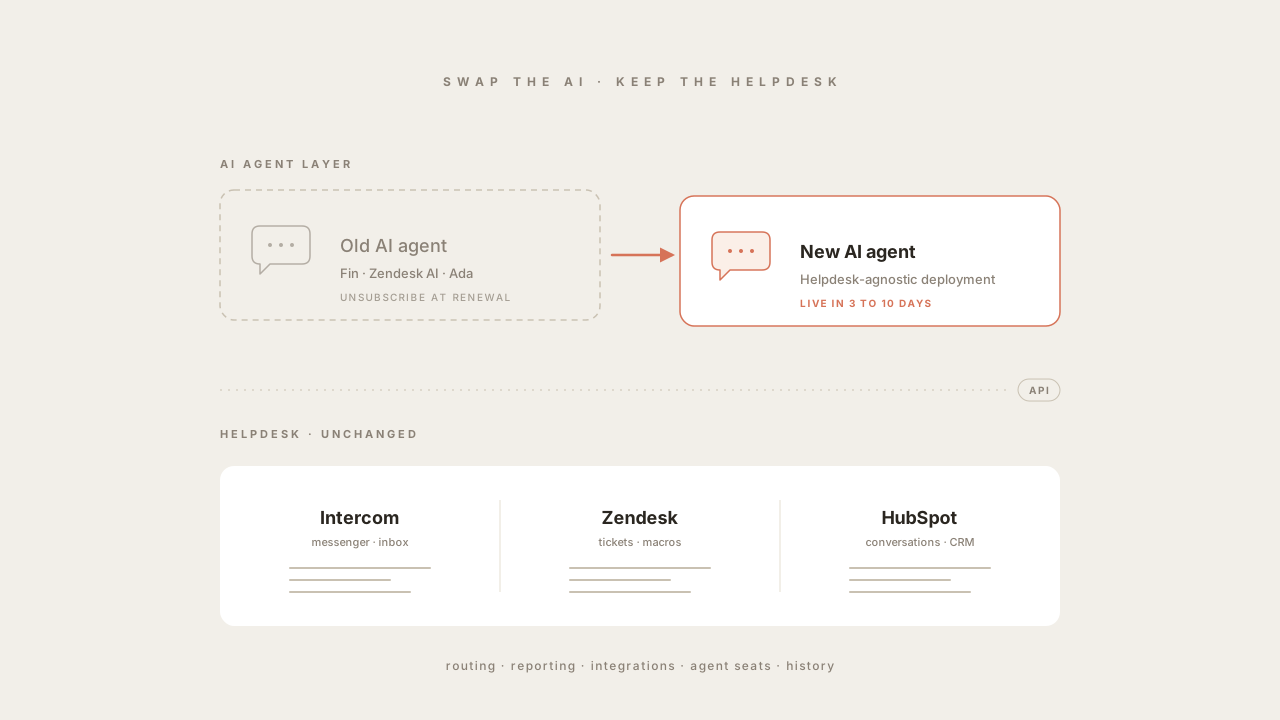
A helpdesk migration used to be a 3 to 9-month project, and even with modern tooling it remains a serious commitment: re-mapping ticket fields, retraining agents, rewriting routing rules, rebuilding reporting, and migrating historical conversations. But most teams who are unhappy with their AI agent are not actually shopping for a different helpdesk in the first place; they just want a different AI on top of the one they already use.
This post is the playbook for that switch. The framework is product-agnostic and works for any helpdesk-agnostic AI agent, with Quickchat AI as the concrete example throughout. If you are arriving here from one of the alternatives listicles (for example, Best Intercom Fin AI Alternatives), this is the procedural detail that sits behind the “no helpdesk migration required” claim those posts make.
Why “no helpdesk migration” is the realistic path
The decision to evaluate AI agents and the decision to migrate helpdesks are usually conflated in vendor marketing but separate in practice. The helpdesk is where human agents work: it owns inboxes, tickets, routing, reporting, integrations with billing and CRM, SLAs, and twelve years of historical conversations. Replacing it is a project. The AI agent is a layer that reads from and writes to the helpdesk: a conversation-shaped API client. Replacing the layer is configuration.
Helpdesk-agnostic AI agents (Quickchat AI, Ada, Decagon and similar) are built around this distinction. They connect to mainstream helpdesks (Intercom, Zendesk, HubSpot, Salesforce Service Cloud) through published APIs, treat the helpdesk’s knowledge base as a source, and use the helpdesk’s existing escalation and routing rules to hand conversations to humans. Nothing on the helpdesk side moves. The trade-off is that the AI agent’s own observability, prompts, and actions are rebuilt in the new platform; the upside is that the rebuild is measured in days, not months.
Pre-switch audit (do this before talking to vendors)
Before any vendor calls, inventory the parts of the current setup that the new agent will need to interact with. The audit takes a day or two and prevents surprises during the parallel-run phase.
- Channels. List every surface the current agent runs on: website widget, in-app messenger, WhatsApp, Slack, email, Discord, voice. Note which are mission-critical and which are optional for the first cut.
- Knowledge sources. Where does the current agent get its answers? Helpdesk-published articles, an external knowledge base (Notion, Confluence, Guru), a documentation site, internal wikis, product PDFs. Note URL patterns or export formats.
- Actions. Every read or write the current agent makes outside of replies: order lookups, refund processing, account updates, ticket creation with structured fields, subscription changes, password resets. Document the underlying API calls and the conditions that trigger them. This is the part that always takes longer than expected.
- Escalation rules. When does the AI hand off to a human? On low confidence, on specific intents (refunds, churn risk), after N back-and-forth turns, on negative sentiment. Document the rule and the routing target (queue, team, individual).
- Macros and message templates. Greeting line, business-hours message, out-of-hours message, escalation handoff, satisfaction survey trigger. List them.
- Reporting. What does the support lead look at every week? Resolution rate, CSAT, time to first response, escalation rate, top topics. These are the metrics you will compare in step 5.
- Compliance constraints. GDPR, HIPAA, PCI, data residency. If the current agent has a Data Processing Agreement or a regional data hosting requirement, list it and check it against any candidate.
The output of the audit is a one-page document. Every step below references it.
The five-step playbook
Step 1: Connect the new AI agent to your existing helpdesk
The first technical task is to install the new AI agent as an integration on top of the existing helpdesk. For helpdesk-agnostic platforms, this is OAuth or API-key-based and takes under an hour for the mainstream helpdesks. The agent registers itself as a teammate or app, gets permission to read conversations and write replies, and starts listening to the inbound conversation stream without yet replying to anything.
For Quickchat AI specifically, the integration is published for the major helpdesks. The detailed setup steps live in the channel-specific tutorials: see Create an AI Chatbot for Zendesk, Create an AI Chatbot for Intercom, or Create an AI Chatbot for HubSpot for click-by-click walkthroughs.
A few helpdesk-specific gotchas worth knowing up front:
- Intercom. The new AI runs alongside Fin (or replaces it), exposed through Intercom Messenger. The conversation stays in the Intercom inbox, and human-agent assignment uses Intercom’s routing rules. Intercom seats for human agents stay where they are; the Fin add-on can be paused or unsubscribed once the parallel run validates the new agent.
- Zendesk. The new AI installs as an app in the Zendesk Marketplace or via API and replies on the same ticket the customer opened. If the team uses Zendesk’s Advanced AI add-on, that line item can be cancelled at renewal once the new agent is in production; the Suite subscription itself is untouched.
- HubSpot. Similar to Zendesk: the agent reads and writes against HubSpot conversations and tickets, the rest of the HubSpot account (CRM, marketing, sales) is unaffected.
- Salesforce Service Cloud. Connection is possible but heavier, because Salesforce expects deeper data model integration. If the current AI is Agentforce, that is a Salesforce-native product and the swap to a third-party agent is more invasive than the Intercom or Zendesk path. Plan for additional Salesforce admin time.
At the end of step 1, the new AI is connected, listening, and silent. Do not let it reply yet.
Step 2: Move your knowledge base
The agent is only as good as the knowledge it can retrieve. Most vendors support three import paths:
- Helpdesk-native knowledge base. If the current agent reads from Zendesk Guide, Intercom Articles, or HubSpot Knowledge Base, the new agent usually does too. The import is a connector, not a file dump; the new agent indexes the same source live and stays in sync as articles are edited.
- External documentation crawl. Most modern agents will crawl a documentation site (a public docs URL or a private one behind a token) and ingest pages on a recurring schedule.
- File upload. PDFs, Markdown, Word documents, plain text. Useful for product manuals, internal playbooks, and anything not on a URL.
What does not migrate cleanly: prompt and persona tuning, agent-specific guardrails written for the old vendor’s prompt template, and any human-written reply suggestions tied to the old platform’s macros. Plan to rebuild those from scratch in the new agent’s authoring surface.
A common shortcut that backfires: importing everything indiscriminately. The single biggest cause of low resolution quality is a knowledge base full of stale articles, deprecated product features, or contradictory guidance between two near-duplicate pages. Use the audit’s knowledge-source list to import deliberately: start with the canonical sources, exclude archives, and add the rest only if a content gap shows up in measurement.
Step 3: Rebuild handoff, escalation, and macros
This is where the playbook becomes specific to each helpdesk. The principle is the same: replicate the escalation rules from the audit document in the new agent’s escalation configuration, point them at the same routing targets the helpdesk already uses, and add a clear handoff message so the customer knows a human is taking over.
Three configuration items matter more than the others:
- Escalation triggers. Replicate the audit’s rules. Common ones: low confidence (the agent does not have an answer it trusts), explicit user request (“talk to a human”), specific high-stakes intents (cancellations, refunds above a threshold, complaints), and negative sentiment over multiple turns.
- Handoff payload. When the agent hands off, what does the human agent see? At minimum: a conversation summary, the user’s intent, the steps the AI already tried, and any structured fields the agent populated (order ID, account ID, sentiment). A clean handoff payload is the single biggest determinant of post-handoff CSAT.
- Out-of-hours and brand voice. Business-hours messaging, weekend behaviour, escalation queue routing when no human is available. Rebuild these from the macros list in the audit; do not let them drift to defaults.
In Quickchat AI, this configuration sits in the AI Guidelines and Human Handoff settings. In other vendors it is named differently. The audit-document discipline is what makes the rebuild fast regardless of platform.
Step 4: Run the new agent in parallel (the A/B split)
Do not cut over on day one. The parallel-run phase is the difference between a clean switch and an outage that costs you a quarter of CSAT. Three common patterns:
- Channel split. Send a subset of channels to the new agent and leave the rest on the old one. For example: the website widget on the new agent, the Intercom Messenger and email on the old one. Easy to set up, very low risk, but harder to compare metrics across because channels behave differently.
- Conversation-ID hash split. Route a fixed percentage of inbound conversations to the new agent based on a hash of the conversation or user ID. This is the cleanest measurement design: identical traffic distribution, identical conditions. Most helpdesks support this through routing rules or a small middleware layer.
- Topic split. Route specific intents (order tracking, simple FAQ, refund status) to the new agent first, keep complex or sensitive intents on the old one. Useful if the new agent has stronger actions for a specific workflow.
A reasonable starting split is 10 to 20 percent on the new agent for the first week, then 50 percent if metrics look good. Keep the split at 50 percent until the measurement window in step 5 is satisfied. Quickchat AI’s free plan covers 50 AI messages per month with no card, which is enough to validate the integration before any commercial commitment; commercial deployments use the standard tier or per-resolution pricing on the pricing page.
Step 5: Measure, then cut over (or roll back)
Compare four weeks of the old agent’s baseline (captured during the audit) against four weeks of parallel-run data on the new agent. The cutover decision is mechanical if the metric framework was set up correctly.
Hard gate (do not cut over if this fails):
- CSAT on AI-handled conversations. Should be at or above the baseline. A CSAT drop is the only signal that justifies stopping a switch even if everything else looks good.
Performance gates (cut over if the new agent matches or beats baseline on at least three):
- Resolution rate. Conversations closed without human handoff, on equivalent intents.
- Escalation rate. The inverse signal. A useful sanity check on resolution rate.
- Time to first response. Usually a tie between modern agents, but worth confirming.
- Cost per resolved conversation. The economic case for the switch.
Once the gates are satisfied, raise the new agent’s traffic share from 50 percent to 100 percent. The old agent is silenced (not deleted) for another two weeks so a rollback is still one configuration change away. After two stable weeks at 100 percent, cancel the old agent’s subscription. If the helpdesk is Intercom, that means cancelling the Fin add-on; if Zendesk, the Advanced AI add-on; if HubSpot, the relevant AI add-on. The helpdesk subscription itself stays.
If the new agent fails a gate, the rollback is to flip the traffic share back to 0 percent on the new agent. The helpdesk, tickets and human-agent workflows are unaffected because they never moved. This is the entire point of the helpdesk-agnostic deployment model.
What to test before and after
A short, opinionated testing checklist. Run all of these in both the pre-switch baseline and the parallel-run window.
Most modern AI agents include a simulation surface that lets you script scenarios and validate the agent’s responses without sending traffic to real users. In Quickchat AI this is the Testing feature, which replays intent scripts against the agent’s current configuration and shows the response, retrieved knowledge and tool calls for each turn. Use it to dry-run the checks below before opening the parallel split; it converts what would otherwise be live-traffic learning into a controlled rehearsal.
- Top 20 intents. Take the 20 most frequent intents from the last quarter (the helpdesk reporting layer will have them). For each, run a sample of real conversations through the new agent and score: did it resolve, did it escalate cleanly, was the answer correct.
- Edge-case intents. The intents that historically went badly with the old agent. The new agent should handle them at least as well.
- Action correctness. For every action the agent can take (refund, order lookup, account update), test 10 scenarios: success path, failure path, edge case, race condition, malformed input.
- Handoff quality. Sample 20 escalated conversations and have human agents rate the handoff payload on a 1 to 5 scale. A 4-plus average is the bar.
- Customer satisfaction. CSAT survey response on the AI-handled conversations during parallel run. Should match or beat baseline.
Common pitfalls
A handful of mistakes recur across switches. None are fatal; all are avoidable.
- Cutover before parallel-run. Skipping the parallel phase to save weeks usually costs months when CSAT drops and the team has to scramble.
- Importing the whole knowledge base on day one. Stale articles, duplicates and deprecated product pages drag down resolution quality. Import the canonical sources only, expand on signal.
- Forgetting the persona rebuild. The new agent’s personality, tone and guardrails do not migrate. Budget a half day to author them deliberately, with the audit’s brand-voice notes as input.
- Skipping the handoff payload. A new AI that escalates cleanly but hands off a useless summary will tank post-handoff CSAT. Treat the handoff payload as a first-class deliverable.
- Cancelling the old agent too early. Keep both running silently in parallel for at least two weeks after full cutover. The rollback option is cheap; losing it is expensive.
- Confusing the AI swap with the helpdesk question. If the team is also unhappy with the helpdesk, treat that as a separate project on a separate timeline. Conflating the two is the most common reason “switch to a new AI” becomes a six-month migration.
Wrapping up
The shortest version of this post: the helpdesk is the slow, expensive thing to change; the AI agent on top of it is the fast, cheap thing to change. Treating them as separate decisions is what makes a switch tractable. Helpdesk-agnostic AI agents are designed for this; the playbook above is the same regardless of which one you choose.
If you are evaluating Quickchat AI specifically, the product details for support teams live on the AI for customer support page, the head-to-heads against the most-shopped competitors are on the Intercom Fin AI alternative and Zendesk AI agent alternative pages, and the free plan and tier pricing are public.