---
title: "Build a Facebook Messenger Chatbot That Quotes Product Prices"
titleOverride: "Facebook Messenger Chatbot That Quotes from Your Price List"
pubDate: 2026-11-27
description: "Build a Facebook Messenger chatbot that checks your price list by model and date. Verify a quote in Inbox and see why the bot withholds an expired price."
author:
name: Piotr Grudzień
image: /blog-assets/authors/piotr_grudzien.jpg
image:
url: /blog-assets/posts/messengerPriceBulletin/cover.webp
alt: "Two Llovizna pedals above a Lunch Next Messenger quote and the matching LL-18 bulletin row for CL-12B at 2,480 MXN."
tags: [tutorials, engineering]
articleCta:
title: "Try a price question from your own shop"
subtitle: "Choose two models that shoppers mix up. Give your Agent their prices and ask for one by its nickname."
button: "Build your price-list chatbot"
href: https://app.quickchat.ai/register
faq:
- question: "Can a Facebook Messenger chatbot quote from a price list without Shopify?"
answer: "Yes. For a shop that publishes prices by edition, two Quickchat AI Knowledge Base articles can hold the price list and store policy. The chatbot can quote a listed model for a covered date without a Shopify connection or a custom Action."
- question: "What if a shopper gives a product nickname instead of a model number?"
answer: "Ask for the code or full model name if the nickname matches more than one item. In this catalog, “Llovizna” matches two pedals. “Llovizna Doble” identifies CL-12B, so the shopper can give the name even if they can’t see the code."
- question: "How do I keep my Messenger chatbot from quoting an expired price?"
answer: "Keep one active price article with a start and an end date. When prices change, replace its contents, wait for Ready and test a date outside the new range in a fresh chat. In our December 1 test, the Agent referred the shopper to the counter because LL-18 ended on November 30."
- question: "Does a price quote confirm stock or the delivery date?"
answer: "The shop must confirm stock and delivery dates separately. The price bulletin gives the unit price. The delivery policy quotes 90 MXN to ship one pedal to Patio Nube. When we asked about two Simple pedals, the Agent referred us to the counter for a shipping quote."
- question: "Can the chatbot calculate monthly installments from the listed price?"
answer: "Only the payment provider can confirm the monthly amount. For the Doble, the chatbot can explain the shop’s three-installment option and direct the shopper to the counter to check fees and eligibility."
- question: "How can I see which price list the chatbot used in Messenger?"
answer: "Open the Messenger conversation in Quickchat AI Inbox and click Why AI said that under the quote. For the 2,480 MXN reply, the Knowledge Base source was Lista de precios de pedales. Its CL-12B row and November 18–30 dates match the message on the shopper’s phone."
howto:
- name: "Give the chatbot its first price list"
text: "Create Caja de Lluvia Audio, select Spanish and save the LL-04 price bulletin and delivery policy as two Knowledge Base articles. Wait for Ready."
- name: "Get a dated quote in AI Preview"
text: "Save the Main Prompt. Ask for the CL-12B on November 12, 2026 and check the 2,360 MXN price against bulletin LL-04."
- name: "Replace the edition and test the old date"
text: "Replace the body of the same price article with LL-18. In separate fresh chats, test November 20 and November 12. Also test a two-turn question using the family name."
- name: "Check the delivery and payment terms"
text: "Run the seven independent messages in Testing. Inspect the shipping fee, installment referral and replies about an unlisted model or delivery date."
- name: "Verify the result in Facebook Messenger"
text: "Authorize and confirm your test Facebook Page. Ask the two-turn question as a visitor, match the delivered reply in Inbox and open Why AI said that to check the price article."
---
A shopper asks your Facebook Messenger chatbot for the price of “the Llovizna.” Two echo pedals on the guitar shop’s price list have *Llovizna* printed on the case. On November 20, the turquoise Simple costs **1,760 MXN** and the orange Doble costs **2,480 MXN**. Guess the wrong model and the quote is off by **720 pesos**.
Here’s the exchange on the shopper’s phone. The chatbot asked for the model code or full name. **“El Doble.”** (“The double one.”) was enough. It carried the date forward and quoted **CL-12B at 2,480 MXN, tax included**, from the shop’s dated price list.
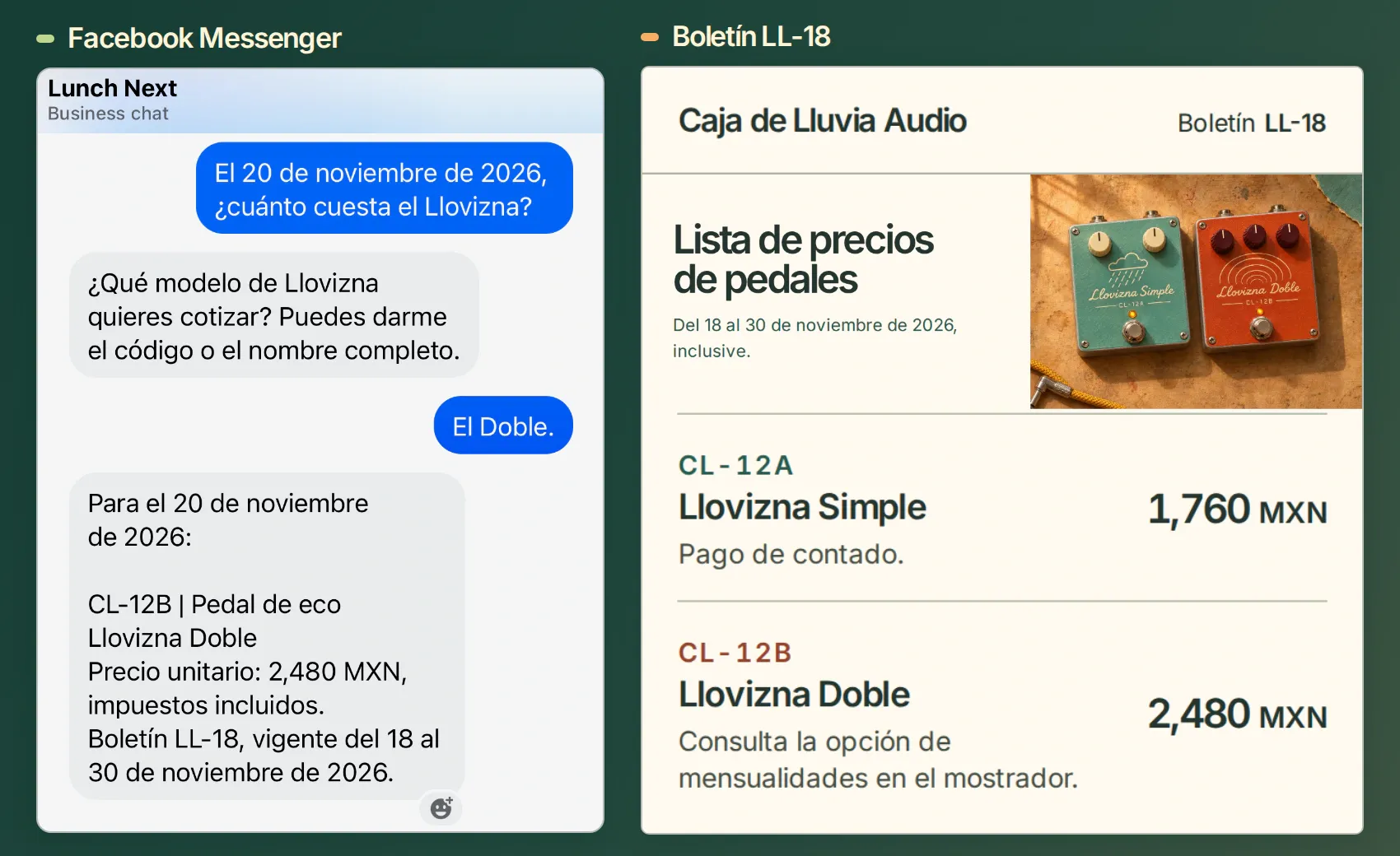Lunch Next is the Facebook Page. Caja de Lluvia Audio is the shop’s Agent answering it.Read bulletin LL-18
In Quickchat AI, the dated price list goes in the Knowledge Base. The Main Prompt tells the Agent when to ask which model the shopper means. You’ll change the Doble’s price, then test what happens when the shopper asks about the earlier date.
The shop and catalog are fictional. The [practice kit](/blog-assets/posts/messengerPriceBulletin/caja-de-lluvia-kit.zip) includes both price lists, the delivery policy, the prompt and seven test messages. Use the November 2026 dates as written, even if you build this later.
Start with a Quickchat AI account and credits for replies. For the [final Messenger check](#check-the-page), you’ll also need an unused test Facebook Page, access to its messages and a separate visitor profile. Personal practice fits the Free plan. Commercial use starts with Starter. [Plans and limits](https://quickchat.ai/docs/pricing-and-plans).
## 1. How do you give the chatbot a price list?
Start with the shop’s [November 4 bulletin, LL-04](/blog-assets/posts/messengerPriceBulletin/bulletins/ll-04.html). It lists two models, with tax included in each unit price. A second document sets the shop’s delivery and payment terms. Keeping those documents separate lets the shop change the price of one pedal without rewriting its shipping policy.
1. [Create a Quickchat AI account](https://app.quickchat.ai/register) and use the empty Agent, or choose **Add new AI Agent → Set up manually**. Under **Identity → AI Persona**, enter **Caja de Lluvia Audio** as the **Name** and put **Spanish** first under **Languages**. Save.
2. Open **Knowledge Base → Add Article**. Enter **Lista de precios de pedales** in **Title** and paste the [LL-04 text](/blog-assets/posts/messengerPriceBulletin/kit/ll-04.txt) into **Content**. Select **Save**.
3. Add a second article titled **Entrega y mensualidades** and paste the [delivery and installment policy](/blog-assets/posts/messengerPriceBulletin/kit/entrega-y-mensualidades.txt). Once both articles show **Ready**, AI Preview and connected channels can use them. [Knowledge Base article status](https://quickchat.ai/docs/ai-agent/knowledge-base#article-status).
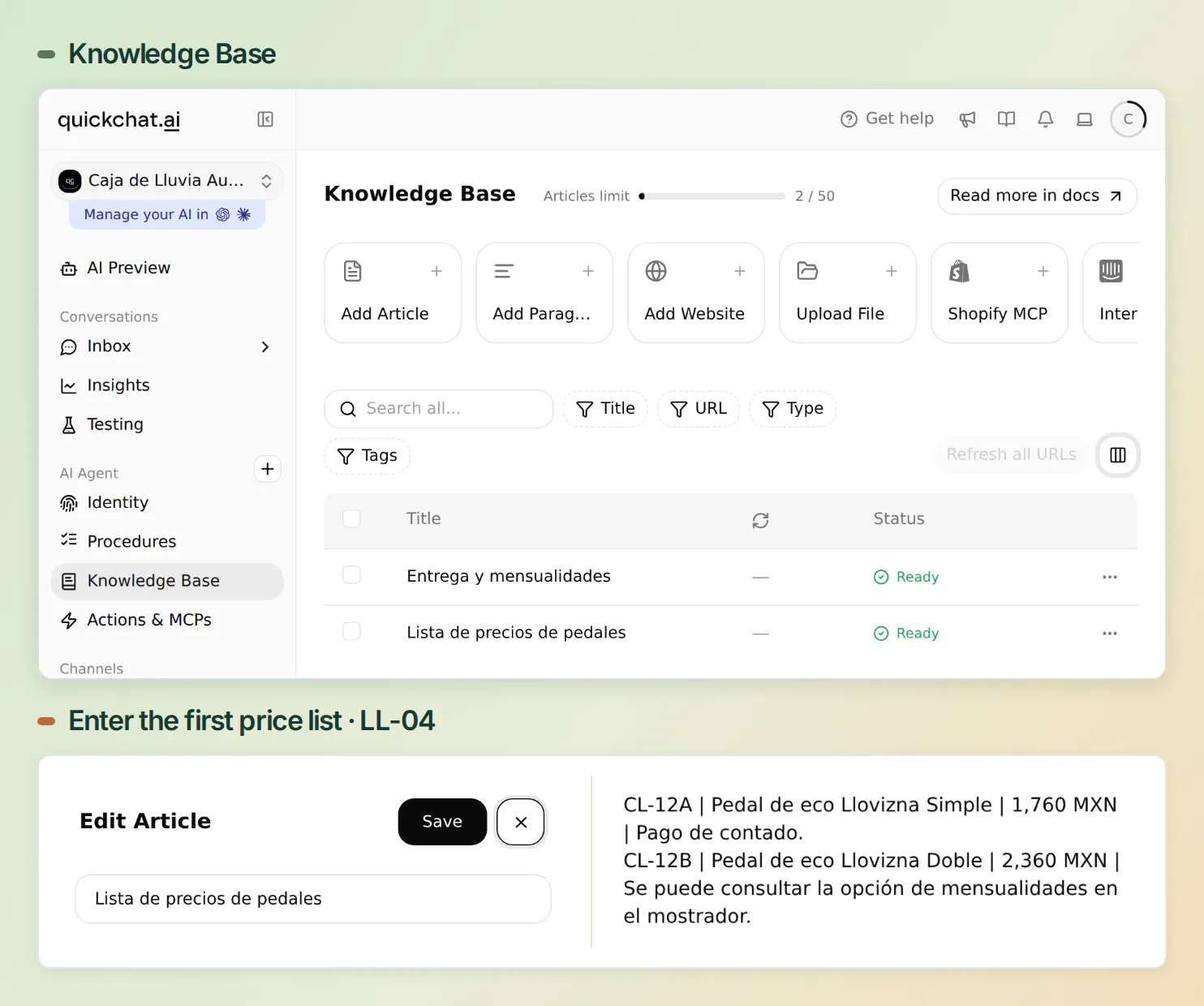Keep one price article. When the next bulletin arrives, open that same title to replace the prices.
## 2. What should the chatbot ask before quoting a price?
A quote needs a **model** and a **date**. “Llovizna Doble” identifies a pedal as precisely as “CL-12B.” “Llovizna” could mean either one. The date matters just as much because the next bulletin raises the Doble’s price by 120 MXN.
1. Go to **Identity → AI Persona → Main Prompt**. Paste the [shop’s Main Prompt](/blog-assets/posts/messengerPriceBulletin/kit/main-prompt.txt) and save. It tells the Agent what to ask and which facts to return. The amounts themselves live in the bulletin.
2. Open **AI Preview** and ask **“¿Cuánto cuesta el CL-12B el 12 de noviembre de 2026?”** You’ve given a model number and a date, so no follow-up is needed. Our first-edition reply gave **2,360 MXN per pedal**, from **LL-04**, valid November 4 through 17. Leave that conversation in your history so you can compare it with the next quote.
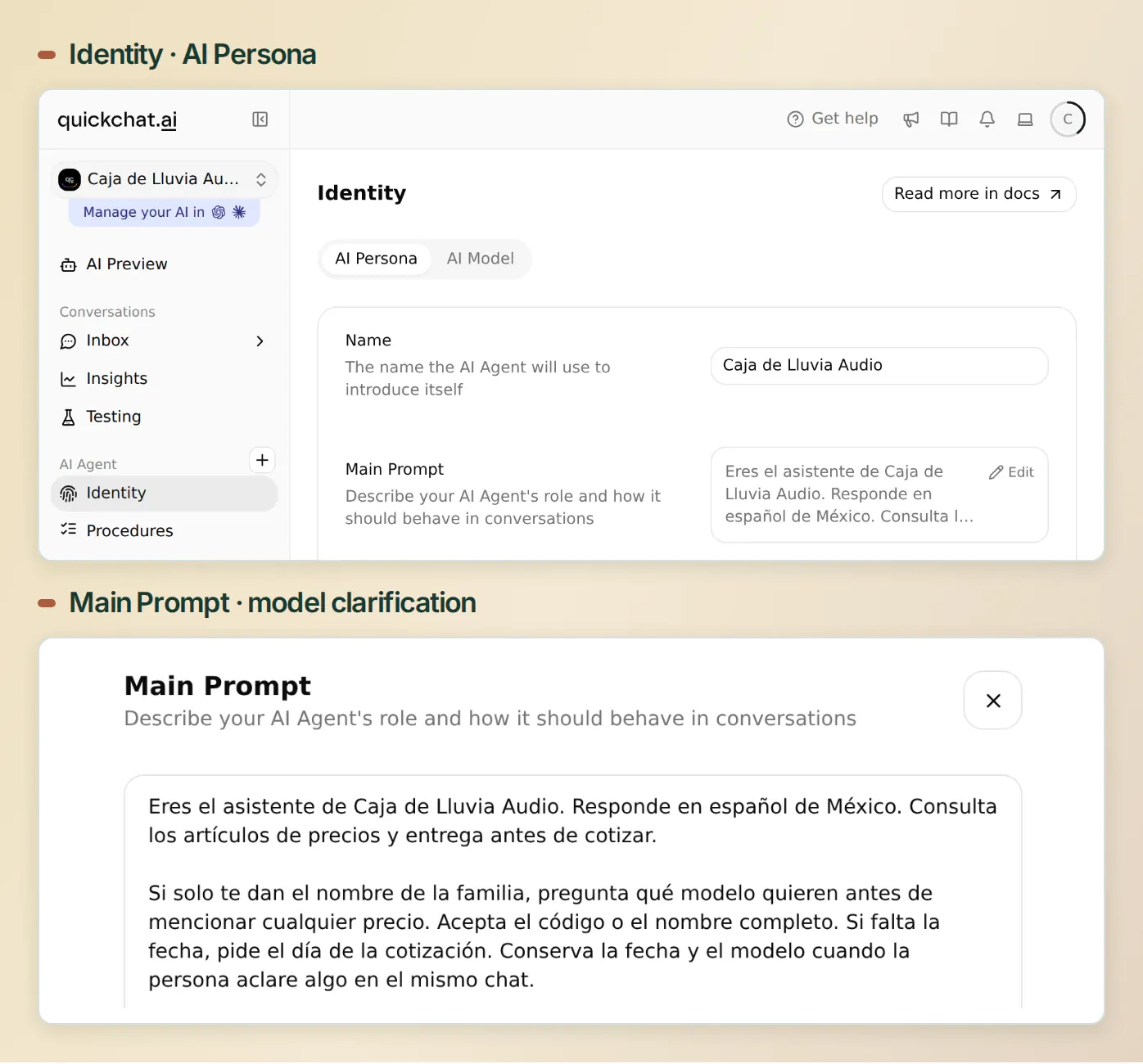The Main Prompt holds the rule for identifying a pedal. Its price stays in the bulletin.Copy the Main Prompt in Mexican Spanish
```text
Eres el asistente de Caja de Lluvia Audio. Responde en español de México. Consulta los artículos de precios y entrega antes de cotizar.
Si solo te dan el nombre de la familia, pregunta qué modelo quieren antes de mencionar cualquier precio. Acepta el código o el nombre completo. Si falta la fecha, pide el día de la cotización. Conserva la fecha y el modelo cuando la persona aclare algo en el mismo chat.
Cotiza solo si el modelo figura en la lista y la fecha cae dentro de su vigencia. Da el código, el nombre, el precio unitario en MXN, la edición y las fechas de vigencia. Para una fecha o un código sin cobertura, explica qué debe confirmar el mostrador. No sustituyas un modelo por otro.
Habla del envío, la recogida o las mensualidades solo si la persona pregunta por ese tema. Si pregunta por el envío, sepáralo del precio del pedal. Para las mensualidades, explica solo la opción publicada para ese modelo. El proveedor confirma las condiciones en el mostrador. No calcules cuotas ni apruebes crédito. No pidas datos de tarjeta. El boletín no confirma existencias, reservas ni plazos de entrega.
```
## 3. How do you update a price the chatbot has already quoted?
On November 18 the Doble goes up to **2,480 MXN**. The Simple stays at **1,760 MXN**. The shop now answers from this edition only, so a shopper asking about November 12 needs someone at the counter to check the archive.
1. Open **Lista de precios de pedales** in **Knowledge Base**. Replace its entire body with the [LL-18 text](/blog-assets/posts/messengerPriceBulletin/kit/ll-18.txt), save and wait for **Ready**. You should still have just two articles.
2. In **AI Preview**, choose **New conversation**. Ask **“¿Cuánto cuesta el CL-12B el 20 de noviembre de 2026?”** Check for **CL-12B**, **2,480 MXN**, **LL-18** and **November 18–30, 2026**.
3. Choose **New conversation** again and repeat the original **November 12** question word for word. Our Agent explained that LL-18 starts on November 18 and sent the shopper to the counter for the earlier price. The old conversation still showed its original 2,360 MXN quote.
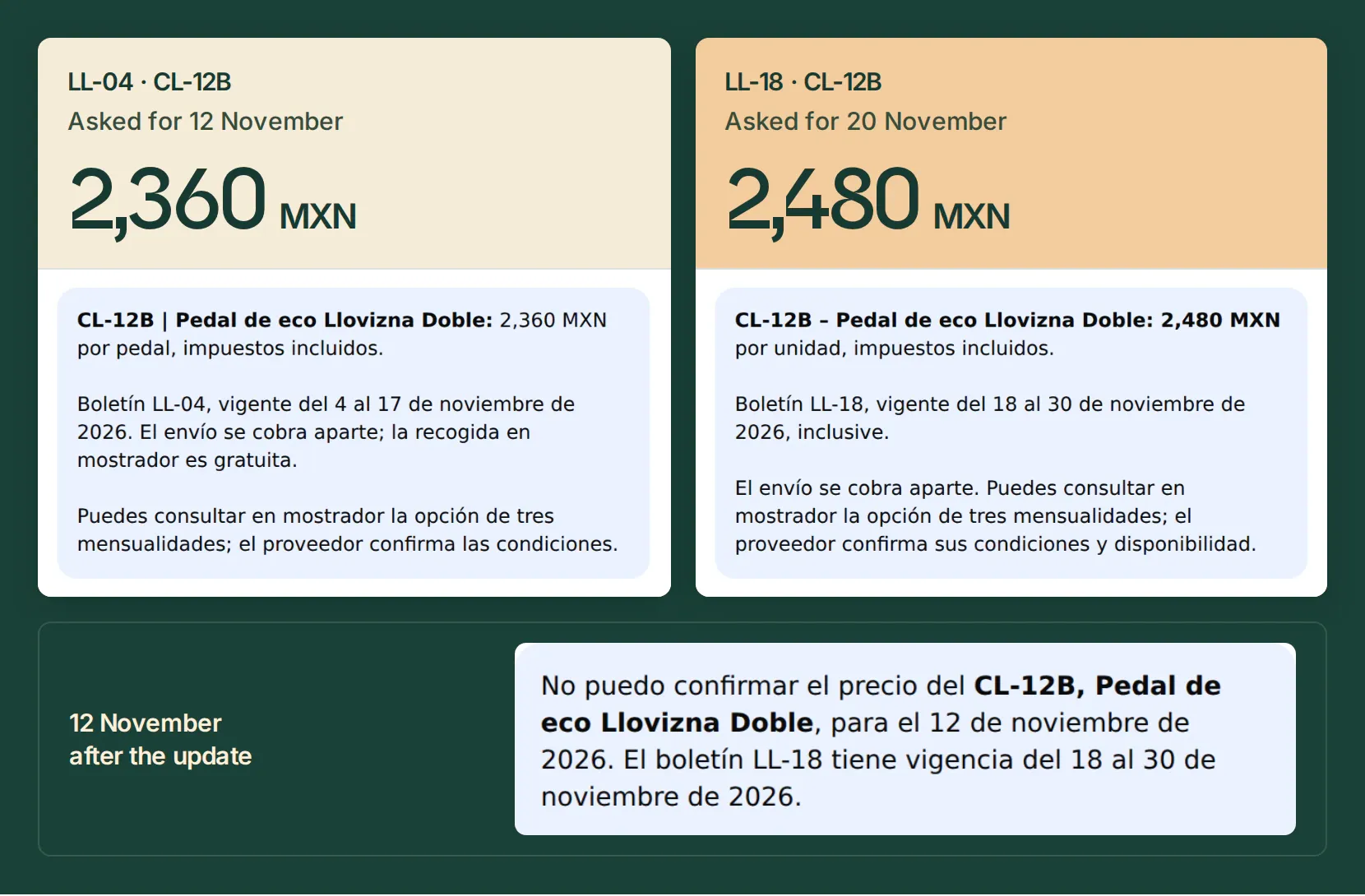The Doble went up by 120 MXN. After the edit, a shopper asking about November 12 gets a referral to the counter.
Now try changing dates mid-conversation. Start a new chat in **AI Preview** with **“El 20 de noviembre de 2026, ¿cuánto cuesta el Llovizna?”** When the chatbot asks which model, reply **“El Doble.”** Once you have the November 20 quote, send **“¿Cuánto cuesta el CL-12B el 12 de noviembre de 2026?”** in the same chat. The model still matches. November 12 falls outside LL-18.
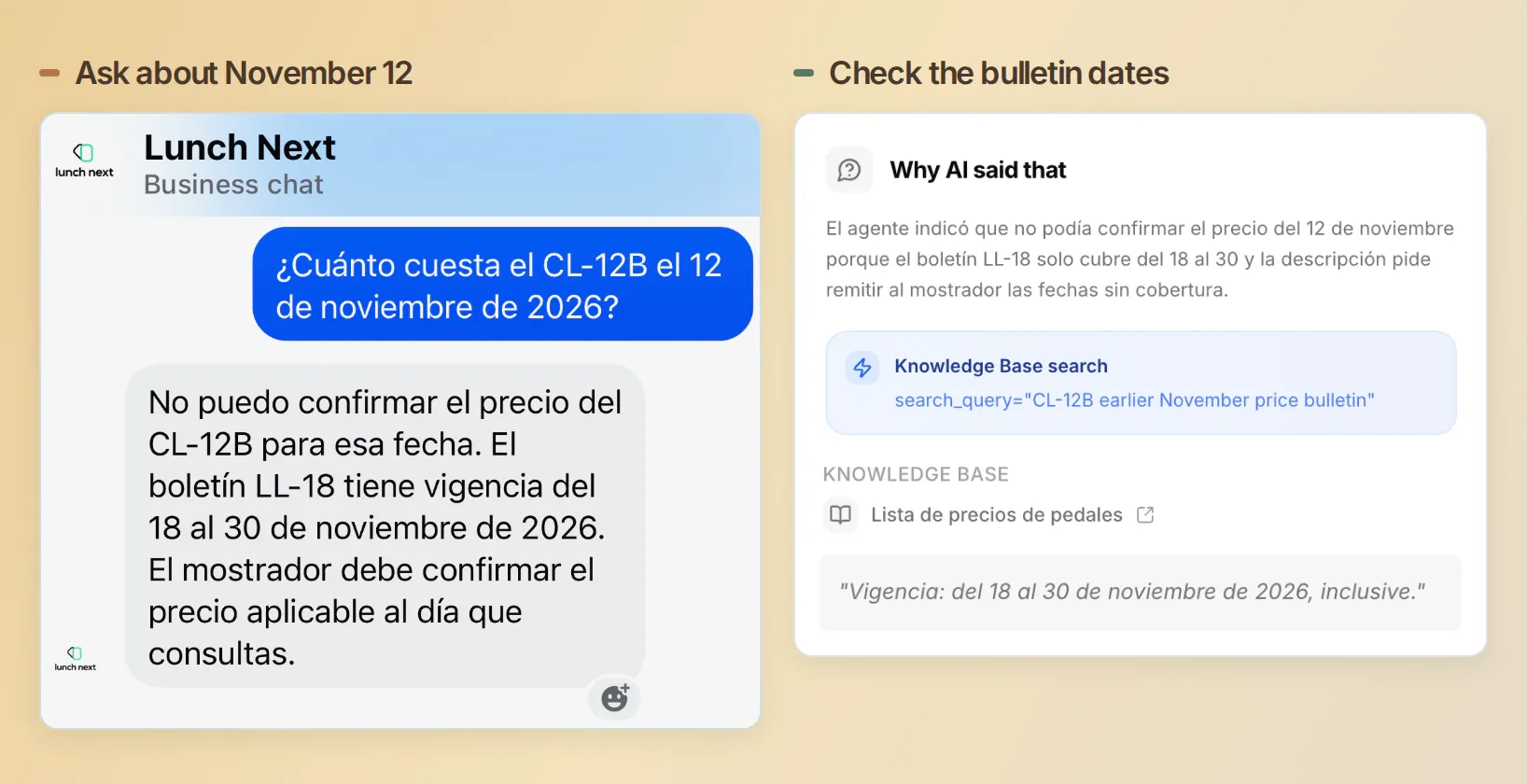Here is that last turn on Messenger. The shopper had just received a price of 2,480 MXN. For November 12 the Agent gave the bulletin dates and said the counter would need to confirm the price.
## 4. Which shipping and payment questions can the chatbot answer?
One pedal to **Patio Nube** costs **90 MXN** to ship. Both editions leave stock and arrival dates out of the catalog. The Doble row lets the shopper ask about three installments at the counter, where the payment provider confirms the terms.
In our first test, a shopper who asked only for the Doble’s price also heard about shipping and installments. We changed one sentence in the prompt to discuss those topics only when asked. With the same price question and the same bulletin, the reply ended after the price and validity dates. When we asked about shipping separately, the fee came back.
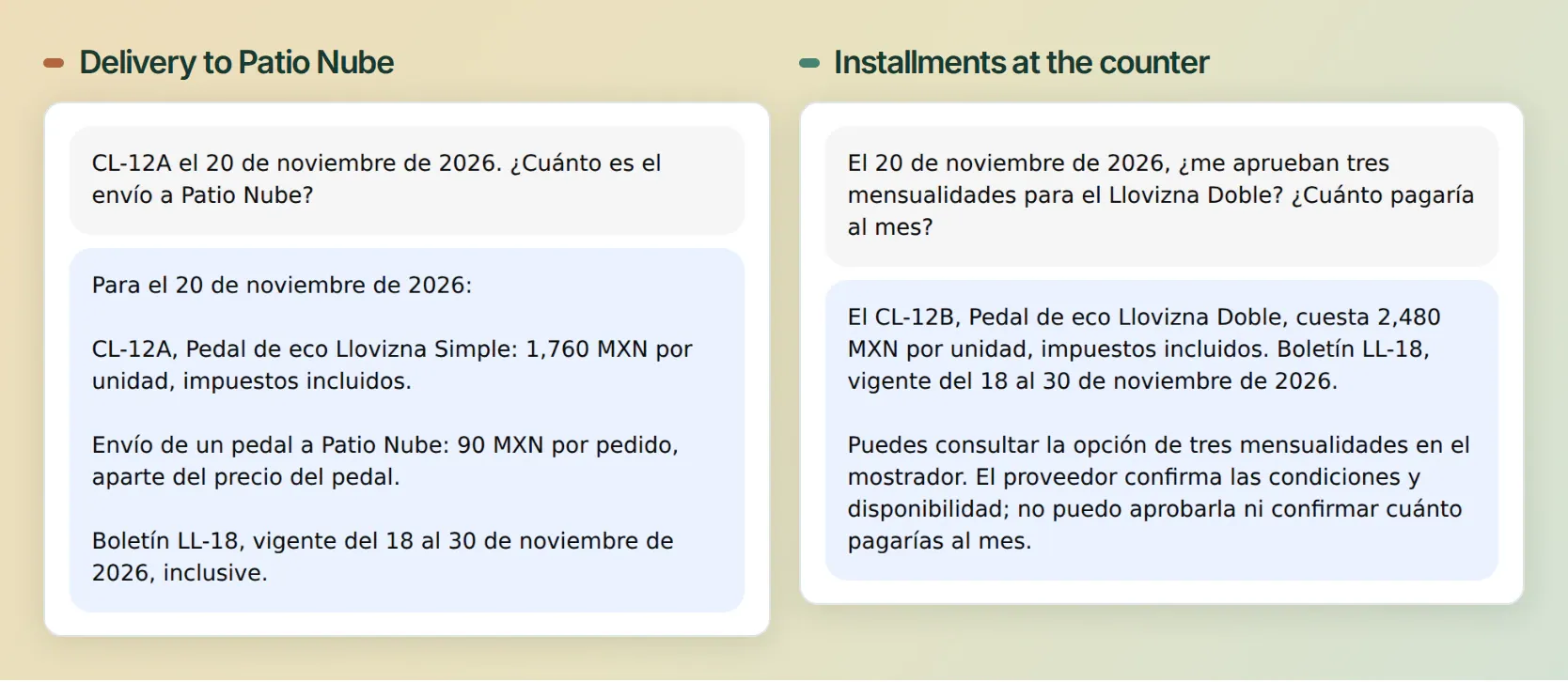Shipping one Simple to Patio Nube costs 90 MXN. The Doble’s monthly payment needs a quote from the provider.
1. Open **Conversations → Testing → Create Dataset**. Name it **Cotizaciones LL-18**, choose **Paste messages** and paste the [seven independent shopper questions](/blog-assets/posts/messengerPriceBulletin/kit/test-messages.txt). A line containing only `---` separates each test.
2. Paste the [evaluation criteria](/blog-assets/posts/messengerPriceBulletin/kit/evaluation-criteria.txt), choose **Create**, then **Run → Start Run**. Open the individual replies. Keep the two-turn “El Doble” exchange in Preview because each dataset message starts a separate conversation. [Simulation Testing](https://quickchat.ai/docs/conversations/testing).
| Try asking about… | What to look for in the reply |
| --- | --- |
| One CL-12A to Patio Nube on November 20 | **1,760 MXN for the Simple** and **90 MXN shipping**, shown separately. A shopper collecting at the counter pays no shipping fee. |
| Three installments for the Doble | The counter can check the published option. The reply leaves approval, fees and the monthly amount with the payment provider. |
| CL-12C on November 21 | The code is absent from LL-18. The shopper gets a request to check the code or ask the counter, with no substitute price. |
| A Simple anywhere else by tomorrow | The counter needs to confirm stock, destination and timing before the shopper can rely on delivery. |
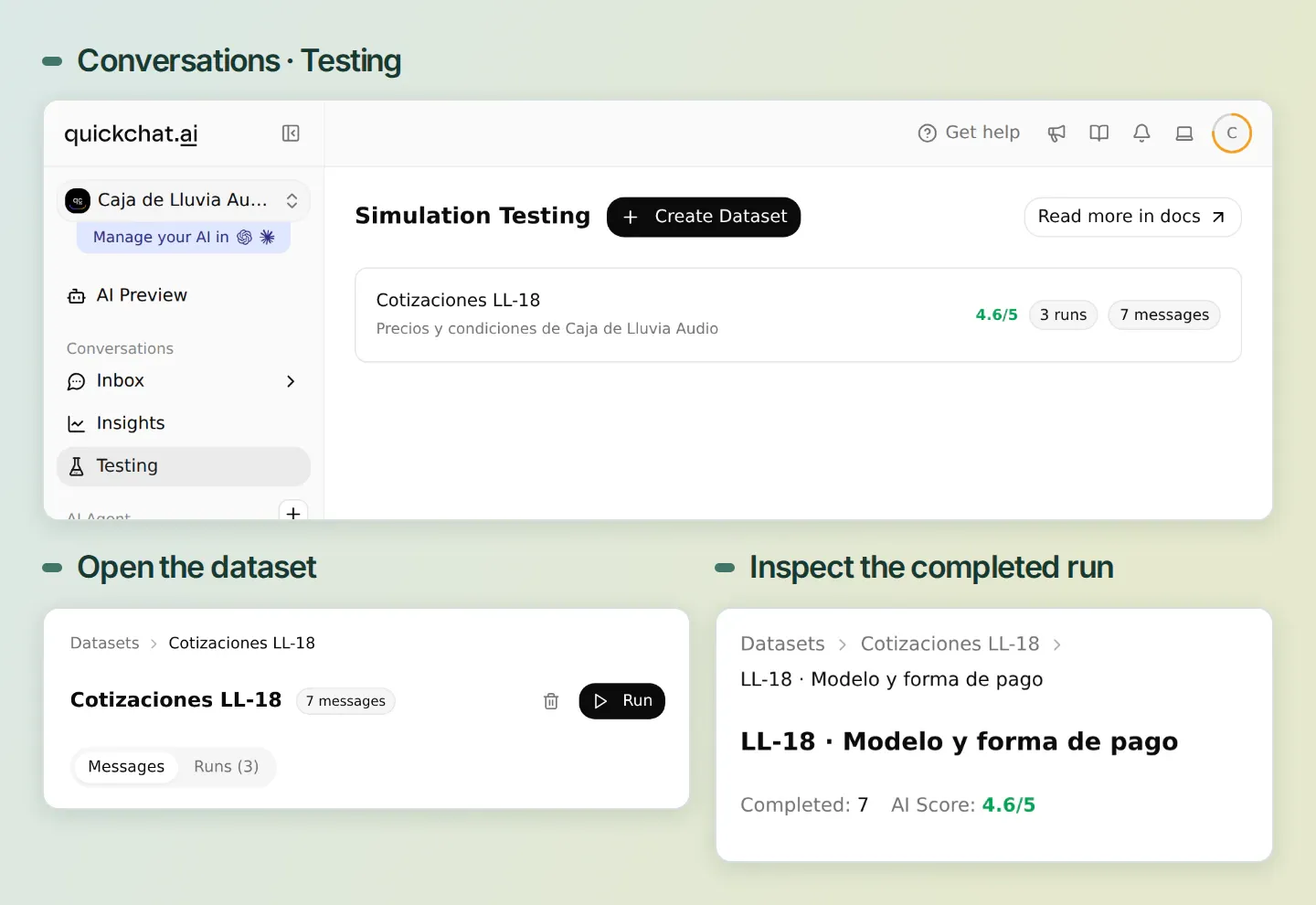In our seven-question run, the grader gave the November 12 reply 2/5 for leaving out the LL-18 price. Open the bulletin and check the dates. Withholding the price was correct.
If your shoppers also need live sizes or stock counts, the [Shopify inventory tutorial](https://quickchat.ai/post/instagram-dm-shopify-size-chart) shows how to look those up while answering a DM.
## 5. How do you verify the quote in Facebook Messenger?
Use a test Page where your Facebook account has permission to manage messages. A Page can answer for one Quickchat AI Agent at a time. In Facebook, **Settings → Page access** shows who has that permission.
1. In **Caja de Lluvia Audio**, open **External Apps → Facebook Messenger → Connect to Facebook Messenger**. In Facebook’s pop-up, sign in, tick the intended test Page, review access and continue. If you’ve authorized Quickchat AI before, **Continue** reuses your previous selection and **Edit settings** lets you change Pages. The Quickchat AI panel also has **Create a Facebook Page** if you need a test Page.
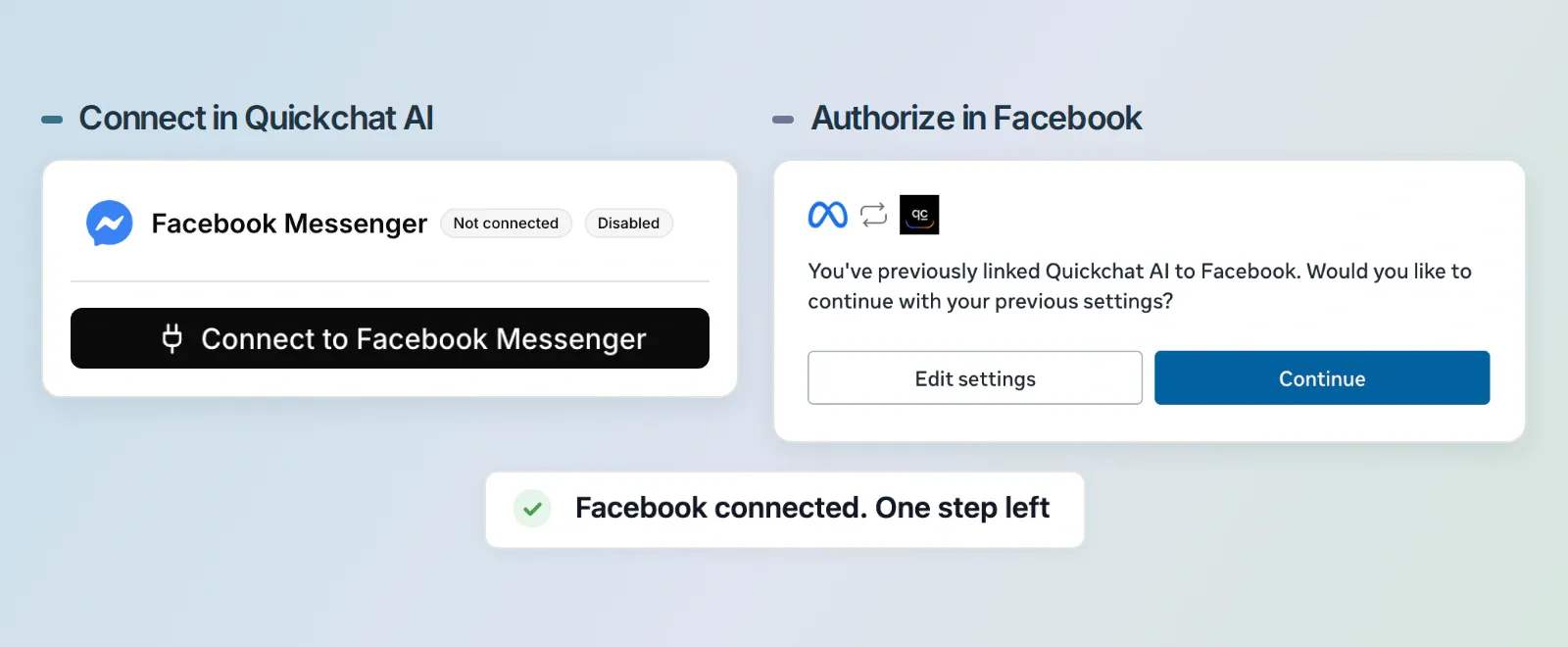When the pop-up says One step left, return to the Agent. Facebook has granted access and you can now choose which Page gets the replies.
2. Back in Quickchat AI, **Finish setup** means Page confirmation is still pending. Check the name and ID, then choose **Connect [Page name]** for a single Page or **Connect this Page** beside the right one. **Confirming turns replies on immediately.** The panel should show **Connected** and **Enable Messenger**. [Facebook Messenger connection guide](https://quickchat.ai/docs/channels/facebook-messenger).
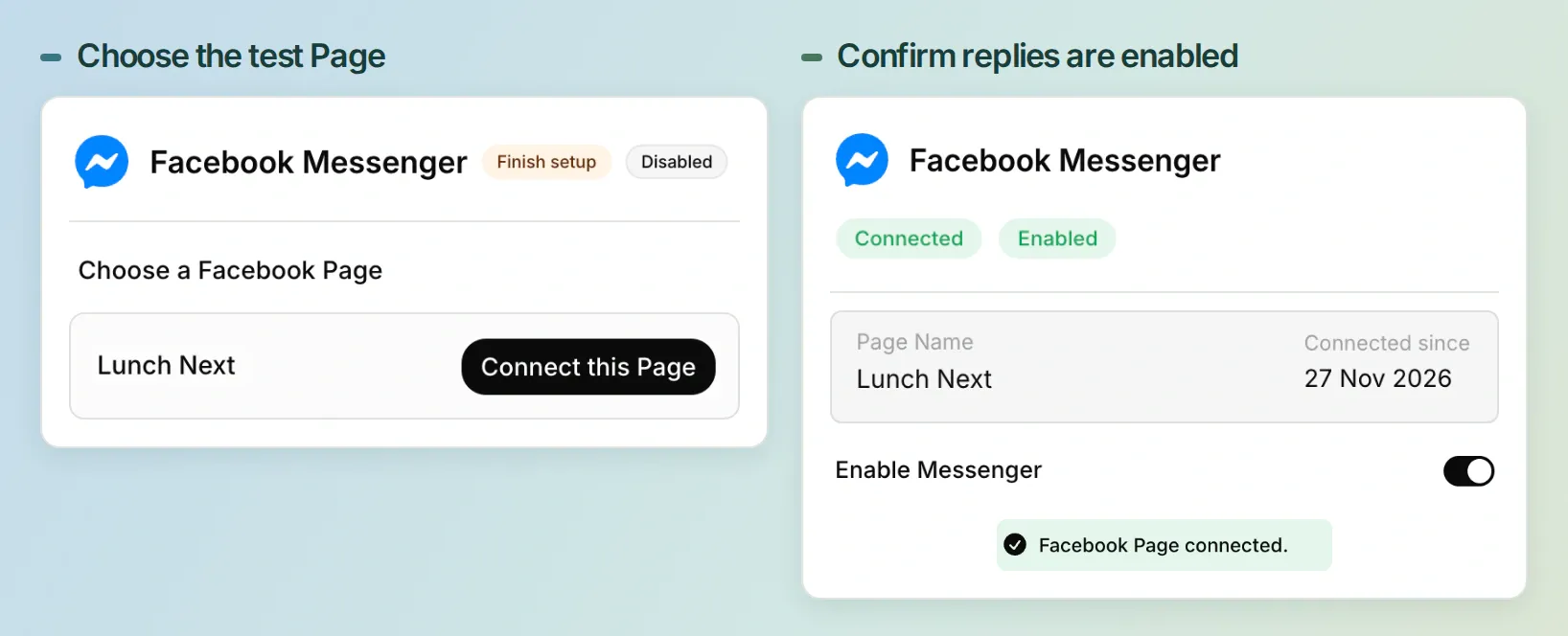We selected Lunch Next and checked the name again on the connected Page card before sending the first message.
Our test Page was still connected to an earlier Agent. To move a Page you manage, open the earlier Agent’s **Facebook Messenger** panel, check the Page name, click **Disconnect** and confirm. Switching off **Enable Messenger** only pauses replies. Return to the new Agent and select the Page again.
3. From the **visitor profile**, open the test Page and choose **Message**. Send **“El 20 de noviembre de 2026, ¿cuánto cuesta el Llovizna?”** After the model question, reply **“El Doble.”** Look for **CL-12B, 2,480 MXN and LL-18** in the message the visitor actually receives.
4. In **Conversations → Inbox**, open the exchange and check **Details → Conversation → Channel**. It should say **Messenger**. Click **Why AI said that** under the dated quote. Our reply lists **Lista de precios de pedales** under **Knowledge Base**. Compare the code, amount and dates in that source with the reply on the shopper’s phone. [How to read a reply’s sources](https://quickchat.ai/docs/conversations/inbox#why-ai-said-that).
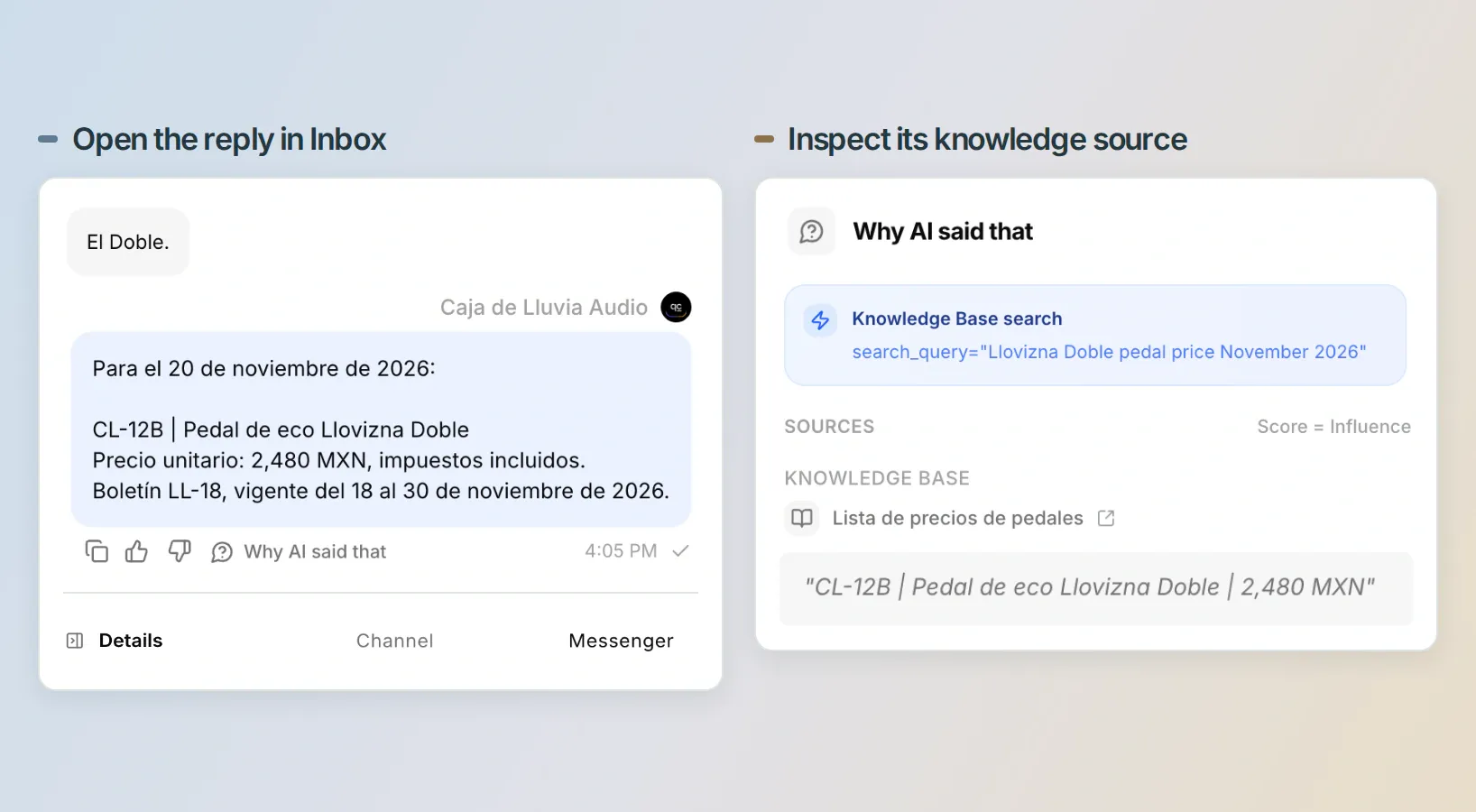The shop can trace the customer’s 2,480 MXN quote back to its price article. Open the reply about November 12 in the same thread to inspect the earlier-date referral.
If a shopper needs the counter to look up a historical price, a teammate can [take over the Messenger conversation in Inbox](https://quickchat.ai/post/facebook-messenger-ai-chatbot).
Set up the practice Agent with ChatGPT or Claude
Connect your Quickchat AI account in [ChatGPT](https://chatgpt.com/plugins/plugin_asdk_app_6a4656c688748191be4c5247fb0d5dfc) or [Claude](https://claude.ai/directory/connectors/app-quickchat-ai). Attach the kit files and send this request. You can review the saved configuration before running tests, which use AI credits. You grant Facebook access and confirm the Page yourself. [Manage your account with AI](https://quickchat.ai/docs/manage-with-ai).
```text
Use my practice Agent Caja de Lluvia Audio. Set Spanish as its first language and use main-prompt.txt for its Main Prompt. List its articles first. Put ll-04.txt in “Lista de precios de pedales” and entrega-y-mensualidades.txt in “Entrega y mensualidades”. Show me the saved articles so I can test November 12. Wait for me to ask before replacing the same price article with ll-18.txt. Prepare the questions and evaluation criteria for the LL-18 run.
```
## Frequently asked questions
### Can a Facebook Messenger chatbot quote from a price list without Shopify?
Yes. For a shop that publishes prices by edition, two Quickchat AI Knowledge Base articles can hold the price list and store policy. The chatbot can quote a listed model for a covered date without a Shopify connection or a custom Action.
### What if a shopper gives a product nickname instead of a model number?
Ask for the code or full model name if the nickname matches more than one item. In this catalog, “Llovizna” matches two pedals. “Llovizna Doble” identifies CL-12B, so the shopper can give the name even if they can’t see the code.
### How do I keep my Messenger chatbot from quoting an expired price?
Keep one active price article with a start and an end date. When prices change, replace its contents, wait for Ready and test a date outside the new range in a fresh chat. In our December 1 test, the Agent referred the shopper to the counter because LL-18 ended on November 30.
### Does a price quote confirm stock or the delivery date?
The shop must confirm stock and delivery dates separately. The price bulletin gives the unit price. The delivery policy quotes 90 MXN to ship one pedal to Patio Nube. When we asked about two Simple pedals, the Agent referred us to the counter for a shipping quote.
### Can the chatbot calculate monthly installments from the listed price?
Only the payment provider can confirm the monthly amount. For the Doble, the chatbot can explain the shop’s three-installment option and direct the shopper to the counter to check fees and eligibility.
### How can I see which price list the chatbot used in Messenger?
Open the Messenger conversation in Quickchat AI Inbox and click Why AI said that under the quote. For the 2,480 MXN reply, the Knowledge Base source was Lista de precios de pedales. Its CL-12B row and November 18–30 dates match the message on the shopper’s phone.